
Key takeaways
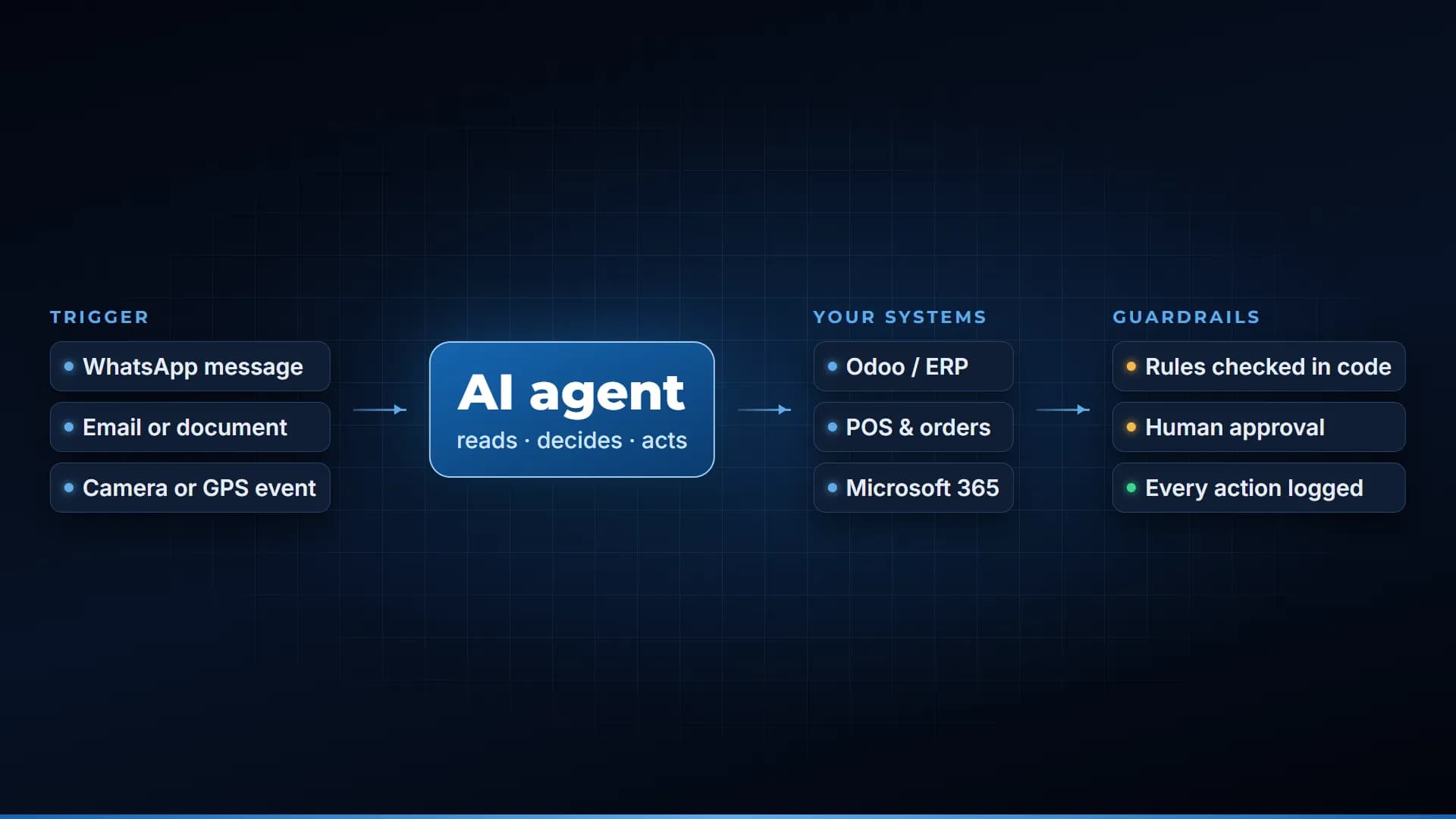
- 1A WhatsApp ordering system turns your WhatsApp Business number into an order channel: the customer writes or sends a voice note, an AI agent reads your menu, confirms the order and passes it to the kitchen and POS.
- 2The price must come from the menu, not from the AI. A separate code check on every line is what stops wrong totals.
- 3Meta charges per delivered message. Customer messages to you are free, and each business number gets 1,000 free delivered service messages a month; from 1 October 2026 replies above that are billed.
- 4A marketplace takes a commission on every order; WhatsApp charges per message above a free monthly tier, and you handle delivery and payment yourself.
- 5The parts that make it work in a real restaurant are the unglamorous ones: duplicate checks, POS item mapping, rider codes and watchdogs for stalled chats.
A WhatsApp ordering system for restaurants is an AI assistant on your WhatsApp Business number that takes orders by text or voice note, quotes prices from your real menu, confirms the order with the customer and sends it to the kitchen and POS without anyone retyping it. It runs on the WhatsApp Business Platform, which Meta bills per delivered message, so you pay Meta a small per-message rate above a free monthly tier instead of a commission on each order. This guide explains how one works, what it costs in 2026 and what to check before you buy one.
Why restaurants in Pakistan start with WhatsApp
Customers already order this way. They send a photo of the menu back with "2 of this", or a voice note at 9 pm with the whole family's order. Statista's model puts WhatsApp at roughly 93.7 million users in Pakistan in 2025, so for most restaurants it is the one app every customer has.
The problem is what happens on the restaurant's side. Someone reads the chat, asks for the address, quotes a price from memory, then types the order into the POS. At rush hour that person is also answering the phone and the counter. Orders get typed twice, prices differ by who answered, and a customer who asked for the menu and went quiet is never followed up.
An ordering system fixes the restaurant's side of the chat and leaves the customer's side as it was.
How a WhatsApp ordering system works
Here is the flow we built for a five-branch restaurant chain, which we describe in more detail in our WhatsApp AI ordering project story.
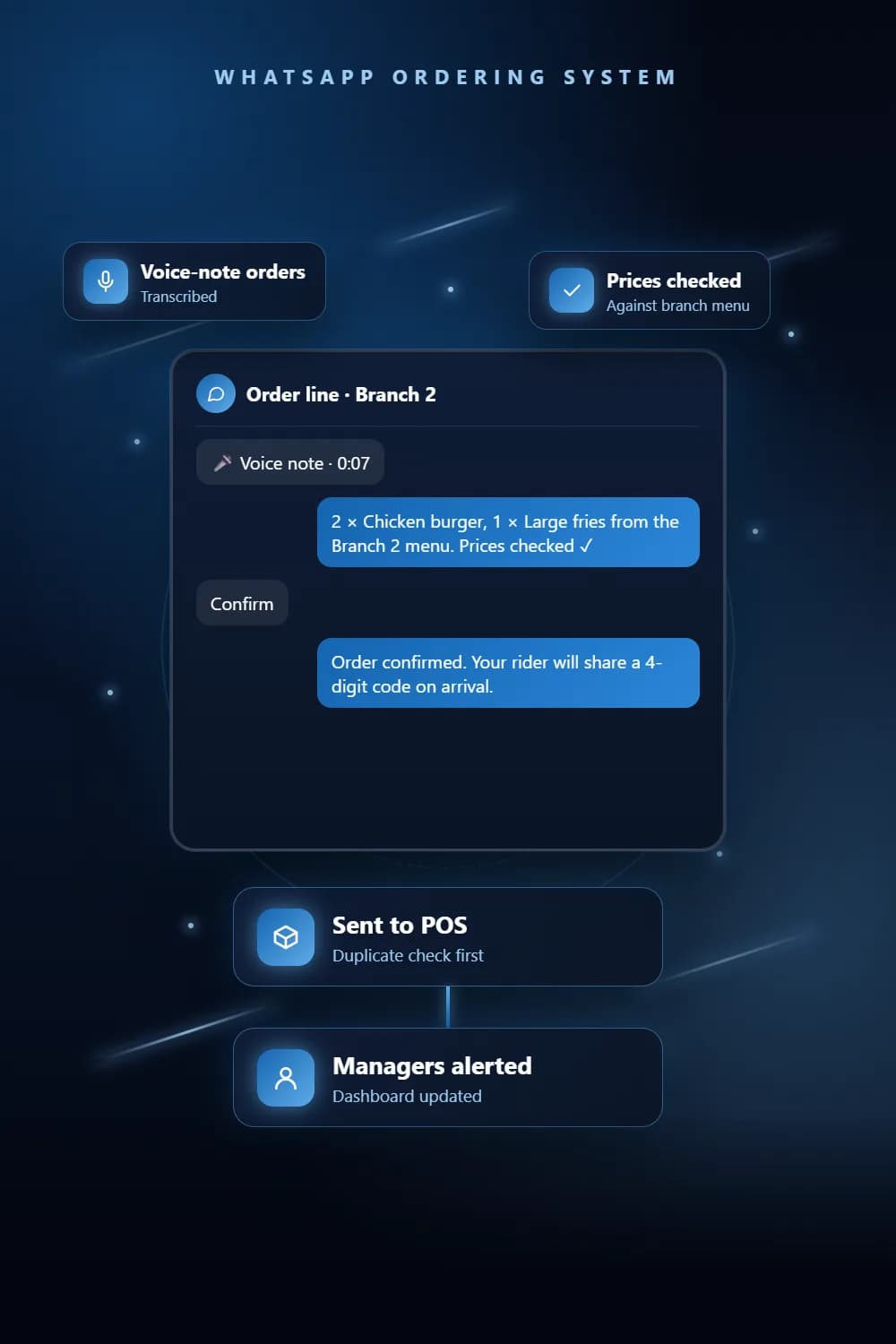
1. The customer messages your number
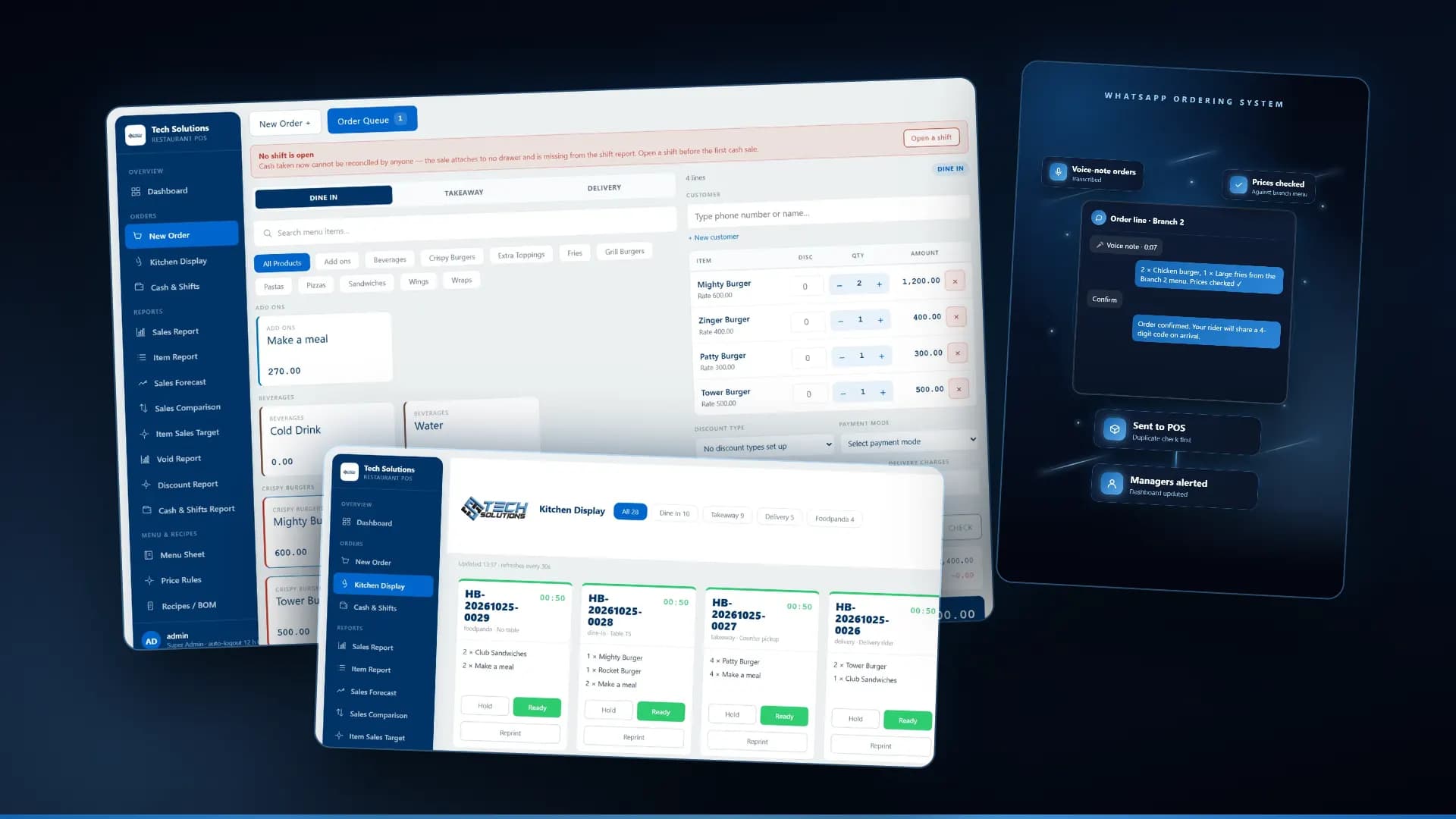
A message or a voice note arrives on the WhatsApp Business number. Voice notes are transcribed first, and the transcript is kept so staff can read what the customer actually said.
2. The AI agent picks the branch and reads only that menu
The customer chooses a branch, and from then on the agent works from that branch's menu, prices, opening hours and delivery rules. It can send the menu PDF or the location pin on request. Keeping one menu per branch is what stops a customer getting a price from the wrong branch.
3. Every line is checked in code before the customer confirms
The agent writes the order, then a separate step checks each item and price against the menu. The AI never has the last word on a total. The customer then confirms or cancels with WhatsApp buttons rather than typing "yes".
4. The order goes to managers, the dashboard and the POS
The confirmed order is sent to the branch manager's channel, a live dashboard and the POS system, with a duplicate check on the way. Any item the POS cannot match raises an alert instead of a wrong kitchen ticket. If you are still choosing a till, our guide to restaurant POS features in Pakistan covers what to look for.
5. The rider gets a code, and so does the customer
When a rider is assigned, the customer gets a 4-digit delivery code on WhatsApp. The same code stays with the order if it moves to another rider, so there is no argument at the door.
6. Watchdogs catch what people miss
Stalled chats are checked every 2 minutes and escalated to staff. Customers who went quiet are nudged. Abandoned orders are swept every 30 minutes. Any failure alerts the team. Staff can also mute the bot on any chat and take over by hand.
What WhatsApp itself charges in 2026
These rules come from Meta's pricing page for the WhatsApp Business Platform.
- Meta charges per delivered message, and has done since 1 July 2025. Messages your customers send you are free.
- Marketing, utility and authentication messages are templates you send outside a chat. Service messages are the free-form replies you send inside the 24-hour window that opens when a customer writes to you. Order taking is almost entirely service messages.
- Each business phone number gets 1,000 delivered service messages a month for free, and the unused part does not roll over.
- From 1 October 2026, service messages above the free tier and utility templates sent inside the 24-hour window are charged per message at the rate for the customer's country. Before that date both were free.
- A chat that starts from a Click-to-WhatsApp ad or a Facebook Page call-to-action button opens a free entry point window of up to 7 days, during which messages in that chat are not charged.
For a restaurant, a typical order is a handful of replies, so a branch with a few hundred orders a month may stay inside the free tier, and a busy one pays per message above it. Order status updates sent after the 24-hour window close are utility templates and are charged each time, so it is worth sending them only when they help. For the exact rates by country and a worked example, see our post on WhatsApp chatbot cost in Pakistan.
WhatsApp ordering vs marketplace commission
Food marketplaces charge a percentage of every order. In October 2021, foodpanda Pakistan's CEO told Dawn that its commission rates ranged from 22 to 23 percent up to 29 to 30 percent, with large chains paying the lowest tier and single-outlet restaurants the highest. The platform earns that by bringing new customers and running delivery.
WhatsApp ordering is a different deal:
- The cost per order is the message fees above the free tier, set per message and per country, rather than a share of the bill.
- The customer stays yours. The number, the chat history and the repeat orders are on your phone, not on a platform.
- You handle delivery and payment with your own riders and your own cash-on-delivery or bank transfer, and any mistakes are yours to fix.
Most restaurants we work with keep the marketplace for discovery and move their repeat customers to WhatsApp. If you run several branches, the same system can feed the restaurant management system so branch reports include WhatsApp orders alongside dine-in and marketplace sales.
What to check before you buy one
- Where do prices come from? The only right answer is your menu, checked in code. Ask to see a wrong price get caught.
- Does it reach your POS? Ask which POS systems it has sent orders to and what happens when an item does not match.
- Does it handle several branches? One branch's menu, hours and delivery area must never leak into another.
- Does it take voice notes? Many customers send one. Ask to hear a voice order go through.
- What happens when it fails? A good system tells a human within minutes instead of staying quiet while orders pile up.
- Can staff take over? There must be a way to mute the bot on one chat and answer by hand.
- Who owns the WhatsApp number and the Meta account? It should be you.
What it costs to build
A WhatsApp ordering system is priced by what it has to connect to, not by a fixed menu of plans. The factors that move the quote are the number of branches and menus, which POS the orders must reach and whether it accepts outside orders, extras such as delivery codes, discounts, campaigns or phone ordering, and the message volume that drives Meta's fees. Simpler WhatsApp chat automation, such as answering questions and sending the menu, costs less than full ordering with POS forwarding.
We build WhatsApp ordering systems for restaurants on the WhatsApp Business API, and the one described above has been live for a five-branch chain in Pakistan. Send us your menu and your POS name and we will tell you what it would take.
*Screens are from our restaurant POS, shown with a demonstration menu. The WhatsApp panel is a sample order that illustrates the flow.*
Frequently asked questions
It is software on your WhatsApp Business number that takes food orders from customers by text or voice note, quotes prices from your real menu, confirms the order with the customer and sends it to the kitchen and POS without staff retyping it.
The free WhatsApp Business app is fine for replying by hand. An ordering system that answers automatically, reads a menu and talks to a POS needs the WhatsApp Business Platform (the API), which is billed per delivered message by Meta.
Messages customers send you are free. Your replies inside the 24-hour service window are service messages, with 1,000 delivered ones free per business number each month; above that, and for template messages such as order updates sent later, Meta bills per message at the rate for the customer’s country.
Yes, if the POS accepts outside orders. Each menu item is mapped to the POS catalogue, duplicate orders are blocked, and any item the POS cannot match raises an alert to a manager instead of a wrong ticket.
They do different jobs. A marketplace brings new customers and handles delivery for a commission on each order. WhatsApp ordering keeps repeat customers on your own number at a per-message cost, with your own riders. Most restaurants we work with run both.
Get new articles by email
How we build automation and software, with the lessons learned. One short email when a new article goes up. No spam.
- #WhatsApp Ordering
- #WhatsApp Business API
- #Restaurant Automation
- #POS Integration
- #Pakistan