
Dispatch Software for Trucking Companies
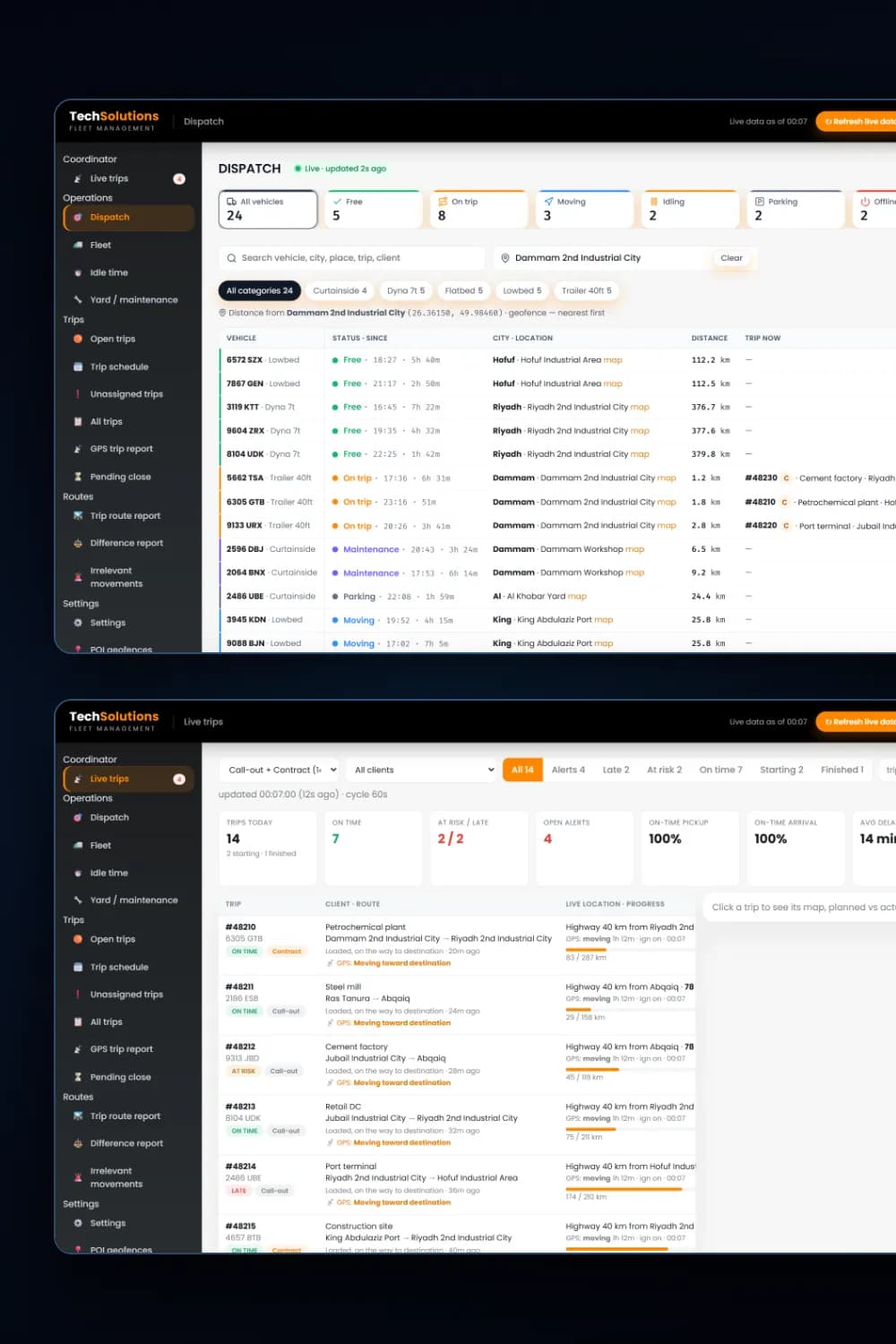
Dispatch software shows a trucking company which vehicle can take the next trip and what every trip on the road is doing. Ours reads live GPS data, ranks free trucks by distance to the pickup, follows each trip against its plan with ETAs and alerts, and turns trips into income, idle-time and utilisation reports.
Key takeaways
- 1A dispatch board that ranks trucks by status and distance to the pickup, so the nearest free truck is first.
- 2A live trips desk with progress, ETA, delay and alerts for every trip on the road.
- 3Alerts for late trips, long stops outside a geofence and trucks moving without a trip.
- 4Trip, idle-time, utilisation and difference reports built from the same GPS and trip records.
The problem
Why businesses need Dispatch Software
Trucks assigned by phone call
Dispatchers ring drivers to find out who is free and where they are, then pick a truck that is not the nearest.
Late trips found out by the customer
Nobody sees a truck falling behind plan until the customer calls to ask where their load is.
Trucks moving without a trip
Vehicles drive off with no trip assigned, and nobody notices until the fuel and kilometres show up at month-end.
No view of idle time
There is no measure of how many hours each truck sits idle between trips, so utilisation is a guess.
What you get
What does our Dispatch Software service include?
Dispatch board
Every vehicle with its live status: free, on trip, moving, idling, parked, offline or in maintenance, ranked by distance to the pickup you type in.
Live trips desk
Each trip with client, route, live location, kilometres done, ETA and delay, filtered by on time, at risk, late, starting and finished.
Trip detail and map
Planned against actual times for each step, the driver’s status updates, and the expected route against the GPS track on a map.
Alerts
Late trips, long stops outside a geofence and trucks moving without a trip, with acknowledgement and a note for each alert.
Trip, idle and utilisation reports
Ongoing, future and overdue trips with income, idle hours and utilisation per vehicle, and a difference report of claimed against GPS kilometres.
Geofences and daily reports
Customer sites and yards kept in sync as geofences, with daily operations reports sent by email.
How it works
How we deliver Dispatch Software
- 1
Map your dispatch
We sit with your dispatchers and list how trips arrive, how trucks are chosen and what gets checked on the road.
- 2
Connect your data
We connect your GPS tracking platform and your trip or order system, and load your sites and yards as places.
- 3
Build and test
We build the board, the trips desk and the reports and run them on your real trucks and trips until the results are right.
- 4
Run and extend
We support the system day to day and add reports, alerts and automations as your fleet grows.
Tools & platforms
What we build with
- Python
- Flask
- GPS tracking platform APIs
- OpenStreetMap / Leaflet
- Google Maps
- Excel exports
- Email reports
Industries
Who it's for
- Trucking & haulage
- Logistics & cargo
- Construction & heavy equipment
- Distribution fleets
- Oil, gas & industrial transport
Pricing
What affects the cost of Dispatch Software?
Every project is quoted on its scope. These are the factors that move the price.
Number of vehicles and how many dispatchers use the system.
Which GPS platform and trip or order system it connects to.
Which views and reports you need beyond the dispatch board.
Alerts, daily reports and notifications to set up.
Support and new features after launch.
FAQ
Frequently asked questions
Software that shows which trucks are free and where they are, helps the dispatcher pick the right truck for each trip, and follows every trip on the road with ETAs and alerts, so problems are seen before the customer calls.
Usually yes. We connect to the tracking platform your trucks already report to and read live location, ignition, speed and status from it, so you do not need new hardware.
Yes. A small fleet gains the most from seeing free trucks and late trips on one screen, and we build only the views you need, starting with the dispatch board and live trips.
Yes. A truck that moves more than a set distance with no trip assigned raises an alert, and the dispatcher records a note when acknowledging it.
Yes. Our dispatch system runs for a transport company in Saudi Arabia, and we build and support systems remotely for fleets in the UAE, the UK and Pakistan.
Related
Services that work well with this
Need Dispatch Software? Get a free quote.
Tell us what you need. We reply within one business day with a clear scope and quote.