
What do restaurant operators actually struggle with?
Almost every kitchen we walk into is running four systems that were never introduced to each other.
The POS and the ERP disagree
Sales live in the till and purchases live in the accounting system, so someone spends the first week of every month reconciling two sets of numbers that were never going to match.
Food cost is a month-end surprise
Without recipes attached to menu items, nobody knows what a dish costs until purchases are totalled weeks later — by which time the pricing decision has already been made.
Stock is counted on paper
Opening and closing counts are written on a clipboard and typed up later, so wastage, theft and a simple miscount all look identical in the final number.
There is no live P&L
Gross margin for the week in progress is a guess, and the first reliable profit figure arrives long after the decisions that produced it.
Aggregator orders arrive separately
Delivery-platform orders come in on a different tablet and are keyed in again, which breaks both the kitchen queue and the revenue picture.
What does the system cover?
Six groups of modules, from the till to the profit and loss statement.
Front of house
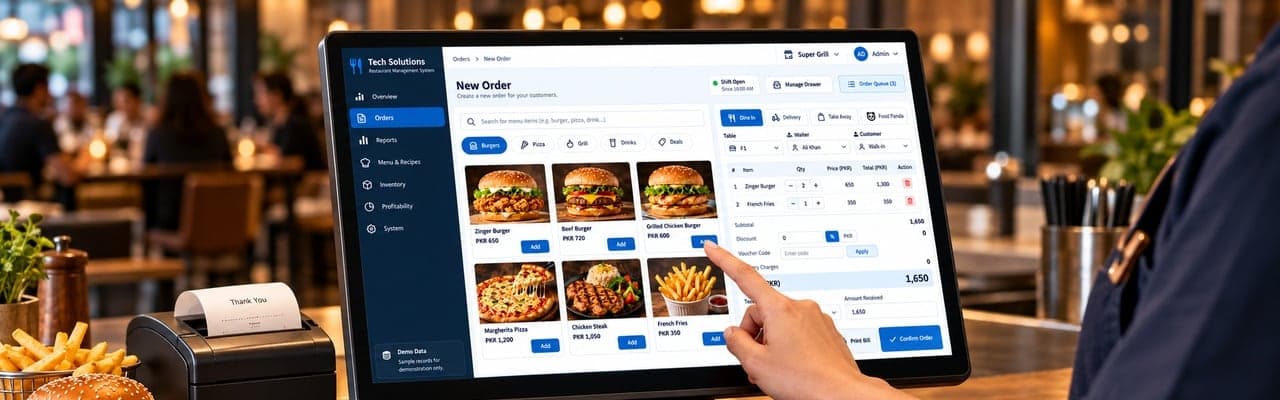
Take an order once, on one screen, and have the bill, the kitchen and the stock register all hear about it.
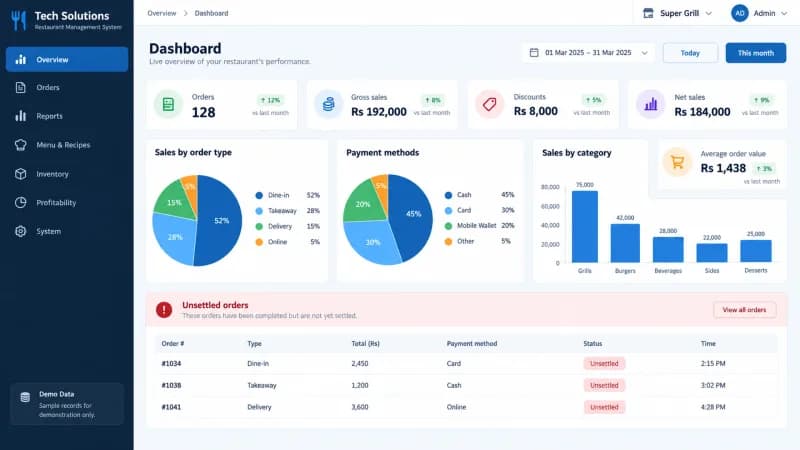
- Dashboard — orders, gross and net sales, discounts and average order value for the selected range
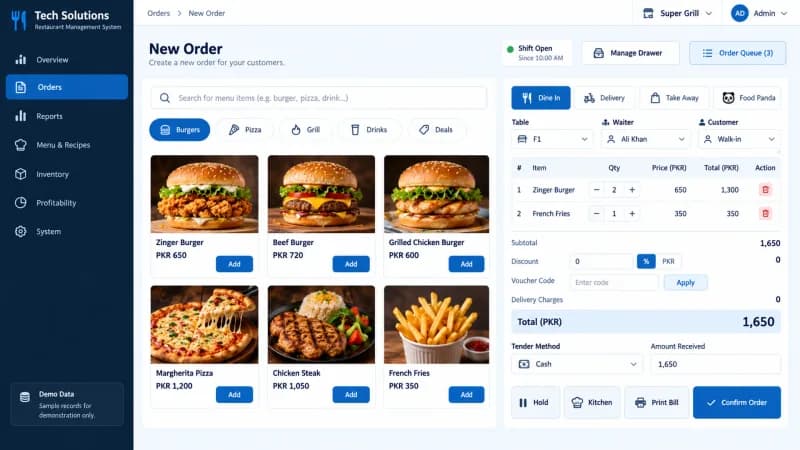
- POS / order taking — product search, category chips, running bill, discounts, vouchers and tender
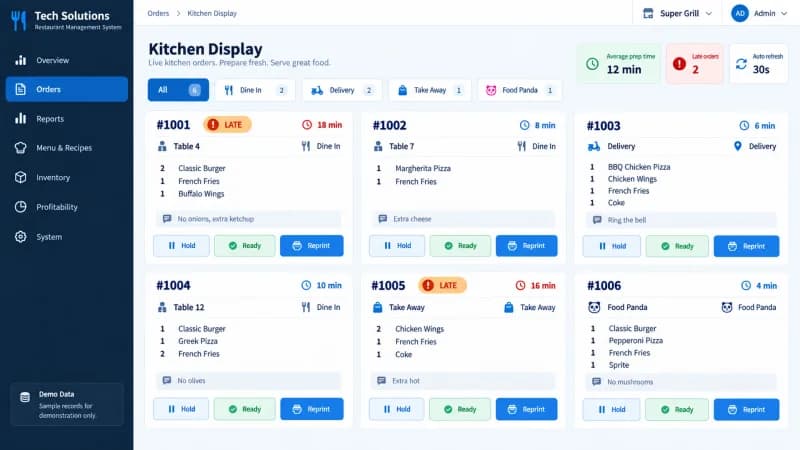
- Kitchen display — live tickets with order type, table, elapsed time, quantities and notes
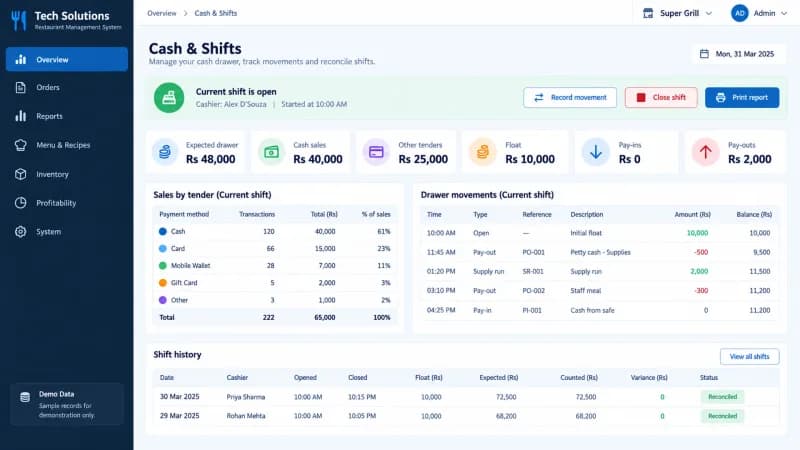
- Shifts & drawer — opening float, cash movements, expected drawer and counted variance
Menu, recipes & pricing
Every item carries its own recipe, so a price change and a cost change become the same conversation.
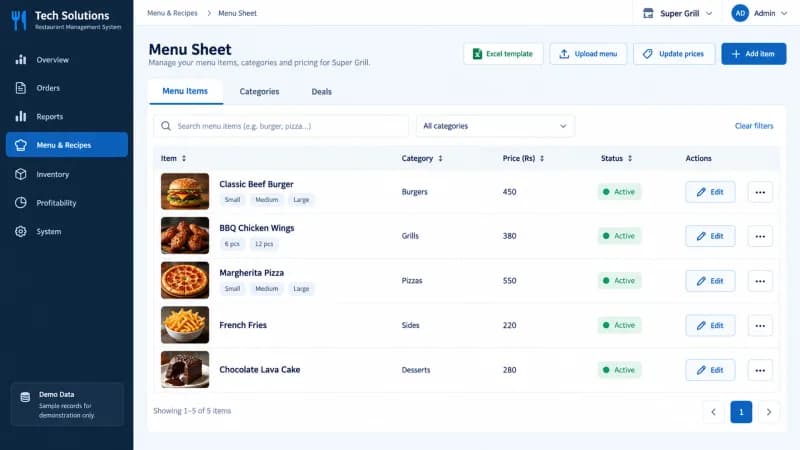
- Menu sheet — items, categories, variants and deals with bulk price updates
- Recipes / BOM — ingredients, yield and recipe cost per menu item
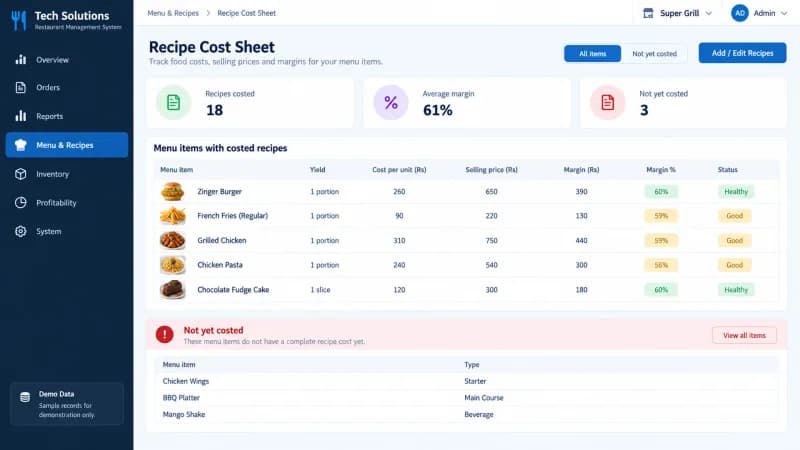
- Recipe cost sheet — cost per unit against selling price and margin, with not-yet-costed items listed separately
- Price rules — priority-based rules such as happy hour or weekend pricing
Inventory & purchasing
Purchases, counts and production land in one register, so stock on hand is a number rather than an argument.
- Products — ingredient master data with units, categories and bought vs made in-house
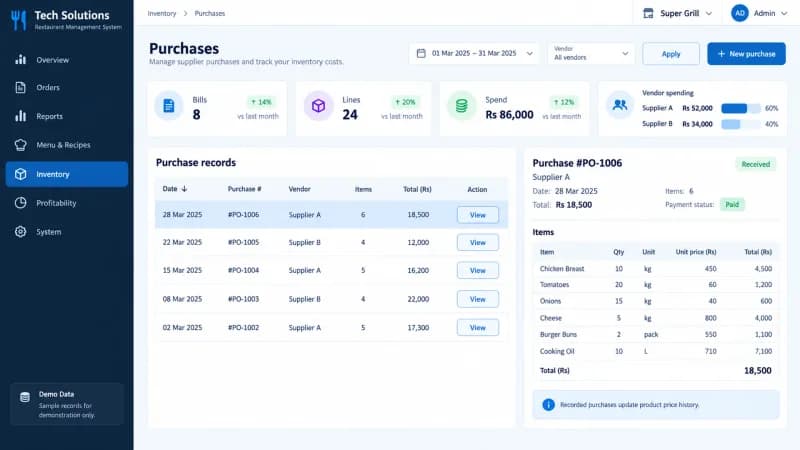
- Purchases & purchase orders — vendor bills, approval states and open order value
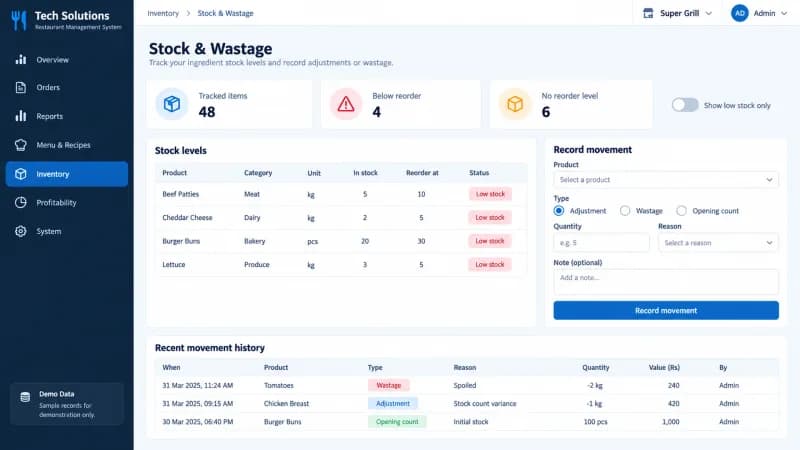
- Stock & wastage — in-stock levels, reorder points and adjustment, wastage and opening-count movements
- Opening & closing inventory — editable count sheets that carry forward between days
- Production — batches of made-in-house items such as sauces and dough
Cost & profitability
Food cost and gross margin are available for the range you are looking at, not four weeks after it closed.
- Food cost sheet — cost per unit, food cost %, COGS and margin by item
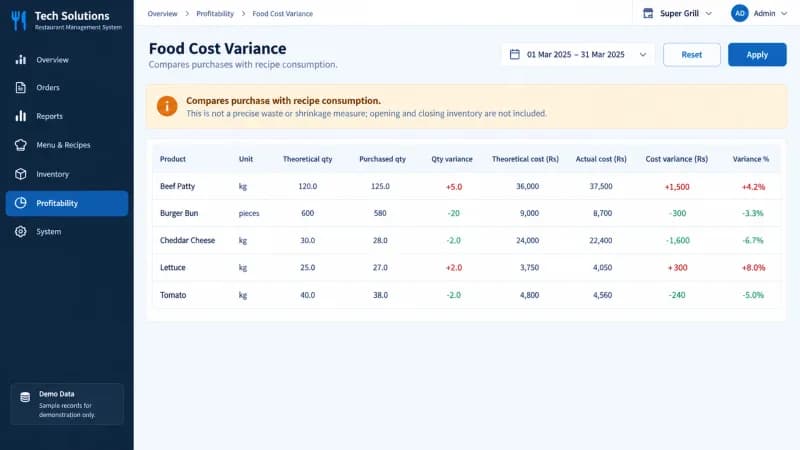
- Food cost variance — purchased quantities against recipe-derived consumption, presented as an indicator rather than a precise waste measure
- Consumption sheet — opening, received, closing and kitchen-used quantities per ingredient
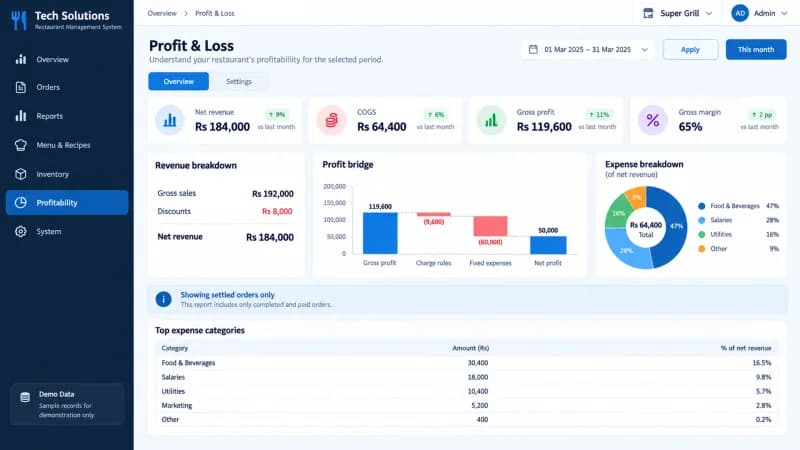
- Profit & loss — net revenue, COGS, gross profit, charge rules and fixed expenses, on settled orders
- Expenses — fixed expense bills plus purchase-versus-fixed expense analysis
Reporting
The same numbers, filtered the way each manager needs them, exportable without rebuilding a spreadsheet.
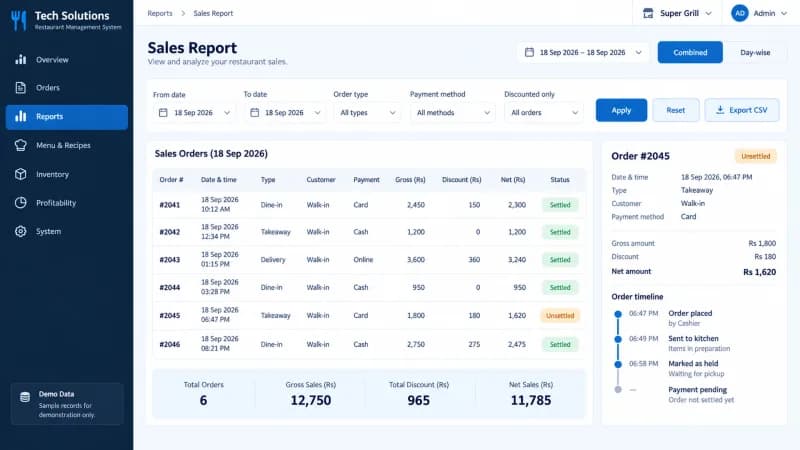
- Sales and item reports with date, order type and payment filters and CSV export
- Sales comparison across two periods — summary, product-wise, order-type-wise and daily
- Forecasting from historical weekday averages, labelled on screen as an estimate
- Voids and discounts reports for audit, alongside item sales targets
Administration & guest ordering
Who can do what, what a payment method means and how a guest orders are all configuration, not code changes.
- Customers, vendors and vouchers
- Users, roles and application activity logs
- Restaurant settings — order types, tables, payment modes, discounts, staff and business hours
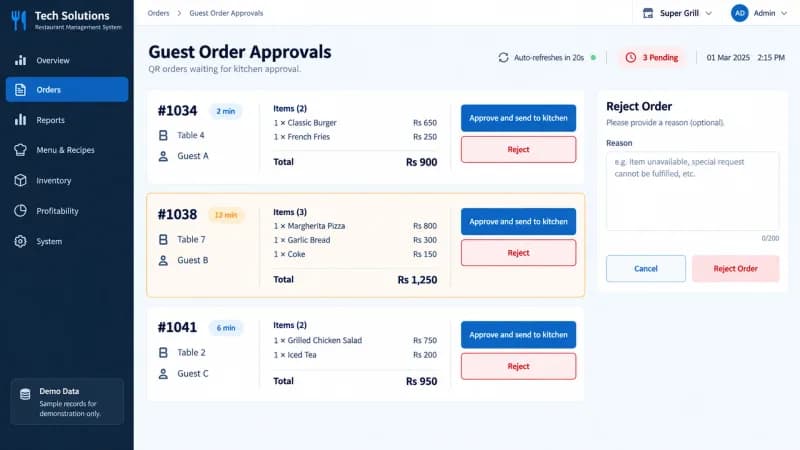
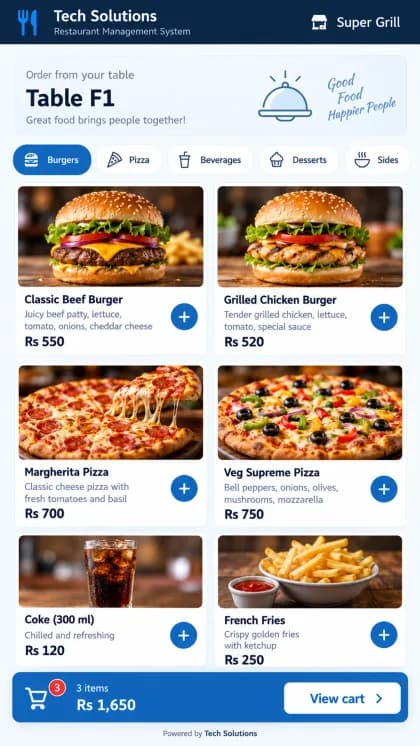
- Guest QR ordering — mobile menu, cart and confirmation, with orders held for staff approval before the kitchen sees them
What do the screens look like?
Twelve views from the system. These are interface illustrations produced with demonstration data, not records from a live installation.
How does an order move through the system?
Order, kitchen, billing, stock depletion, reporting — five steps on one set of records.
Order is taken
A cashier picks the order type — dine in, delivery, take away or an aggregator — attaches the table, waiter or customer that type requires, and builds the bill from the menu.
Kitchen receives it
Sending to kitchen puts the ticket on the kitchen display with its quantities, notes and an elapsed timer. Guest QR orders wait in the approvals queue until staff approve them.
Bill is settled
The bill takes discounts, vouchers and a tender method. Settled orders are the population the profit and loss report uses; unsettled ones stay visibly unsettled.
Stock is depleted
Each sold item resolves to its recipe, so ingredient consumption follows from what was sold and sits next to purchases, production batches and count sheets.
Reports are read
Sales, item, food cost, variance, expense and profit-and-loss reports read the same records, filtered by date range and exportable as CSV.
Which kinds of service does it fit?
Dine-in, delivery, take away and aggregator orders on one screen, across branches, in PKR.
Dine-in service
Tables and seats are configured in settings, orders carry a table and a waiter, and the kitchen ticket shows both.
Delivery and riders
Delivery orders can require a rider and carry delivery charges; staff are maintained as waiters or riders in settings.
Take away and counter
Take away orders skip the table requirement and move straight from bill to kitchen ticket.
Aggregator orders
Aggregator channels such as Food Panda are an order type on the same screen, so their orders land in the same queue and the same reports.
Multi-branch operations
Menus, tables, payment modes and order types are configured per restaurant, and the session resolves which one a user is in.
PKR operations
Amounts, GST and service charge settings are handled in PKR with explicit Rs labels across bills and reports.
What does a client say about it?
“In a high-paced kitchen and dining room, any delay between order taking, billing, and inventory tracking hurts the customer experience. Tech Solutions delivered a rock-solid restaurant management system that unified our front-of-house ordering with back-of-house kitchen displays and live stock registers. It’s fast, dependable during peak hours, and eliminated our operational blind spots.”
Questions operators ask before they buy
Short answer first, detail underneath.
It is one system that covers ordering, the kitchen, stock and reporting instead of a separate tool for each. Here the POS takes the order, the kitchen display shows it, recipes turn the sale into ingredient consumption, and the sales, food cost and profit-and-loss reports all read the same records — so the sales figure and the purchase figure come from one source rather than two systems that have to be reconciled by hand.
Yes — order type is a first-class setting on every order. The order screen carries Dine In, Delivery, Take Away and aggregator tabs such as Food Panda, and each order type is configured with what it requires: a table, a waiter, a rider or an invoice number. Reports can then be filtered and compared by order type, so delivery and dine-in revenue can be read separately or together.
From recipes, not from a month-end guess. Every menu item has a bill of materials with ingredient quantities and a yield, which gives a cost per unit and a margin against the selling price. The food cost sheet reports cost, COGS and margin per item for a date range, and the variance screen compares purchased quantities against recipe-derived consumption. That variance is an indicator worth investigating rather than a precise waste or shrinkage measurement — opening and closing counts are recorded separately on the count sheets.
Not necessarily. The point of sale is part of the system and can be used as the till, but the same architecture is also built to sit alongside an existing POS or ERP and pull its sales and purchase records into one database. Which route makes sense depends on what your current till already does well and what the kitchen and back office are missing, and that is the first thing a walkthrough establishes.
Yes. We deploy and support the system remotely for restaurants in Saudi Arabia, including Riyadh, and the UAE as well as Pakistan. Restaurant settings, menus, payment modes, tax and service charges are configured per restaurant during set-up, so each branch runs on its own rules.
Yes. Restaurant settings, menus, tables, order types and payment modes are configured per restaurant, and the session determines which restaurant a user is working in. Amounts are handled in PKR with explicit Rs labels, and billing settings cover GST and service charge percentages plus charge rules that are deducted from gross profit.
It runs on your infrastructure or on ours, and the database is yours either way. Deployment covers setting up the restaurant, menu, recipes and users, importing existing product and menu data where it exists, and training front-of-house and back-office staff separately because they use different parts of the system. Users, roles and application logs are part of the product rather than an add-on.