
Key takeaways
- 1A restaurant POS should take every order type on one screen, including dine-in, takeaway, delivery and Foodpanda, and send it straight to a kitchen display.
- 2Cash control matters most: shifts with a declared float and counted close, wallet and card takings kept out of the cash count, and voids that need an owner’s approval.
- 3Recipes on menu items turn sales into food cost and stock use, so you see margin per dish instead of guessing at month-end.
- 4In Pakistan an offline edition is worth asking for, so the counter keeps working when the internet does not.
- 5Reports, profit and loss and staff payroll in the same system remove the spreadsheets that sit between the till and the accounts.
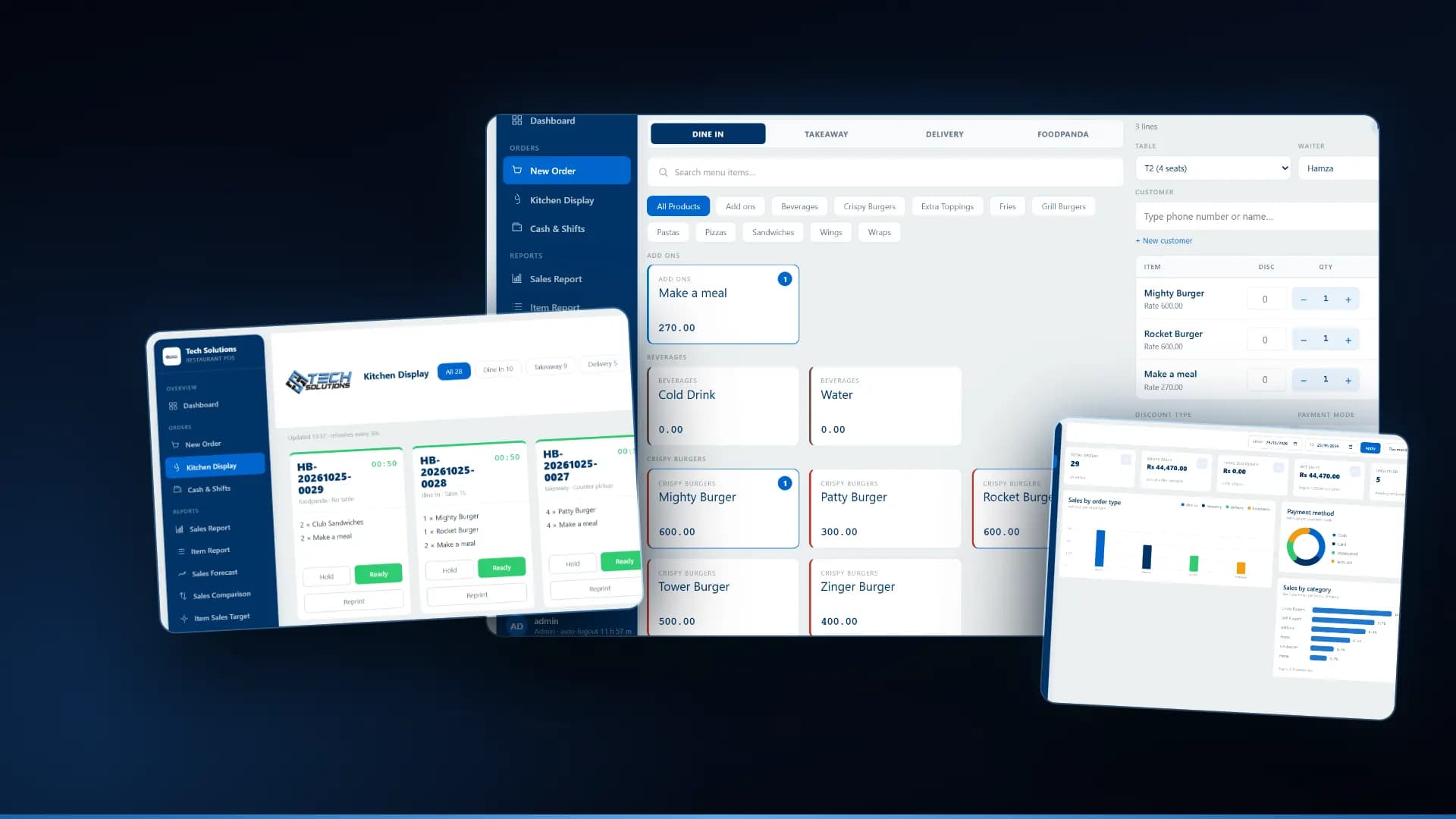
A restaurant POS system in Pakistan should do far more than print a bill. It should take dine-in, takeaway, delivery and Foodpanda orders on one screen, send them to a kitchen display, tie every rupee to a cash shift, turn sales into food cost through recipes, and keep working when the internet drops. Below are the 12 features we think matter most, shown with real screens from our own Tech Solutions Restaurant POS.
1. Every order type on one screen
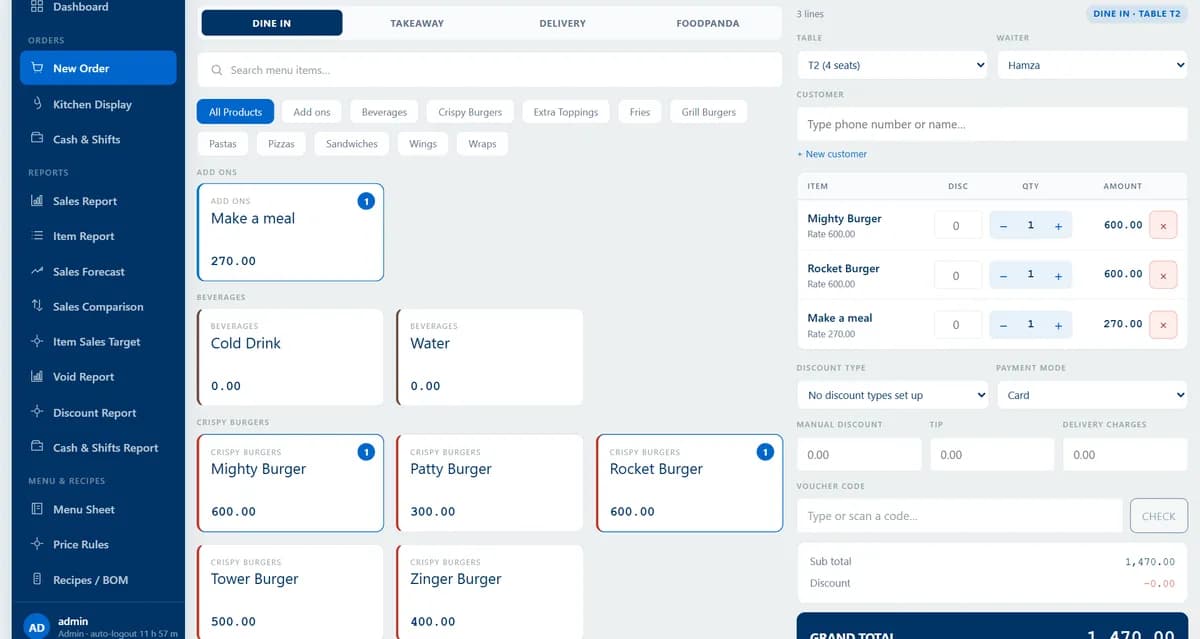
Dine in, Takeaway, Delivery and Foodpanda should be tabs on the same order screen, not separate tablets. Each type should ask for what it needs: a table and waiter for dine-in, a rider for delivery, and the invoice number for Foodpanda.
2. A kitchen display, not paper chits
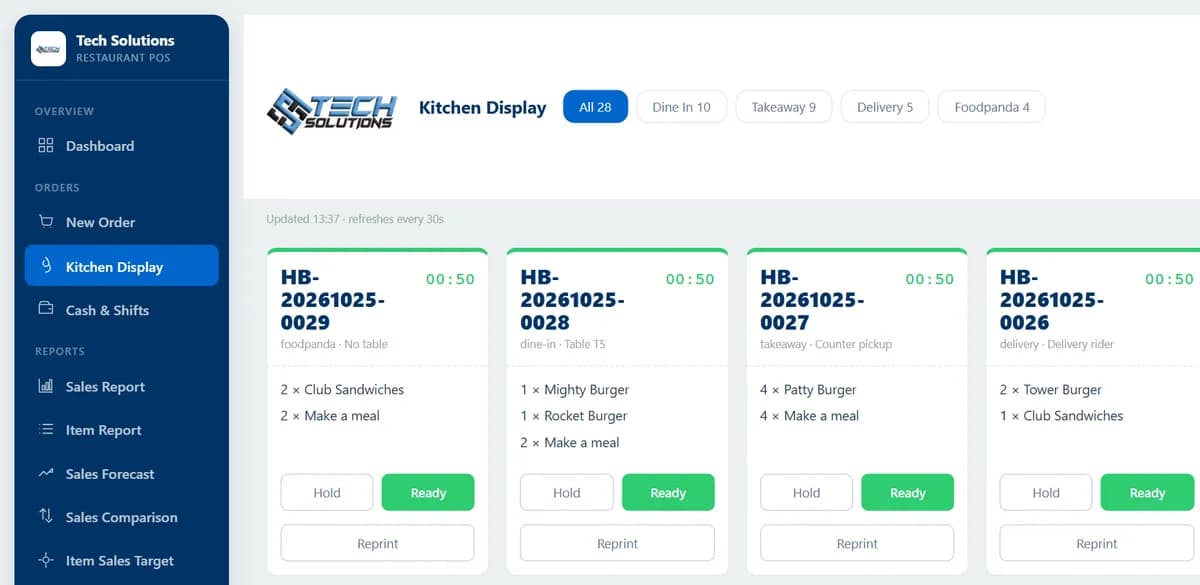
When the cashier presses Kitchen, the ticket should appear on a screen in the kitchen with the order type, table and items, a timer, and Hold, Ready and Reprint buttons. If items are added to an open bill, the next ticket should carry only the new lines, so nothing is cooked twice.
3. Cash shifts with a counted close
Every order should belong to a shift. The cashier declares an opening float, the system works out the expected cash as sales come in, and the shift closes with a counted amount and a variance. A shift should refuse to close while bills are still unsettled.
4. Wallet and card payments kept out of the cash count
JazzCash, Easypaisa and card payments never enter the drawer. If the POS counts them as cash, an honest cashier looks short by exactly the wallet takings. Each payment method needs a clear "this is cash" setting.
5. Voids that need an owner’s approval
A till that can quietly void its own sales is how money walks out of a restaurant. Voiding a bill the kitchen has already seen should ask for the owner’s password, record the reason and the approver, and appear in a void report.
6. Split payments and tips
Guests split bills. The POS should settle one bill across cash, card and wallet, record a tip on each payment, and pay tips out to staff from the drawer without counting them twice.
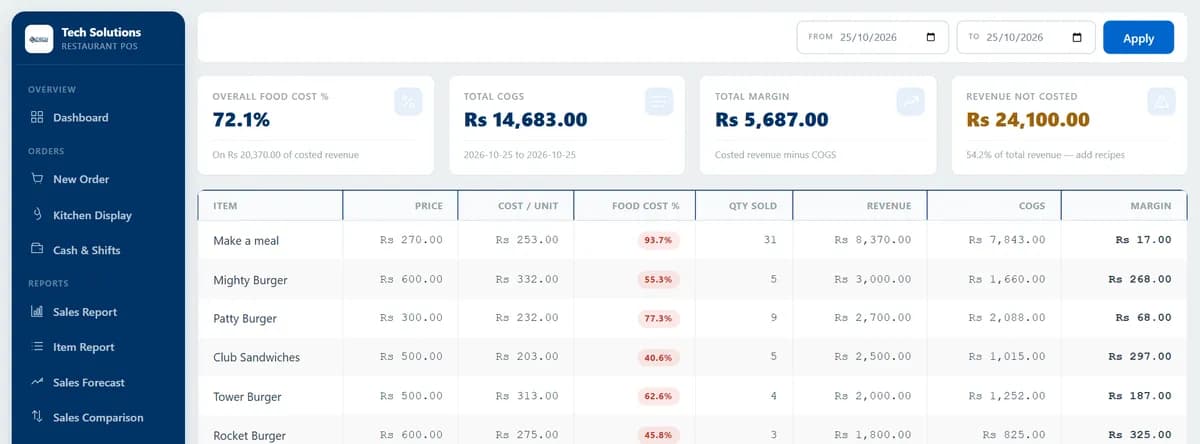
7. Recipes and food cost per dish
Attach a recipe to each menu item and the POS can tell you what a dish costs and what margin it makes, before you set the price. A food cost sheet then shows food cost % and margin for everything sold in a date range.
8. Stock that moves with every sale
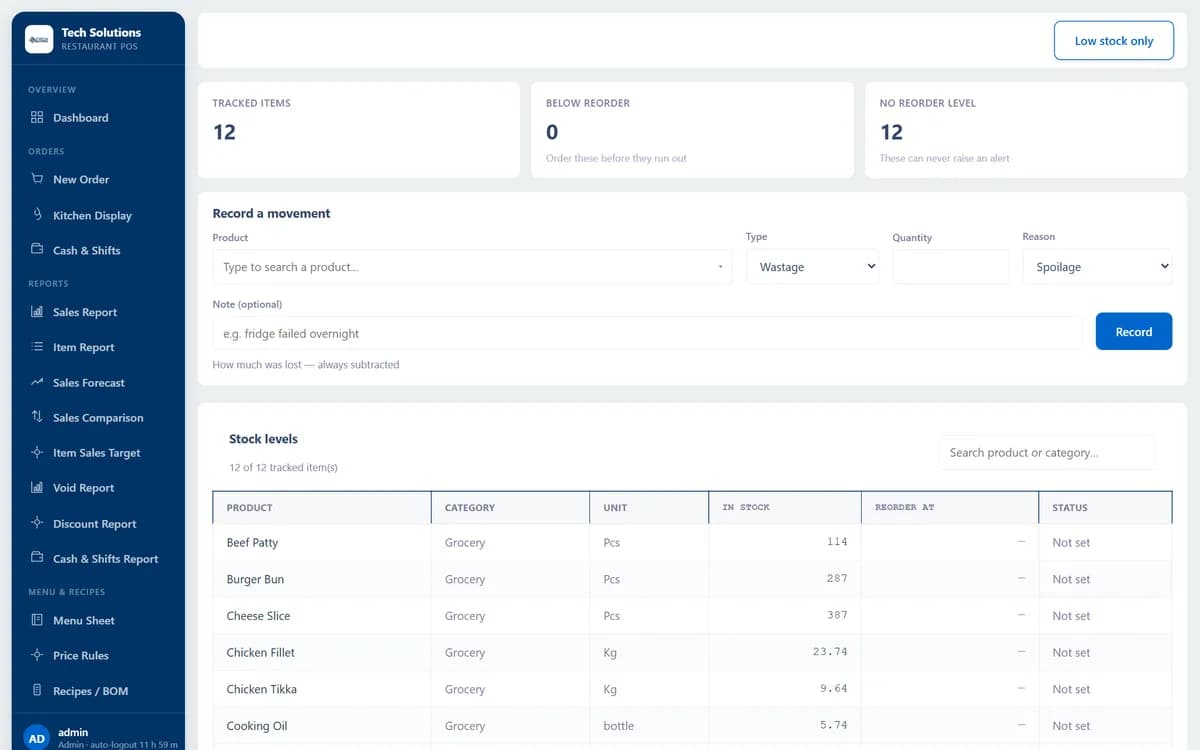
Through recipes, every sale should reduce ingredient stock, and every purchase should add to it. Look for reorder levels, wastage with reasons such as spoilage or staff meal, purchase orders with approval, and opening and closing counts.
9. QR table ordering with staff approval
Guests scan a code at the table and order from their phone. Those orders should wait for staff approval before the kitchen sees them, and prices must always come from the system, never from the guest’s phone.
10. An offline edition
Internet outages hit the counter at the worst time. A POS with an offline edition runs on one shop PC with its own database, so orders, the kitchen display and cash shifts keep working. We explain how we built ours in how we built an offline restaurant POS.
11. Reports and a live profit and loss
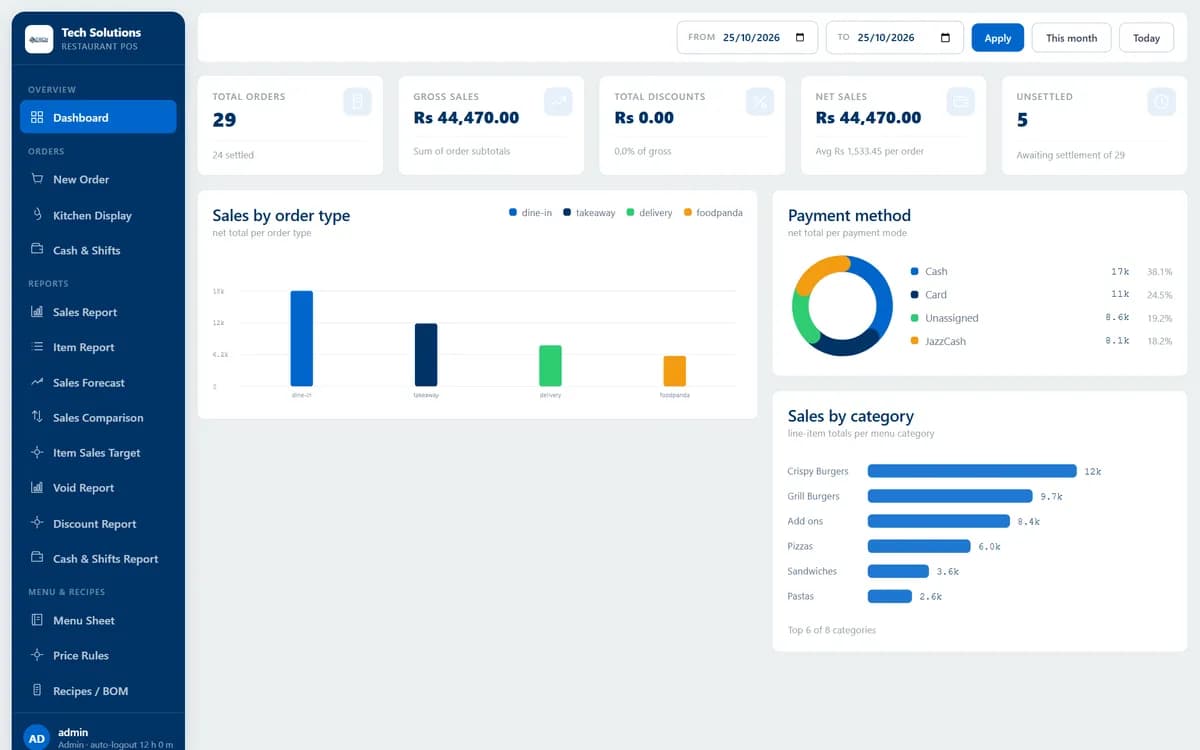
A dashboard of orders, sales, discounts and unsettled bills, sales by order type and payment method, item and comparison reports, and a profit and loss on settled orders, all filtered by date and exportable to CSV.
12. Staff and payroll in the same system
Waiters, riders and cooks, their attendance and their monthly payroll, plus salary advances paid from the drawer, belong in the same system as the sales they serve. It saves another spreadsheet at month-end.
Before you buy: a checklist
1. Ask to see it run with your own menu, including sizes, flavours and deals. 2. Check that Foodpanda and delivery riders fit your real order flow. 3. Close a test shift and see how wallet payments are counted. 4. Try a void from the till login and see who has to approve it. 5. Ask what happens when the internet goes down. 6. Ask who owns the data and how backups work.
Our POS systems for restaurants cover all 12 features above, in a cloud edition, an offline edition or both, and the full restaurant management system adds recipes, purchasing and profit and loss. We set it up for restaurants in Pakistan, Saudi Arabia and the UAE. Send us your menu and we will show it running with your own items.
*The screens above are from the Tech Solutions Restaurant POS, captured with demonstration orders.*
Frequently asked questions
The one that fits how you serve. Look for every order type on one screen including Foodpanda, a kitchen display, cash shifts with a counted close, recipes and food cost, stock, reports in PKR and an option to keep working offline. Ask to see it run with your own menu before you buy.
Yes, if it has an offline edition. Ours runs on one Windows shop PC with its own database, so orders, the kitchen display and the cash drawer keep working with no connection.
A good one treats Foodpanda as an order type on the same screen, with its invoice number, so those orders go to the same kitchen queue and the same reports as dine-in and delivery.
Every order belongs to a shift with a declared float and a counted close, wallet and card payments are kept out of the expected cash, every drawer movement needs a reason, and a void needs an owner’s approval and appears in the void report.
It depends on the number of branches, tills and kitchen screens, whether you need cloud, offline or both, and which modules you want beyond the till, such as recipes, stock, QR ordering or payroll. Ask for a quote based on your own setup.
Get new articles by email
How we build automation and software, with the lessons learned. One short email when a new article goes up. No spam.
- #Restaurant POS
- #POS System
- #Pakistan
- #Foodpanda
- #Food Cost