
Key takeaways
- 1Security guard management software joins the jobs a guarding company runs in separate sheets: guard records, rosters, attendance, payroll and client billing.
- 2In the UK, the first feature to test is SIA licence tracking: employers must check a guard holds the right licence, and licences run for three years.
- 3The shift should be the single record: roster, attendance, pay and client charge all read from it, so the numbers cannot disagree.
- 4A guard app with PIN sign-in and GPS check-in turns attendance into evidence instead of a timesheet.
- 5The test of any system is gross profit per client this month, shown without a spreadsheet.
Security guard management software runs a guarding company from one system: guard records and SIA licences, rosters by client and site, attendance from a phone app, payroll and client billing. In the UK, test it on four things: licence expiry tracking, one shift record behind everything, GPS check-in that writes real attendance, and margin per client without a spreadsheet.
Why do guarding companies outgrow spreadsheets?
Most guarding firms start the same way: the roster in one file, timesheets in another, pay rates in a third and client charge rates in someone's head. Every month someone reconciles them by hand, and every month the numbers disagree a little.
The problem gets worse with licences. The UK government says employers must check someone holds the correct security licence before hiring them for private security work, and paying an unlicensed person to do it can lead to a fine or imprisonment. An SIA licence is valid for three years, so every guard has an expiry date somebody must watch.
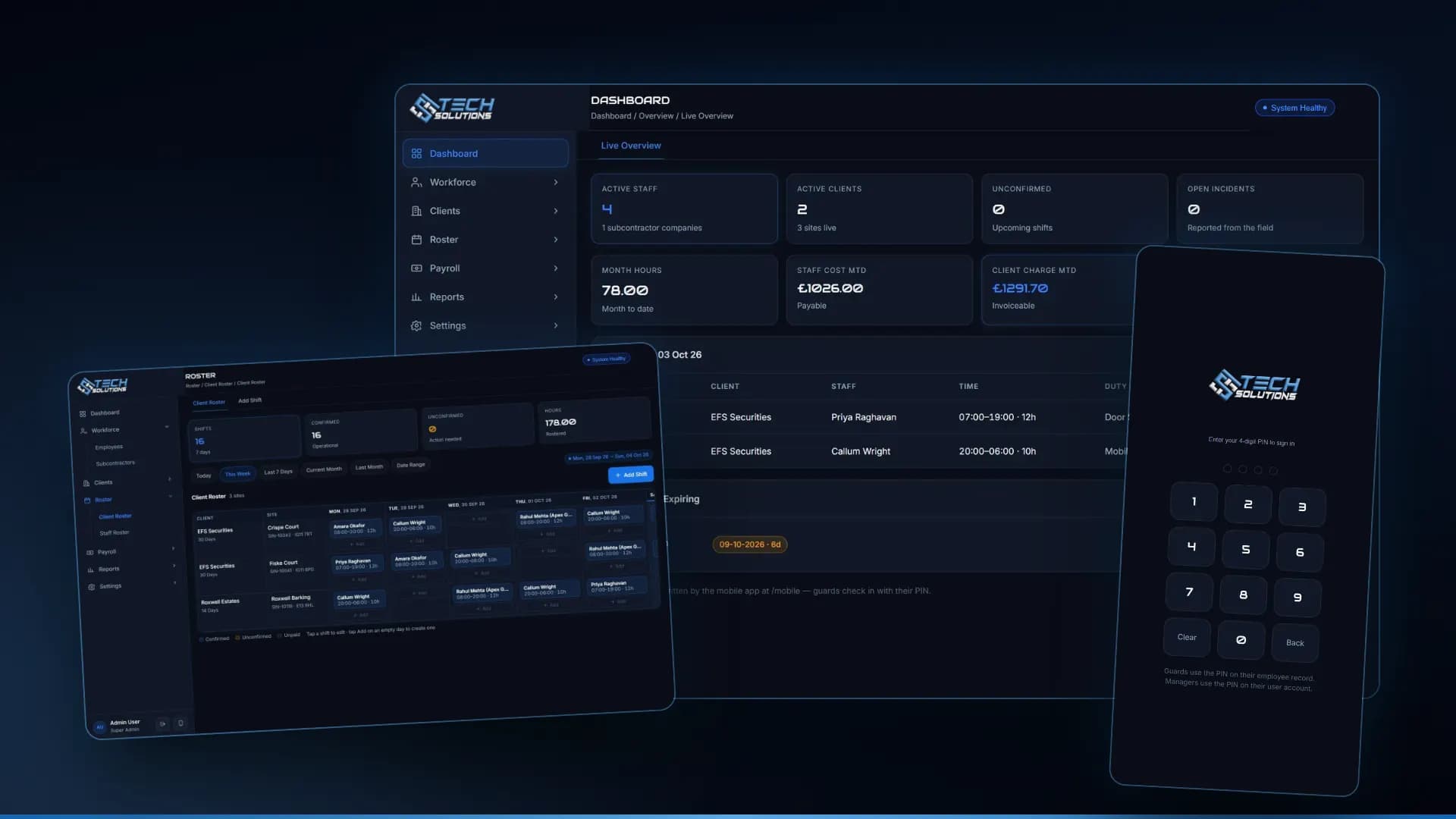
We built a system for a UK security company to fix this, and the screens below are from it. The full build is in our workforce ERP case study; this guide turns it into a buyer's checklist.
1. Guard records with SIA licence tracking
Every guard needs a record with their licence number, licence type, expiry date and status, plus certifications with their own expiry dates. The licence type matters because the activity decides the licence: security guarding, door supervision and public space CCTV are separate licensable activities, and a guard may need more than one.
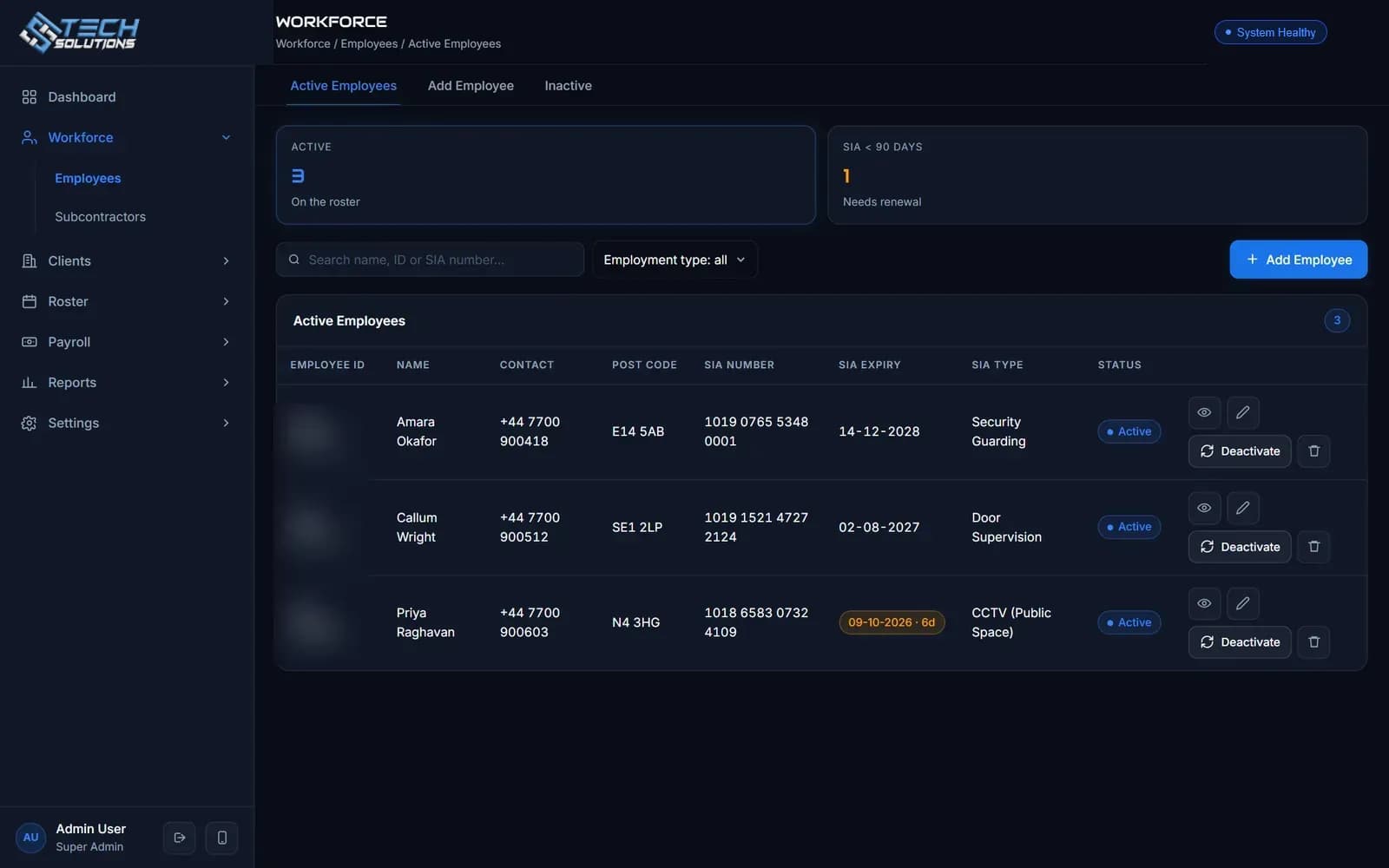
The screen above lists guards with their SIA number, expiry date, licence type and status, and highlights a licence that expires in days. That highlight is the feature: nobody should learn a licence has expired from a client.
2. Rosters by client and site
A roster should be a grid of clients and sites against days, with each shift showing who is on it and the hours. A supervisor adds or edits a shift in two taps, and an empty day is obvious.
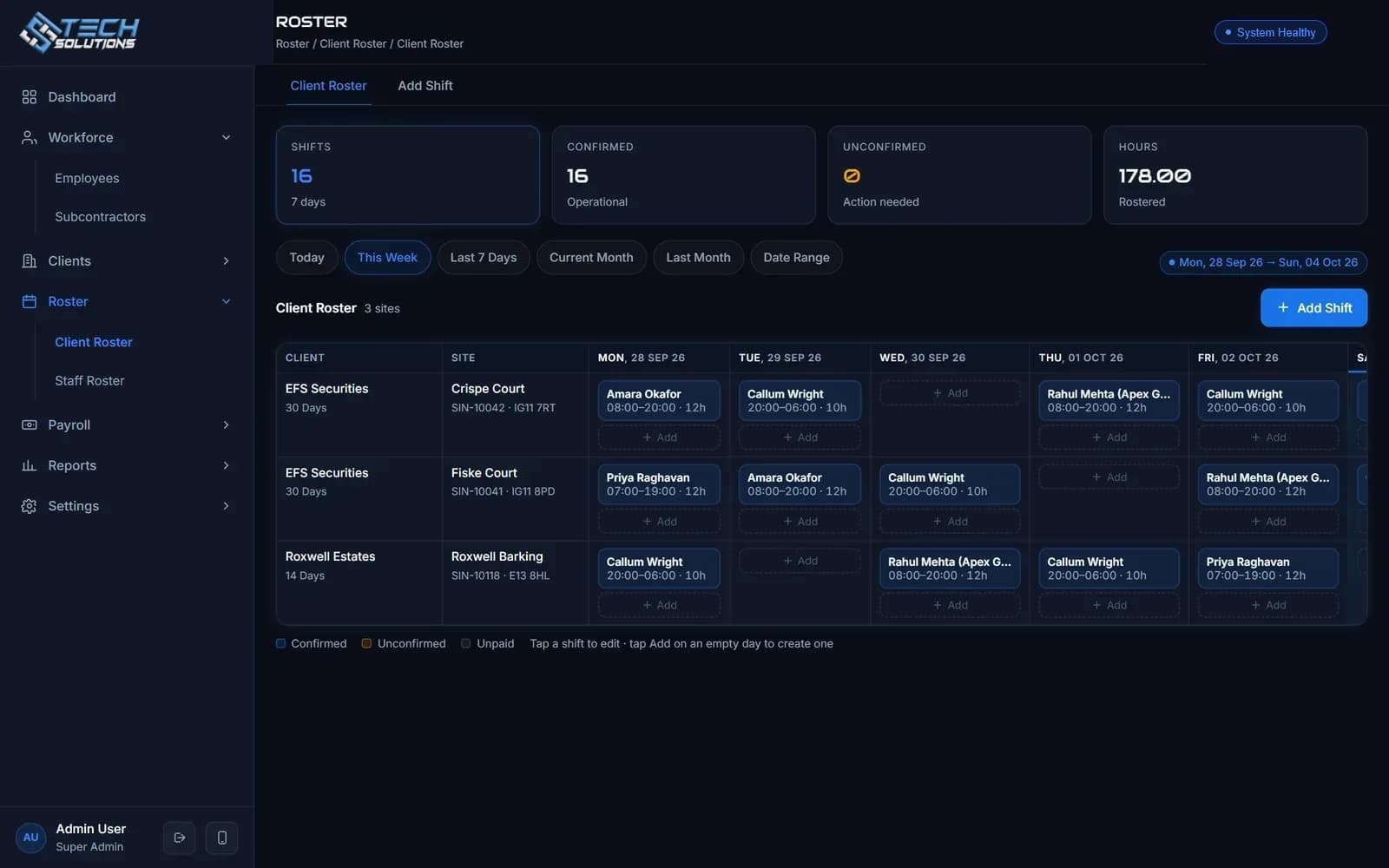
Ask whether the roster shows unconfirmed shifts separately, and whether subcontracted guards sit on the same roster as employees. In our system both do, and the company name is shown next to a subcontracted guard.
3. A guard app with PIN sign-in and GPS check-in
Attendance should be evidence, not a timesheet filled in on Friday. In our system a guard signs in with a PIN, sees today's shifts and taps check in. That writes an attendance row against the shift with the time and, where the phone allows it, the location. Check-out closes the same row.
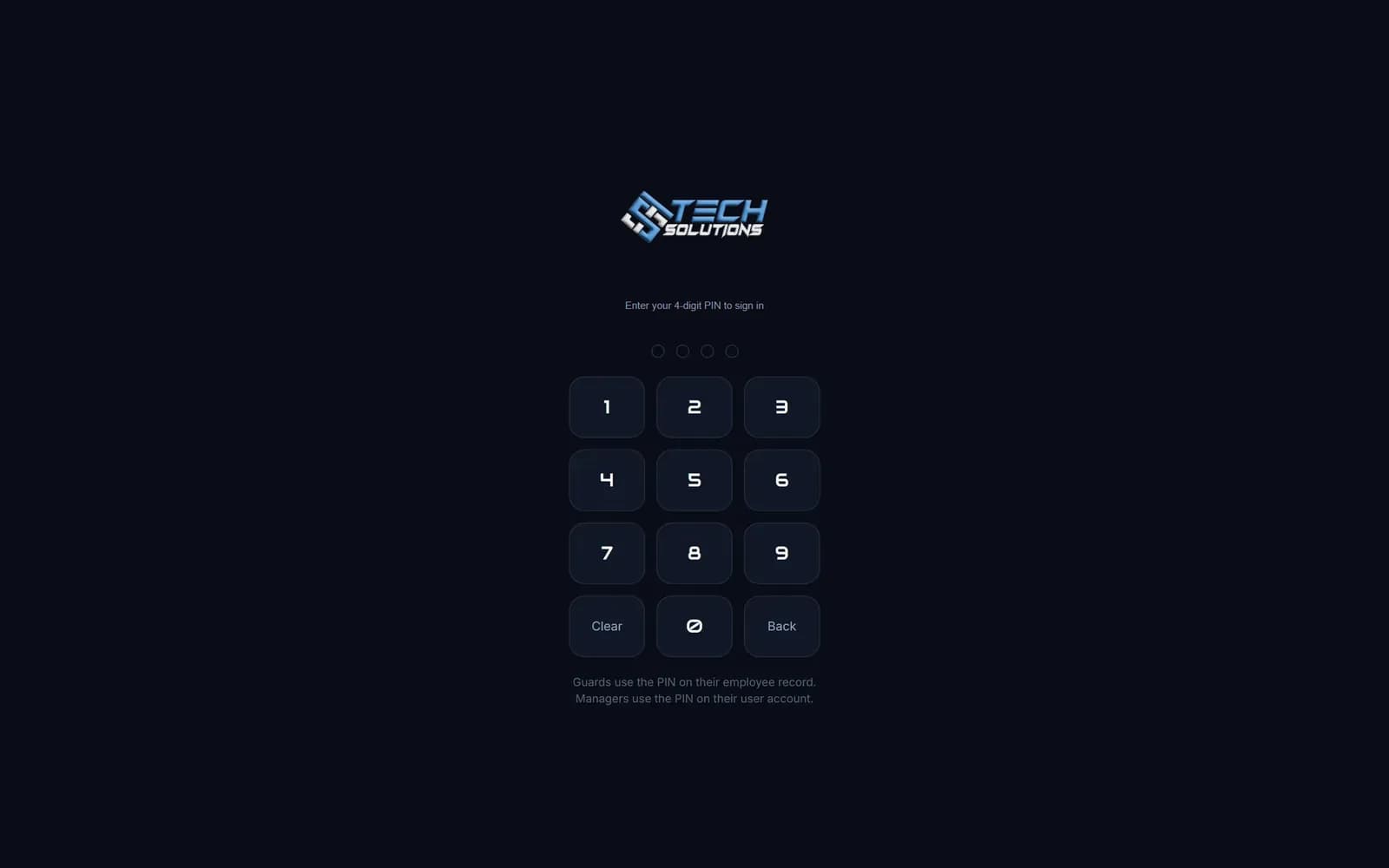
A good app refuses a second check-in on the same shift and a check-out with no check-in. It should also let a guard report an incident from the field, which then appears on the manager's dashboard.
4. One shift record behind payroll and billing
This is the design decision that matters most. When the shift is the single record, with its own pay rate and charge rate stored on it, then the roster, attendance, payroll and client charges are all views of the same data. Change a guard's hourly rate next month and last month's figures do not move.
For payroll, remember the working-time rules: UK workers generally get 11 hours' rest between working days and a 20-minute break when working more than six hours. Ask any vendor whether the roster warns you when a pattern breaks them.
5. Margin per client, this month
Owners should not need a spreadsheet to know whether a contract makes money. The dashboard should show staff cost, client charge and gross profit month to date.
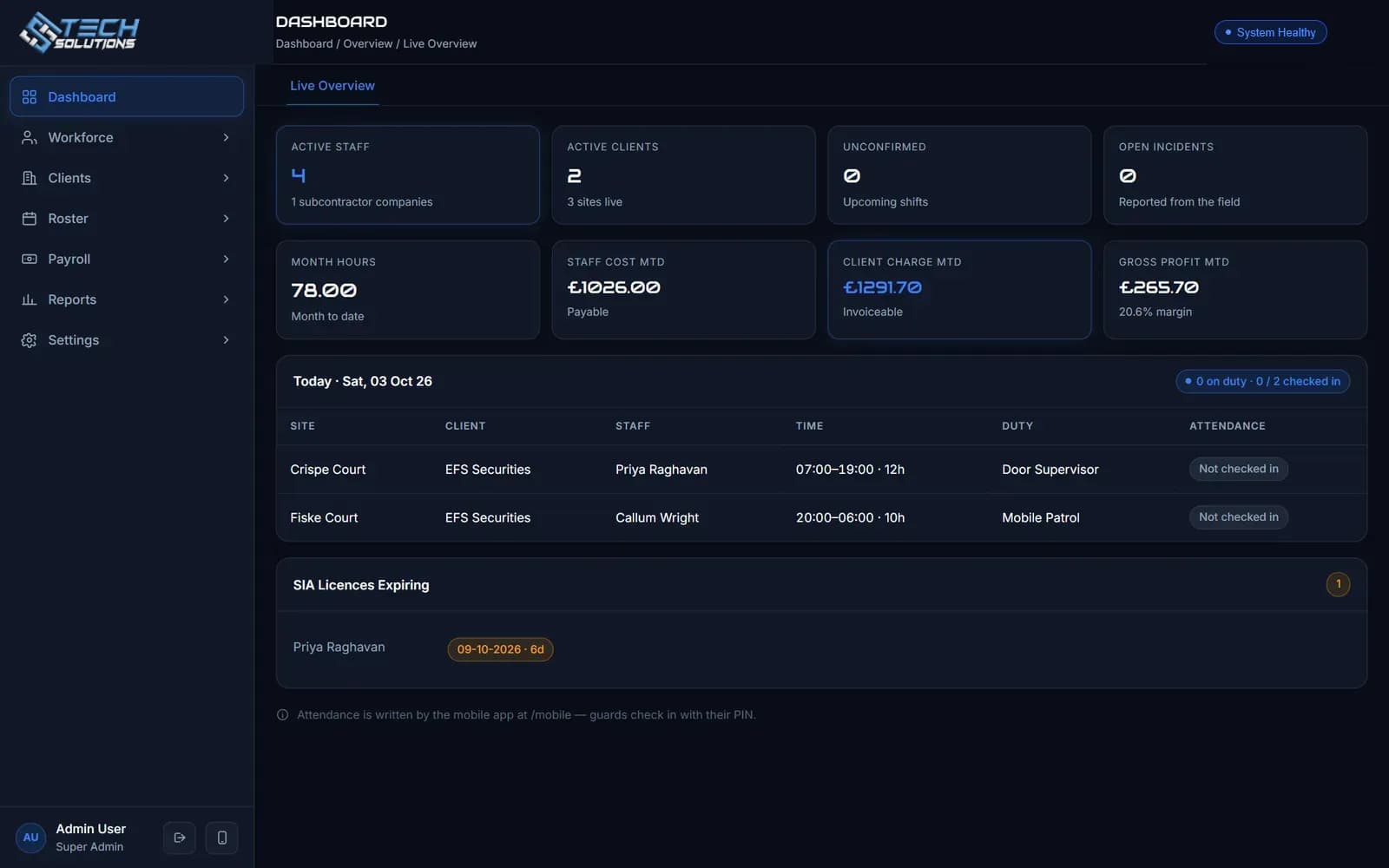
In the screen above, the dashboard shows today's shifts with who has checked in, the month's hours, staff cost, client charge and gross profit with the margin percentage, and the SIA licences expiring soon. Everything comes from the same shift records.
Spreadsheet, off-the-shelf or custom?
| Spreadsheets | Off-the-shelf software | Custom software | |
|---|---|---|---|
| Start-up | Free, immediate | Fast, per-user monthly fee | Longer, built to your rules |
| Licence tracking | Manual reminders | Usually built in | Built in, your fields |
| Subcontractors | Separate sheet | Varies | Same roster and app |
| Pay and charge rules | Formulas that break | Fixed options | Your own rules |
| Data ownership | You | Check the contract | You |
Our security guard management software page explains what we build. If you also need to clock staff in on site, see our attendance systems and our comparison of fingerprint and face attendance.
Questions to ask before you buy
- 1Does every guard record carry an SIA licence number, type and expiry date, with an alert before it lapses?
- 2Is there one shift record behind roster, attendance, payroll and billing?
- 3Can subcontracted guards use the same roster and app?
- 4Does check-in record time and location, and does it block duplicates?
- 5Can I see gross profit per client this month?
- 6Who owns the data, and can I export and back it up?
What is and is not in the system shown
The system shown covers guard records, SIA licence tracking, rostering, subcontractors, PIN and GPS check-in, incident reporting, payroll, client charges and reports, with role-based permissions. Features such as NFC patrol checkpoints or a client-facing portal are not part of it; we would add them to your requirements.
If you run a guarding company and want to see how this would look with your own clients and sites, tell us about your operation.
*Screens are from the system we built, shown with demonstration guards, clients and sites. Client branding is replaced with ours.*
Frequently asked questions
Software that runs a guarding company from one system: guard records and licences, rosters by client and site, attendance from a mobile app, payroll and client billing, and reports on margin.
Yes. Under the Private Security Industry Act framework, employers must check that someone holds the correct SIA licence before hiring them for licensable security work, and paying an unlicensed person to do it can lead to a fine or imprisonment. An SIA licence is valid for three years, so expiry dates need tracking.
Let a guard sign in with a PIN, see today’s shifts, check in and out, and record the time and, where the phone allows it, the location. It should refuse a second check-in on the same shift and report incidents from the field.
It should. Most guarding companies use subcontractors, so the roster, app and payroll must treat a subcontracted guard like an employee, with the supplying company shown next to the name and their own licence details.
Off-the-shelf starts fast and suits standard rosters. Custom is worth considering when your pay rules, client charge rates, subcontractor model or reports do not fit a product. Ask who owns the data either way.
Yes. We built a workforce platform for a UK security company covering rostering, GPS check-in, SIA licence tracking, payroll and client billing, and we build similar systems for security companies in the UK and elsewhere.
Get new articles by email
How we build automation and software, with the lessons learned. One short email when a new article goes up. No spam.
- #Security Guard Software
- #SIA Licence
- #Rostering
- #Workforce Management
- #UK Security Industry