
Key takeaways
- 1A journey management system covers the whole trip: planning it before departure, monitoring it on the road, and closing it out with a record of what happened.
- 2GPS tracking shows where a vehicle is; journey management also knows where it was supposed to be, and raises an alert when the two differ.
- 3Industry guidance, such as the IOGP land transportation recommended practice for journey management, treats it as a process, with software as the tool that makes it routine.
- 4The useful alerts for a small fleet are late or at-risk trips, long stops outside a known place, and vehicles moving without a trip.
- 5A trip is not finished when the truck stops: closing it out, with planned against actual times, is what gives you reports you can trust.
A journey management system plans every vehicle trip before it starts, monitors it while it runs and closes it out afterwards. It differs from GPS tracking because it knows the plan: where the vehicle should be and when, so it can alert you when a trip is late, stopped in the wrong place or moving without an assignment.
What does "journey management" mean?
The term comes from industries where a road trip carries real risk, such as oil and gas and security. The IOGP, the oil and gas industry's safety body, publishes a land transportation recommended practice for journey management (IOGP Report 365-19) that offers a framework for a systematic approach. Summaries of that approach describe three phases: plan the journey, run it with monitoring, and close it out.
A small trucking or delivery company does not need an oil-field safety manual. It does need the same three habits, because the problems are the same: a late truck nobody noticed, a driver stopped for an hour at an unknown place, a trip that was never recorded as finished.
The three phases of a trip
1. Plan before departure
Each trip has a client, a pickup and a delivery point, a vehicle, a driver and a time. Choosing the vehicle is the first decision, and it should be a good one: the nearest free vehicle that is not due for service.
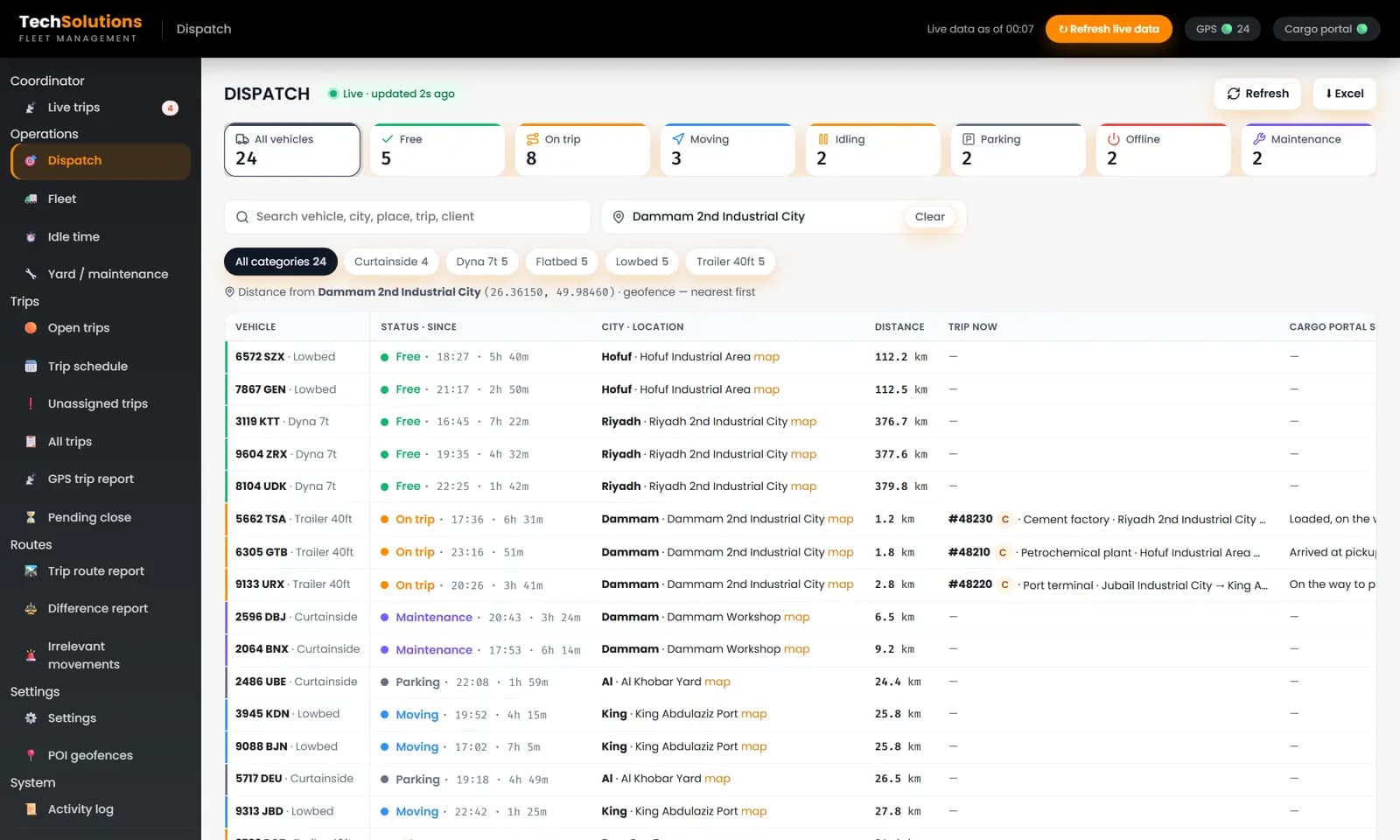
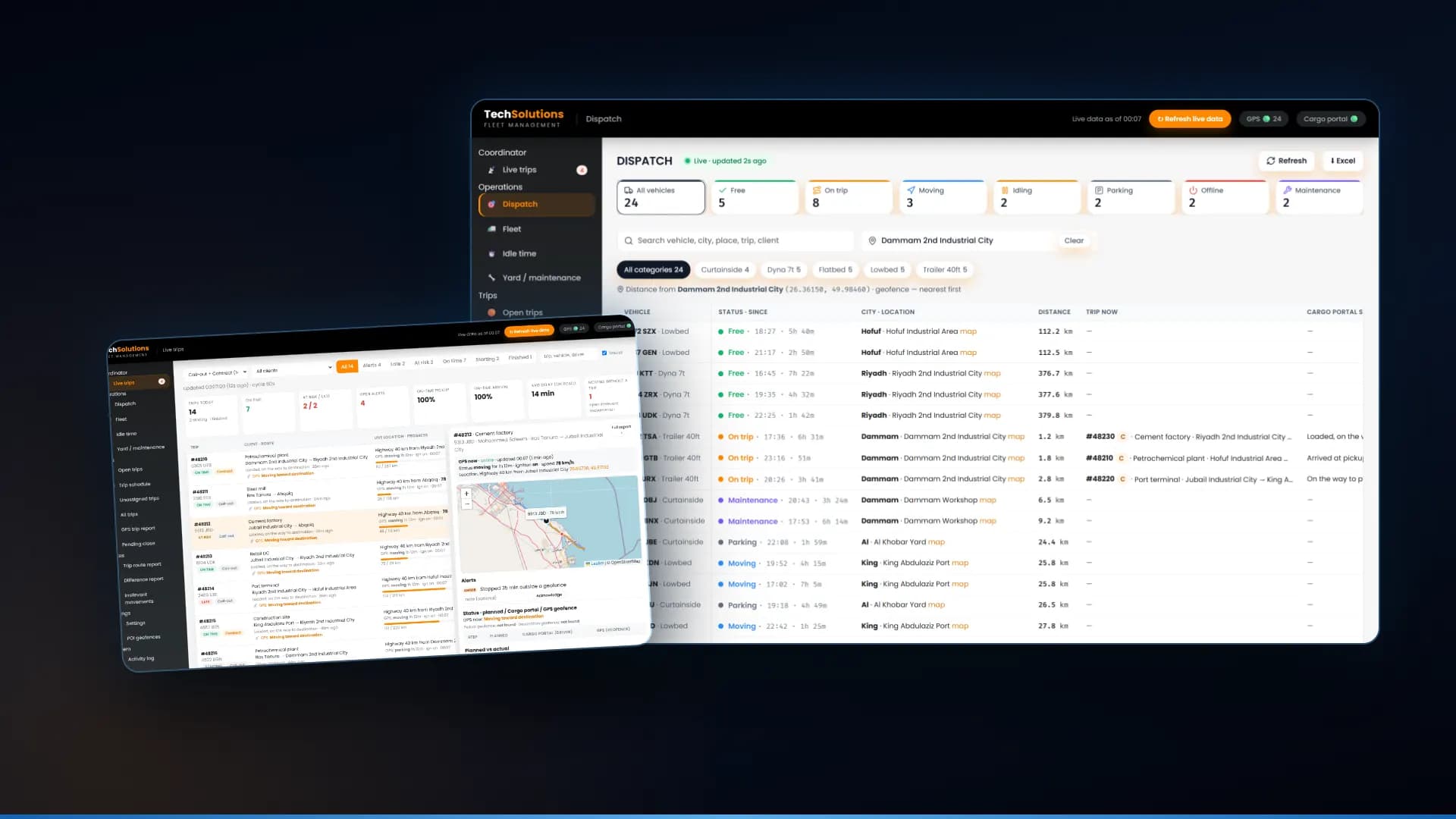
Our dispatch software ranks vehicles by distance to the pickup, free ones first. We cover the details in our guide to dispatch software for small trucking companies.
2. Monitor while it runs
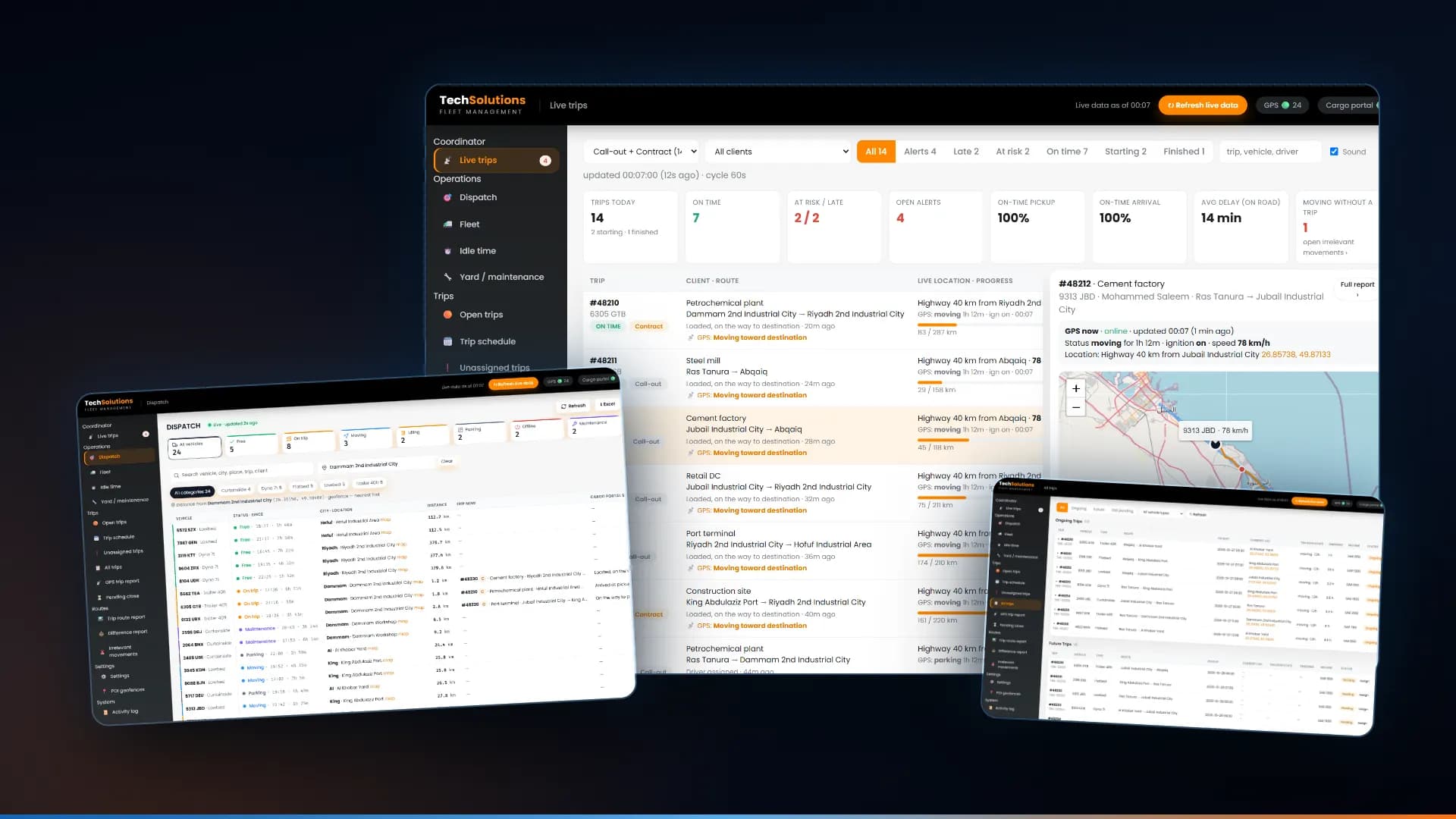
This is where a journey management system earns its keep. One screen shows every trip on the road: on time, at risk or late, how far along each one is, and the open alerts.
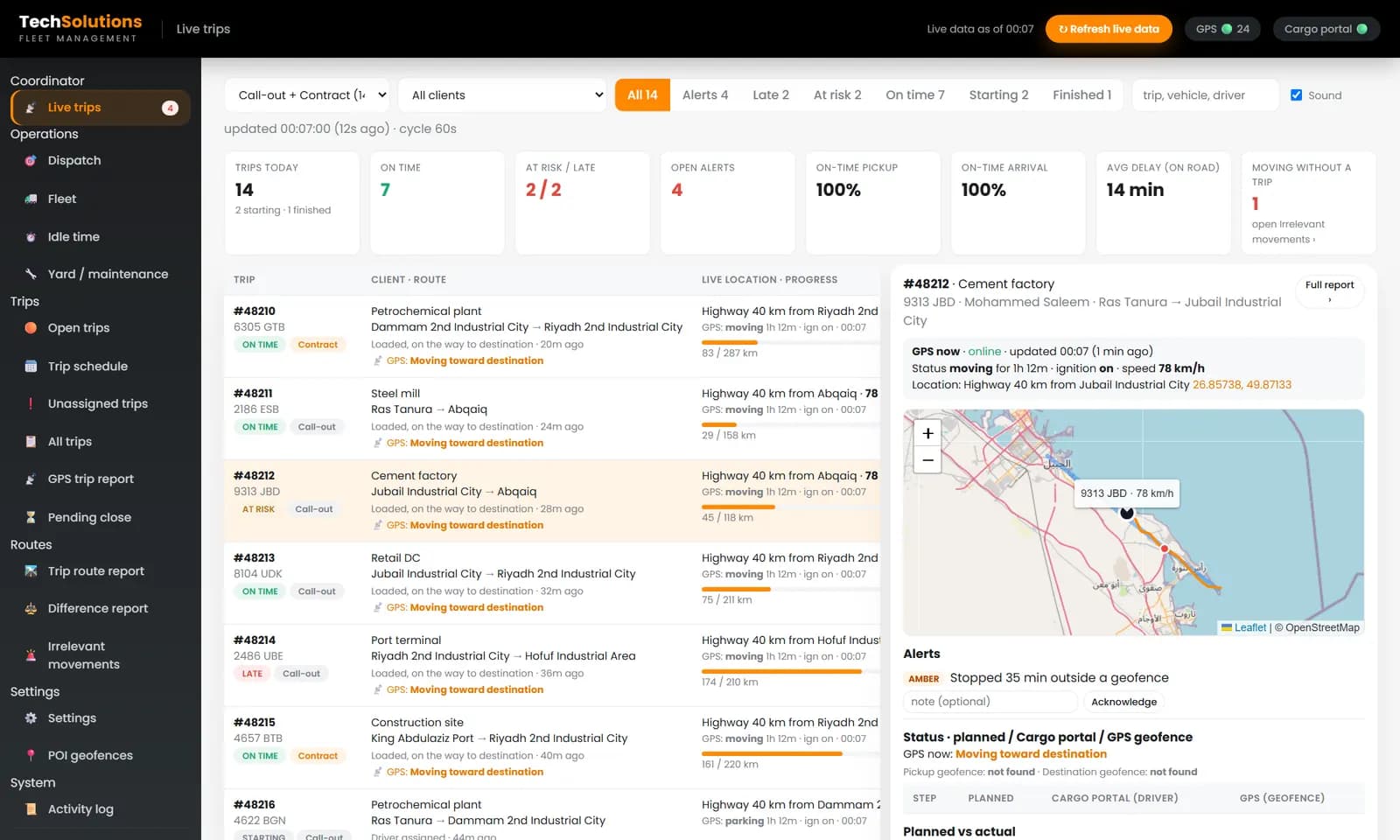
In the screen above, a coordinator sees 14 trips today, 7 on time, 2 at risk or late and 4 open alerts. The selected trip shows the vehicle's speed and ignition from GPS, its position on a map, and an alert: *stopped 35 minutes outside a geofence*. The coordinator can acknowledge the alert and leave a note, so the next person knows it was handled.
The alerts that matter for a small fleet:
- Late or at risk. Compares progress with the schedule, so you act before the client calls.
- Long stop outside a geofence. A stop at a known yard is normal; the same stop on a highway is not.
- Moving without a trip. A vehicle driving with no assignment is either unrecorded work or something you should know about.
- Pending close. A finished trip that is still open.
3. Close out with a record
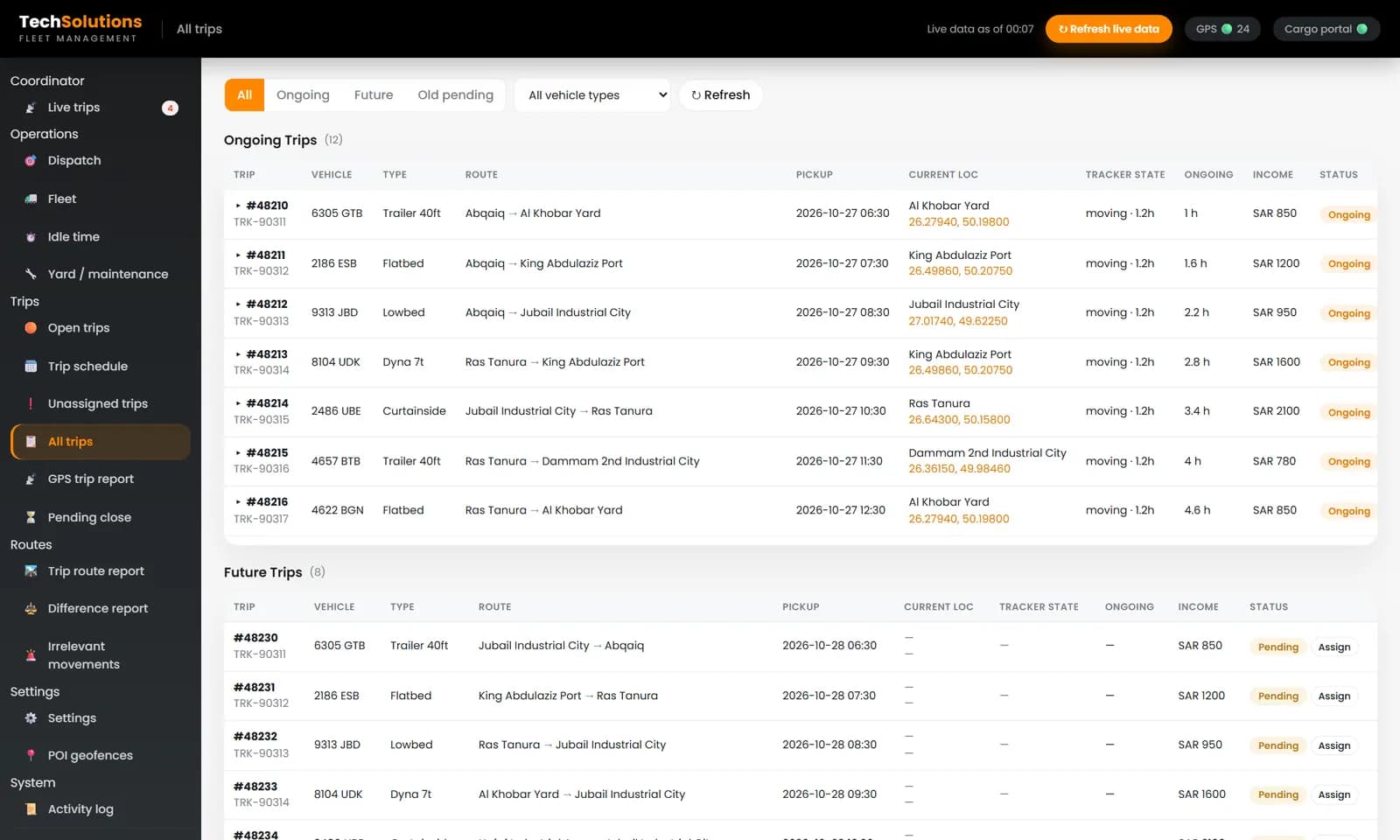
When the vehicle arrives, the trip should be closed with planned and actual times side by side: what the schedule said, what the driver reported and what the GPS recorded. That comparison is what turns trips into reports: on-time pickup and arrival rates, average delay, and a clear view of which clients and routes run late.
Journey management vs GPS tracking vs fleet management
| | GPS tracking | Journey management | Fleet management | |---|---|---|---| | Question it answers | Where is the vehicle? | Is this trip going to plan? | What does each vehicle cost to run? | | Knows the plan | No | Yes | Partly | | Typical alert | Speeding, offline | Late, long stop, no trip | Service overdue | | Best for | A map and history | Coordinators running scheduled trips | Maintenance, parts and costs |
They work best together. Our fleet management software page explains how maintenance and dispatch share one vehicle list, so a truck that is due for service is not sent on a long trip. For the tracking layer, see vehicle tracking, and for the wider picture read fleet management software for small business.
What to ask before you buy
1. Does it read our existing GPS platform, or does it need new trackers? 2. Does it know the trip plan, not just the position? 3. Which alerts are built in, and can we change what counts as late? 4. Can a coordinator acknowledge an alert with a note, and is that kept? 5. Does a trip have a close-out step with planned against actual times? 6. Who owns the data, and can we export reports?
What we have and have not built
The system shown here is a live trips and dispatch desk on top of a transport company's existing GPS platform. It covers trip status, alerts, geofences, planned-against-actual and close-out. We have not built driver fatigue rules or panic buttons into it. If your contracts need those, we would build them to your rules.
If you run scheduled trips and want to see how this would look on your fleet, tell us how many vehicles and trips you run and we will show you the live trips desk with your own routes.
*Screens are from the systems we built, shown with demonstration vehicles and trips. Third-party platform names are replaced with generic labels.*
Frequently asked questions
A journey management system is software and a process that plans each vehicle trip before it starts, monitors it while it runs and closes it out afterwards. It compares the planned route and times with what the vehicle actually did and flags differences.
GPS tracking shows where a vehicle is now. Journey management adds the plan: who is driving, where the trip should go, when it should arrive and what counts as late. That lets the system alert you when a trip is at risk, not just show a dot on a map.
Any business that runs vehicles on a schedule for clients: trucking and haulage, oil and gas contractors, security and cash-in-transit companies, and delivery fleets. It matters more as the number of trips a coordinator must watch at once grows.
At least four: a trip running late or at risk of being late, a vehicle stopped for too long outside a known location, a vehicle moving without an assigned trip, and a trip that has finished but has not been closed out.
Often yes. The system reads positions from your existing tracking platform and adds the trip plan on top, so you do not need to replace hardware. Check that the vendor can read your platform before you commit.
Yes. We built a live trips and dispatch system for a transport company in Saudi Arabia that reads their existing GPS platform, and we build similar systems for fleets in Saudi Arabia, the UAE, the UK and Pakistan.
Get new articles by email
How we build automation and software, with the lessons learned. One short email when a new article goes up. No spam.
- #Journey Management
- #Fleet Management
- #Dispatch
- #GPS Tracking
- #Logistics