
Key takeaways
- 1Dispatch software shows which trucks are free and where they are, helps pick the right truck for each trip, and follows every trip on the road.
- 2The most useful screen is a dispatch board that ranks trucks by status and distance to the pickup.
- 3A live trips desk with ETA, delay and alerts lets the dispatcher act before the customer calls.
- 4Idle time and utilisation per truck show whether the fleet is the right size, and which trucks earn their keep.
- 5If you already have GPS trackers and a trip or order system, custom dispatch software can join the two instead of adding a third system.
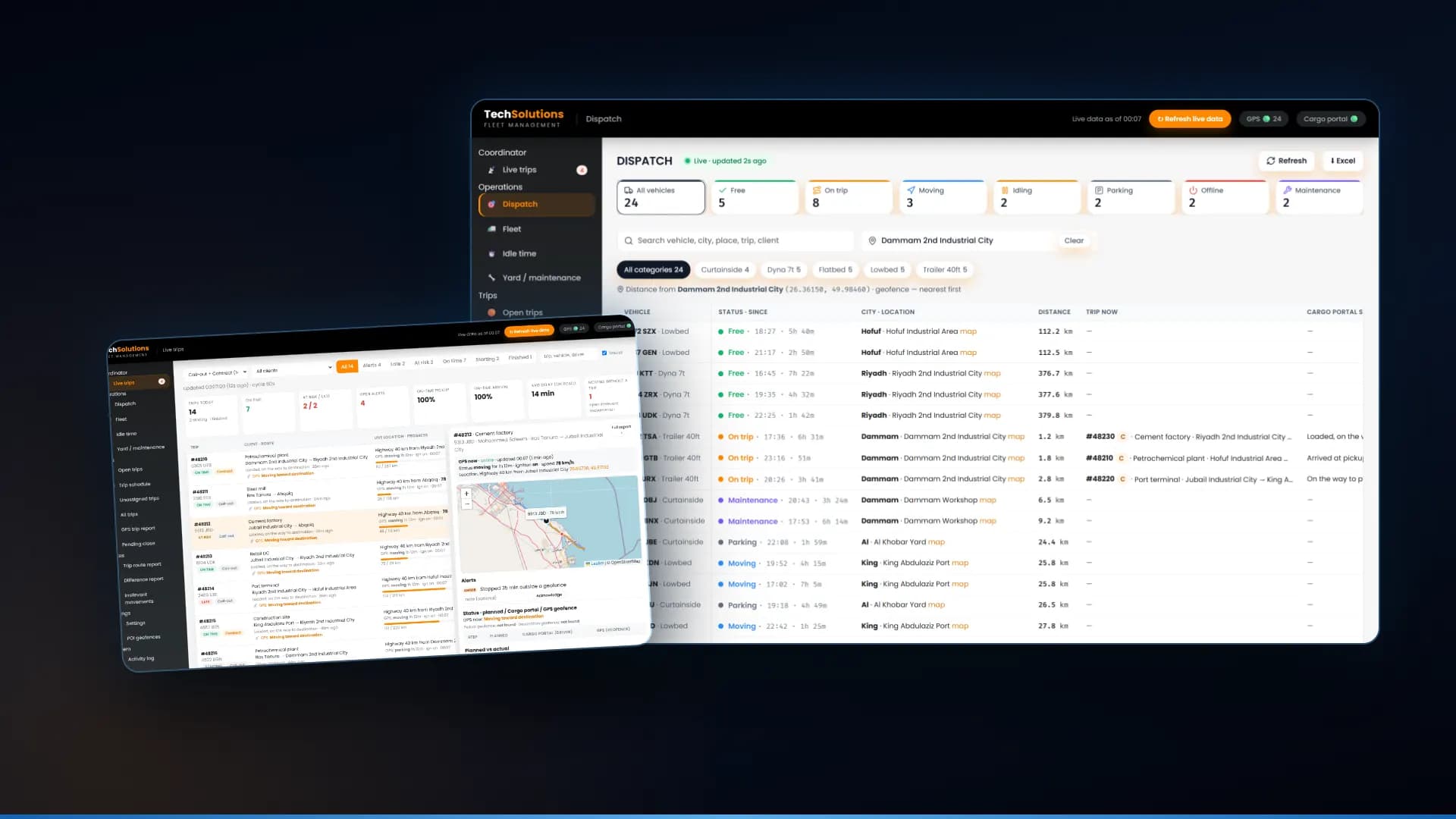
Dispatch software for a small trucking company shows which trucks are free and where they are, ranks the nearest free truck for each pickup, and follows every trip on the road with an ETA, a delay and alerts. Done well, it replaces the phone calls, WhatsApp messages and spreadsheets a dispatcher juggles today. Below are the 10 features that matter most, shown with screens from the dispatch system we built for a transport company in Saudi Arabia.
1. A dispatch board with every truck’s status
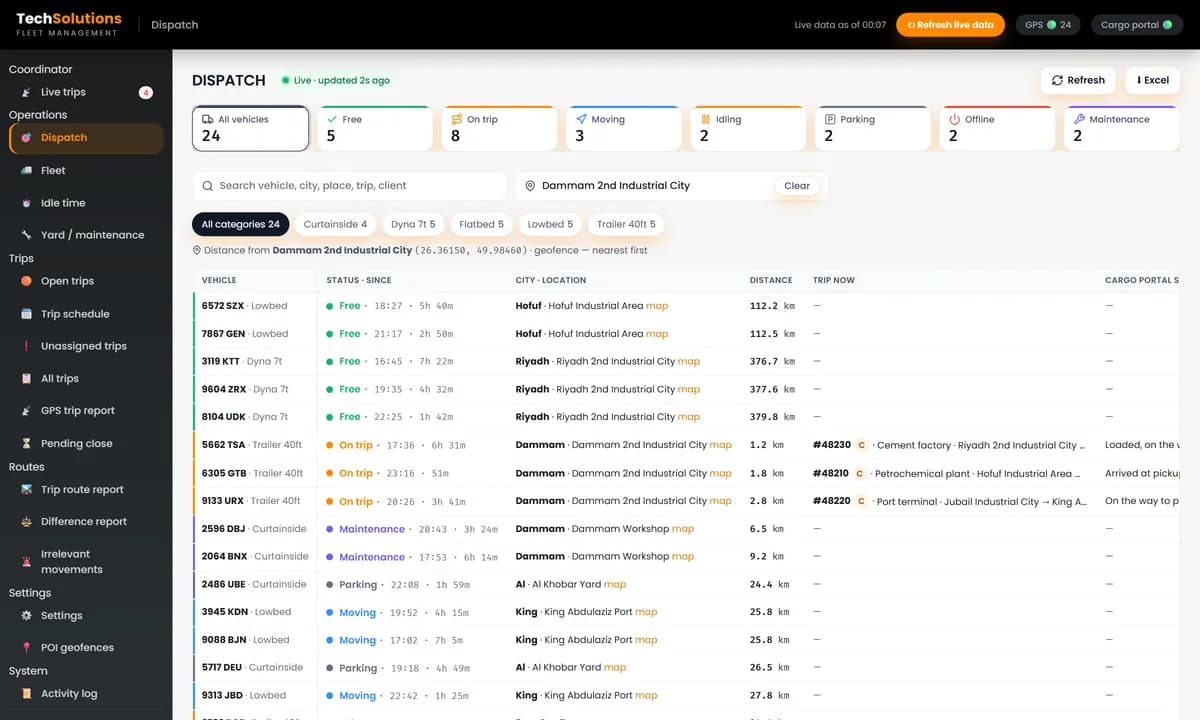
One screen should show every vehicle as free, on a trip, moving, idling, parked, offline or in maintenance, with how long it has been in that state. Counts at the top tell the dispatcher at a glance how many trucks can take work right now.
2. Nearest free truck first
Type the pickup, a customer site, a yard or a coordinate, and the board should sort trucks by distance, with free trucks first. This is the decision a dispatcher makes dozens of times a day, and the one that phone calls get wrong.
3. Assign once, in one place
Assigning a truck and driver to a trip should happen on the board and be written to your trip or order system, not typed twice. Our dispatch software writes the assignment back to the cargo portal the trips come from, once the dispatcher confirms it.
4. A live trips desk
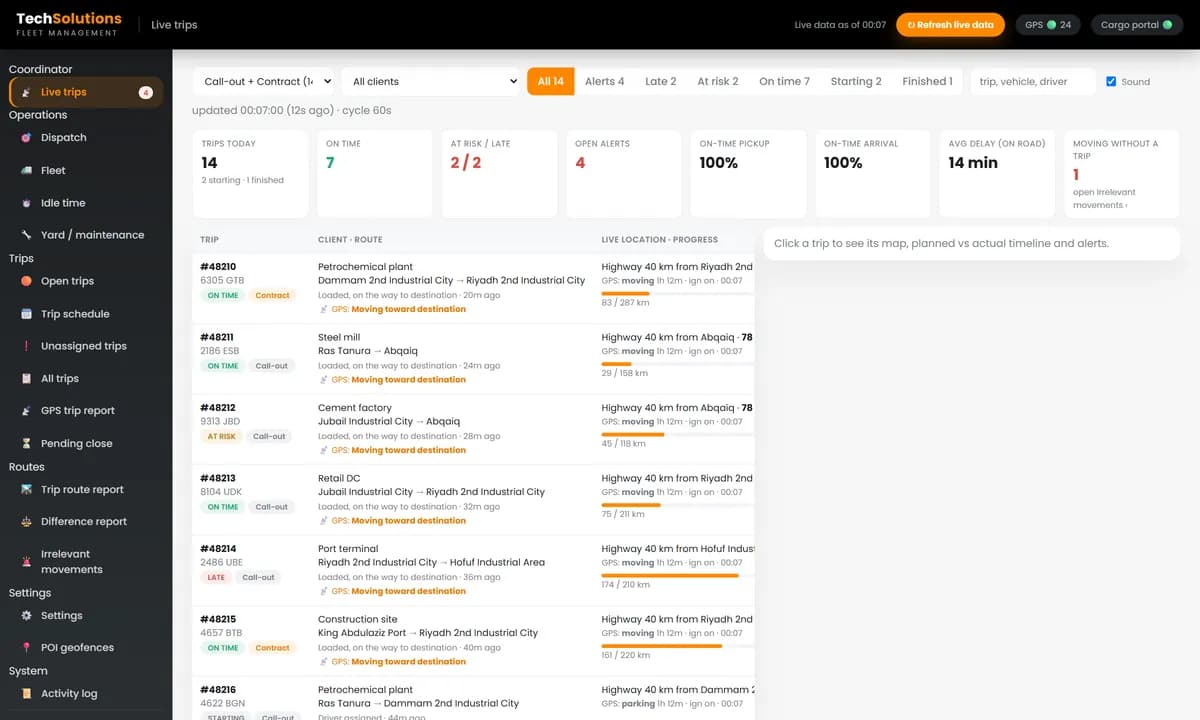
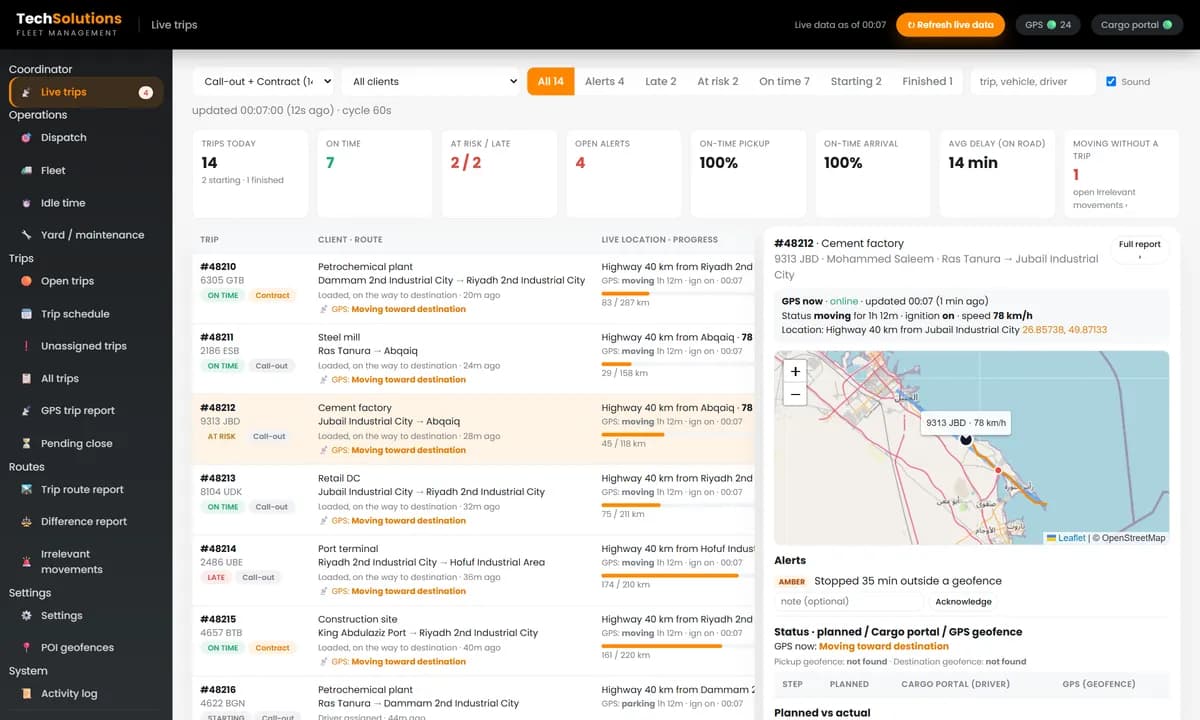
Every trip on the road, with client, route, live location, kilometres done against the total, ETA and delay. Filters for on time, at risk, late, starting and finished let the dispatcher work the problem trips first.
5. Planned against actual, on a map
Open a trip and see its planned times against the actual times from GPS, the driver’s status updates, and the expected route against the real GPS track. When a customer asks where their load is, the answer is on one screen.
6. Alerts that need an answer
The system should raise an alert when a trip is running late, when a truck stops too long outside a geofence, and when a truck moves without a trip. Each alert should be acknowledged with a note, so there is a record of what was done.
7. Trips with income
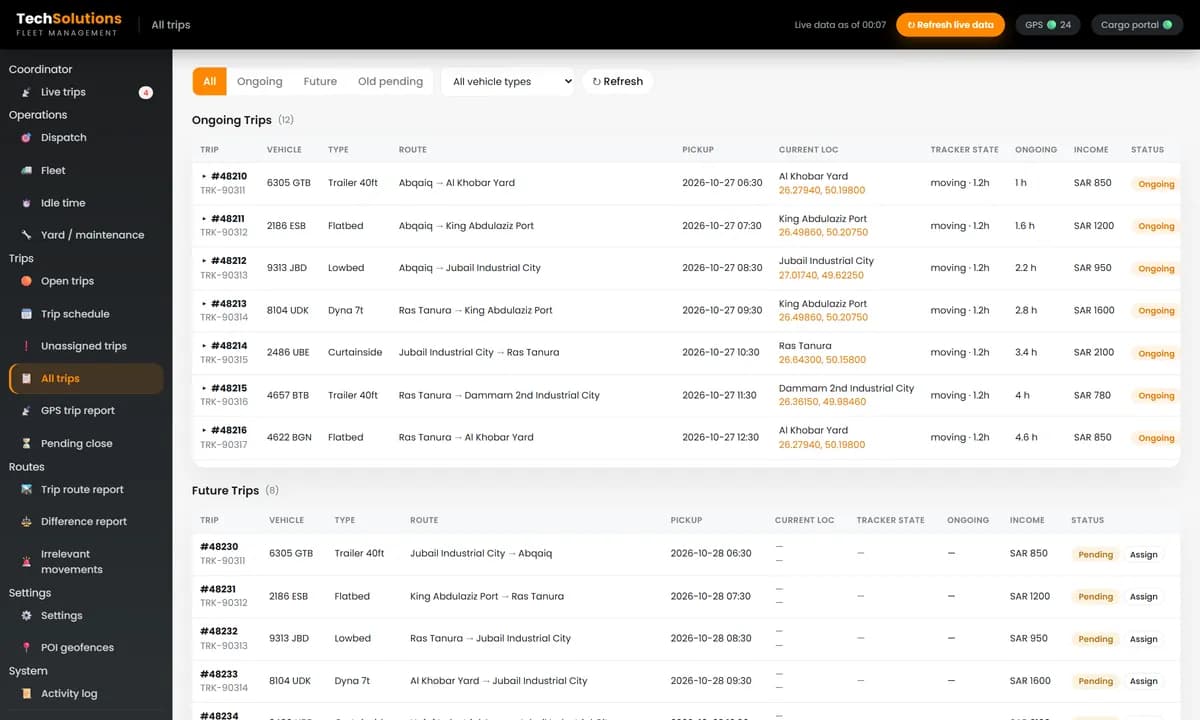
Ongoing, future and overdue trips in one report, with vehicle, type, route, pickup time, current location and income per trip, filtered by vehicle type.
8. Idle time and utilisation per truck
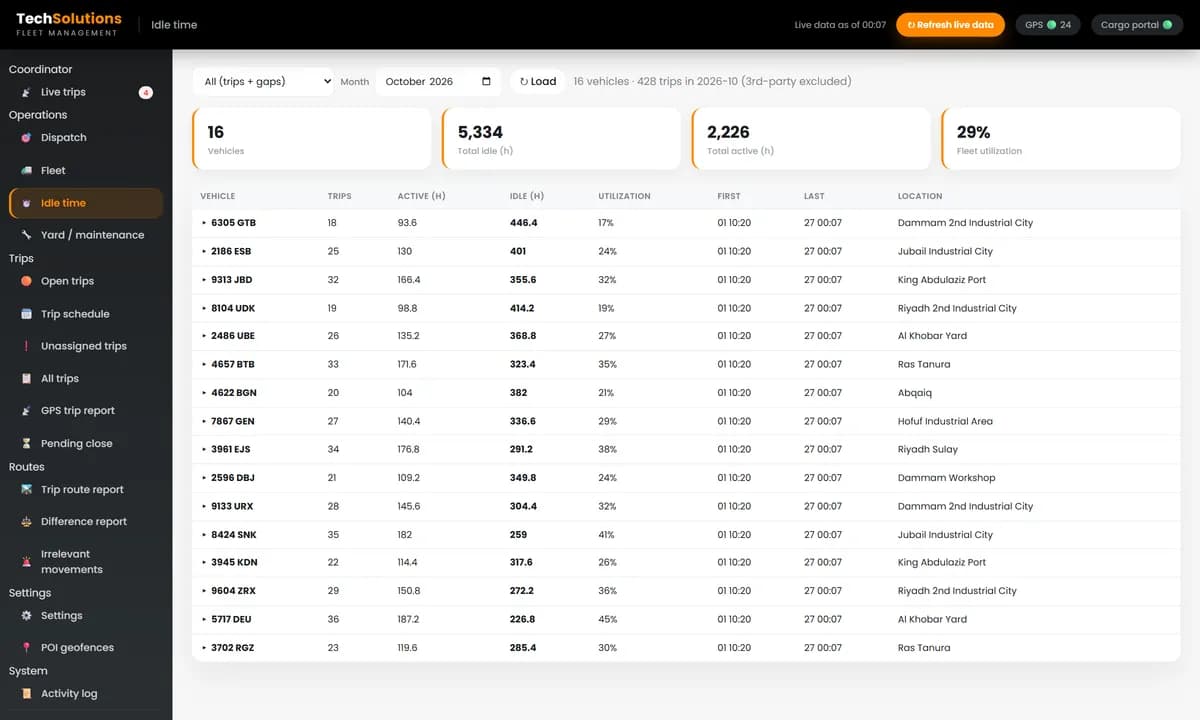
For each truck in a month: trips, active hours, idle hours between trips and utilisation. This is the report that tells you whether you need another truck, or whether the ones you have are standing still.
9. Claimed against GPS kilometres
A difference report compares the kilometres recorded for each trip with the kilometres the GPS actually drove. It catches detours and padded trip claims without anyone checking trips by hand.
10. Geofences and daily reports
Customer sites, yards and workshops should be geofences that stay in sync with your trip system, so arrivals are detected correctly. A daily email with offline trucks, unexplained movements and the trip report keeps managers informed without logging in.
Off-the-shelf or custom?
Off-the-shelf dispatch software is quick to start and charges per truck each month. It suits a fleet whose process matches the product. Custom software makes sense when you already pay for GPS tracking and a trip or order portal and want them joined in one screen, when your contracts need their own rules and reports, or when you want fuel data from a fuel monitoring system next to each trip. We describe how we automated dispatch and fuel expenses for one fleet in automating fleet dispatch and fuel expenses.
Questions to ask before you buy
1. Does it read our existing GPS trackers, or do we need new hardware? 2. Can it rank free trucks by distance to a pickup? 3. Does an assignment write back to our trip or order system? 4. Which alerts does it raise, and who acknowledges them? 5. Can it show idle time and utilisation per truck? 6. Who owns the data, and can we export it?
We build dispatch software for trucking companies in Saudi Arabia, the UAE, the UK and Pakistan, on top of the GPS platform you already use. Tell us how many trucks you dispatch and we will show you the board with your own fleet.
*Screens are from the dispatch system we built, shown with demonstration trucks and trips. Third-party platform names are replaced with generic labels.*
Frequently asked questions
It shows every truck’s status and location, ranks the free trucks nearest to a pickup, records which truck and driver take each trip, and follows trips on the road with ETAs, delays and alerts. Reports then show income per trip and idle time per truck.
Once a fleet is too big to keep in one dispatcher’s head, phone calls and spreadsheets start costing empty kilometres, late deliveries and idle trucks. Dispatch software puts all of it on one screen.
Not usually. Good dispatch software reads live location, ignition and speed from the tracking platform your trucks already report to.
Off-the-shelf software is quick to start and charges per truck each month. Custom software fits better when you already have GPS trackers and a trip or order portal and want them joined, or when your rules, reports and alerts are specific to your contracts.
Add up the hours each truck spends on trips in a month and compare them with the hours it sits idle between trips. Dispatch software can calculate this per truck from trip records and GPS data.
Get new articles by email
How we build automation and software, with the lessons learned. One short email when a new article goes up. No spam.
- #Dispatch Software
- #Trucking
- #Fleet Management
- #Logistics
- #GPS Tracking