

Key takeaways
- 1Inventory management software keeps one trusted number for how much of each item you have, and updates it automatically as you buy, sell, use and count stock.
- 2The money is saved in three places: fewer stockouts, less dead and expired stock, and counts that match the shelf, so you stop guessing.
- 3The features that matter most are real-time stock levels, reorder points, purchase orders, batch and expiry tracking, multi-location support and a stock count or variance report.
- 4You have usually outgrown a spreadsheet when more than one person updates stock, when you run more than one location, or when a count never matches the sheet.
- 5The choice is not only which software, but how it runs: a ready product in the cloud, a hybrid setup, or on your own servers, and whether it fits how you already work.
Inventory management software keeps one trusted number for how much of each item you have, and updates it as you buy, sell, use and count stock. Done well, it saves money in three places: fewer stockouts, less dead and expired stock, and counts that actually match the shelf. This guide explains what it does, the features that matter, and the signs your business has outgrown a spreadsheet.
What inventory management software actually does
A spreadsheet records what you *think* you have. Inventory software keeps what you *actually* have, by connecting the four events that change stock:
- Buying: a purchase arrives and stock goes up.
- Selling or using: a sale or a job consumes stock and it goes down.
- Moving: stock shifts between a shop, a warehouse or a vehicle.
- Counting: a physical count corrects the record to match reality.
When those four are in one system, the number on the screen is the number on the shelf. When they live in separate places, someone reconciles them by hand, late, and the gap is where money leaks.
The three ways it saves money
- 1Fewer stockouts. Reorder points warn you before an item runs out, so you do not lose a sale or stop a job while you wait for a part.
- 2Less dead and expired stock. Expiry and slow-mover reports show what is about to be written off while there is still time to use or discount it.
- 3Counts that match. A stock count and a variance report show the difference between the system and the shelf, so shrinkage, miscounts and theft show up as numbers instead of surprises.
The features that matter
Not every business needs every feature. These are the ones worth checking for:
| Feature | Why it matters |
|---|---|
| Real-time stock levels | The number is current, not yesterday's |
| Reorder points and low-stock alerts | You restock before you run out, not after |
| Purchase orders | From requisition to approved to received, with a cost trail |
| Batch and expiry tracking | Essential for food, pharmacy and chemicals |
| Multi-location and warehouses | Stock per site, with a head-office view across all |
| Barcode support | Faster, more accurate receiving and counting |
| Stock count and variance report | The system is checked against the shelf |
| Valuation | What your stock is worth, for accounts and insurance |
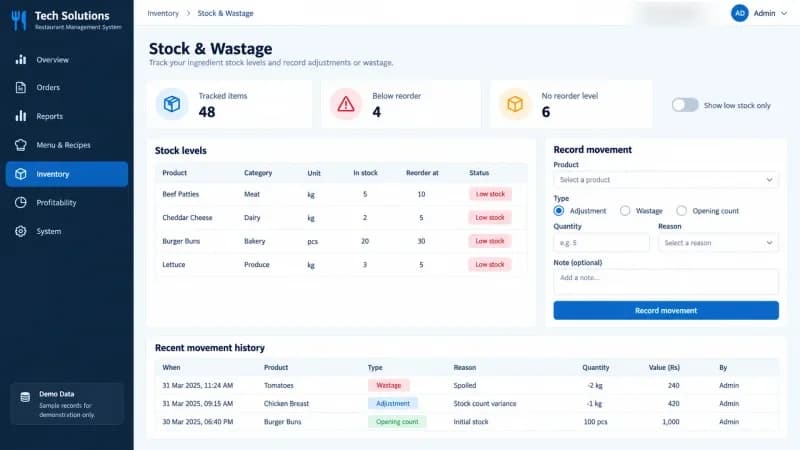
Here is a stock screen from our own restaurant system, with demonstration data. It tracks each item's in-stock level and reorder point, flags what is below reorder, and logs every movement:
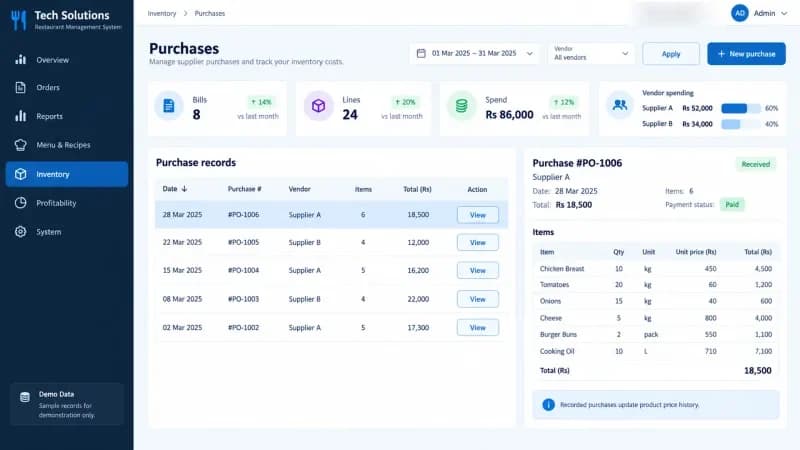
Purchases update the same record and keep a cost trail, so stock value and vendor spend are not a separate spreadsheet:
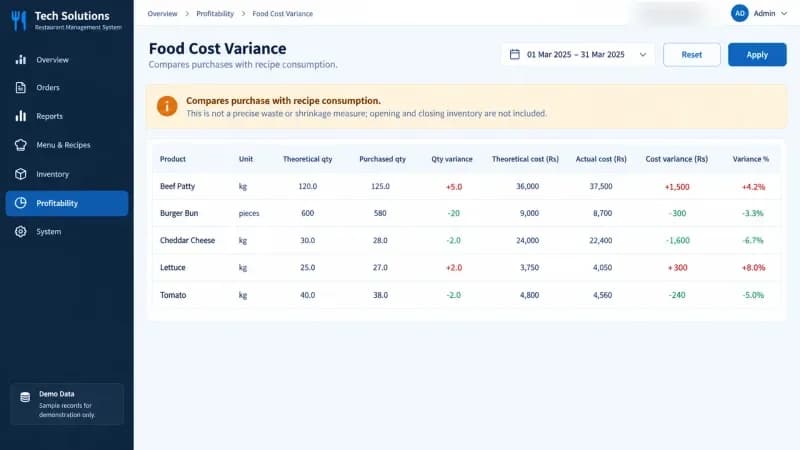
A variance report compares what you bought with what was actually used, so the gap between the system and the shelf is visible instead of hidden:
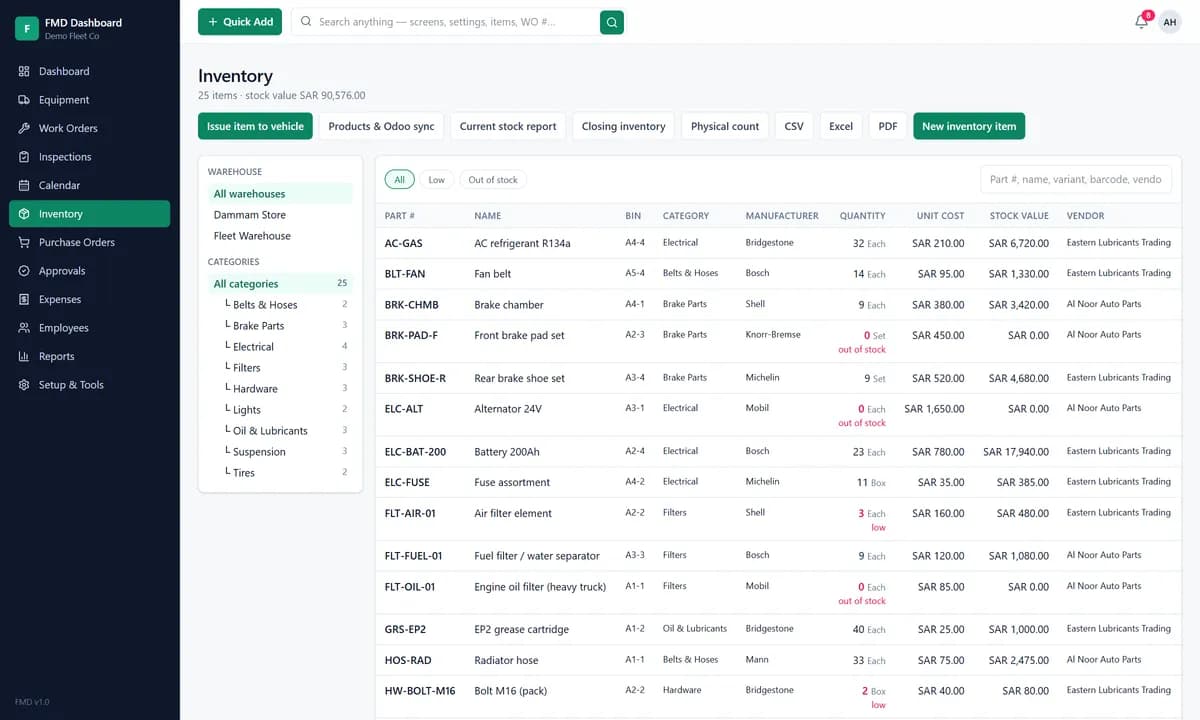
The same ideas apply well beyond food. This is a spare-parts inventory from our fleet maintenance system, with parts held in warehouses, unit cost, stock value and low-stock flags:
Signs you have outgrown a spreadsheet
A spreadsheet is a fine place to start. You have usually outgrown it when:
- More than one person updates stock. Two people editing one sheet means two versions of the truth.
- You run more than one location. A sheet per shop that never adds up is a daily argument.
- A count never matches the sheet. If every stock take finds surprises, the record is not trusted.
- You hold perishables or batches. Expiry and batch numbers are painful to track by hand and expensive to get wrong.
- Stock is tied to sales or jobs. When a sale or a repair should change stock automatically, manual updates fall behind.
If two or more of these are true, the software usually pays for itself in the stock you stop losing.
Inventory on its own, or part of something bigger
Inventory rarely lives alone. It connects to:
- Point of sale, so a sale deducts stock as it happens. See our guide to what a POS system costs in Pakistan.
- Purchasing and accounting, so buying stock and paying for it are the same record. Our explainer on how an ERP system works covers this.
- Maintenance, where parts consumption is tied to work orders, as in our fleet maintenance and inventory system.
The deciding question is not which product has the longest feature list. It is whether stock is one shared record across buying, selling and counting, or a separate spreadsheet someone updates later.
Cloud, hybrid or in-house
There is a second choice beyond features: where the software runs.
- Cloud: we host it, you pay a monthly plan, and you reach it from anywhere.
- Hybrid: part on your servers, part in the cloud, for example data on site and reports online.
- In-house: it runs entirely on your own servers, under your control.
The right one depends on your internet reliability, your data rules and your budget. Ask any vendor for all three and the terms of each in writing.
How we can help
We build and set up inventory management software that fits how you already work, as part of a POS, an ERP or on its own, with the stock, purchasing and variance screens shown above. It runs in the cloud, hybrid or on your own servers, and we adapt it rather than forcing your process to match the tool. For ready starting points, see our restaurant management system and fleet maintenance and inventory system. Tell us what you stock and how you count it today and we will say what we would set up first.
Frequently asked questions
It keeps a single, trusted record of how much of each item you have, where it is, and what it is worth. It updates that record as you receive purchases, sell or use items, move stock between locations and run counts, and it warns you before you run out or before stock expires.
When a spreadsheet stops keeping up: usually when more than one person updates stock, when you run more than one location or warehouse, when counts never match the sheet, or when you lose money to stockouts and expired or dead stock. For most small businesses that point arrives sooner than expected.
Real-time stock levels, reorder points with low-stock alerts, purchase orders from requisition to received, batch and expiry tracking if you hold perishables or medicines, multi-location and multi-warehouse support, barcode support, and a stock count and variance report so the system matches the shelf.
Often, yes. A good POS deducts stock as you sell, and an ERP ties inventory to purchasing, accounting and sales. The important thing is that stock is one shared record, not a separate spreadsheet that someone updates later. Standalone inventory tools suit businesses that do not need a full ERP.
Yes. It can run in the cloud, in a hybrid setup, or in-house on your own servers. Which suits you depends on your data rules, your internet reliability and your budget. Ask any vendor for all three options and the terms of each in writing.
Get new articles by email
How we build automation and software, with the lessons learned. One short email when a new article goes up. No spam.
- #Inventory Management
- #Stock Control
- #Warehouse
- #POS Systems
- #ERP