
Key takeaways
- 1Fleet Maintenance Pro (by Innovative Maintenance Systems) sells both a Windows desktop version and a cloud version; aggregator listings put the cloud at roughly $35–95 per user per month and the desktop at a one-time ~$1,495–1,995, so pricing is the first thing to confirm with the vendor.
- 2The main reasons teams look for an alternative are moving off desktop-only software, per-user pricing that punishes growth, and wanting deeper parts and inventory control alongside maintenance.
- 3Compare on six things, not on a feature count: deployment (desktop, cloud or your own servers), pricing model (per user vs per asset vs flat), preventive maintenance scheduling, work orders with cost per vehicle, parts and inventory depth, and inspections.
- 4Common alternatives include Fleetio (fleet-native, maintenance depth), Whip Around (inspection and DVIR first), UpKeep (broad CMMS for vehicles and other equipment) and Simply Fleet, each strong at something different.
- 5Our Fleet Maintenance & Inventory Management System is a cloud, hybrid or in-house option priced to your fleet, with parts and consumption recorded against each vehicle and support included, and we adapt it to how your workshop actually runs.
If you are looking for a Fleet Maintenance Pro alternative in 2026, compare on six things, not on a feature list: deployment (desktop, cloud or your own servers), pricing model (per user, per asset or flat), preventive maintenance scheduling, work orders with cost per vehicle, parts and inventory depth, and inspections. The strongest options are Fleetio, Whip Around, UpKeep and Simply Fleet, each best at something different, plus our own Fleet Maintenance & Inventory Management System. This guide shows what each is good at and how to decide.
Every figure below comes from the vendor's own page or a software-aggregator listing, read in November 2026. Pricing on aggregator sites is inconsistent and changes often, so treat it as a guide to the ballpark, not the price you will pay. Always confirm the current figure with the vendor.
What Fleet Maintenance Pro is
Fleet Maintenance Pro is fleet and equipment maintenance software from Innovative Maintenance Systems (mtcpro.com). It tracks vehicle and equipment service history, schedules preventive maintenance, and manages work orders, parts inventory, fuel and costs. It comes in two forms:
- Desktop (Windows): editions listed by aggregators at a one-time price of roughly $1,495–1,995, installed on your own machines.
- Cloud (web): listed at roughly $35/user/month (Basic) to $95/user/month (Enterprise), with a mobile app for iOS and Android.
Those numbers are from Capterra and other listing sites and differ between them, so verify before buying.
Why teams look for an alternative
It is a capable product. The common reasons to shop around are practical, not a criticism:
- Desktop-only history. If you are on the desktop edition, only people at that machine (or a shared server) can use it. Teams increasingly want a browser and phone.
- Per-user pricing. At about $35–95 per user per month, cost climbs with every person you add. A busy workshop with many logins can get expensive.
- Parts and inventory depth. Maintenance and inventory often live in different tools. Teams want parts, consumption and the cost of each repair in one place.
- Fit to your workflow. A generic product rarely matches a specific repair process. Some teams want the system shaped to how they actually work.
The six things to compare
Ignore the feature-count race. These decide whether a tool fits:
- 1Deployment. Desktop, cloud, or your own servers? Cloud means any browser; your own servers may be a security requirement. Pick for your rules, not the brochure.
- 2Pricing model. Per user, per asset, or flat. Per-asset suits many light users; per-user suits few heavy users. Model matters more than the headline rate.
- 3Preventive maintenance. Can it schedule by distance and by date, warn you before a service is due, and flag overdue? That is the core job.
- 4Work orders and cost per vehicle. Does a repair land its parts, labour and downtime on that vehicle, so you can see which truck is expensive to keep?
- 5Parts and inventory. Stock with unit cost and value, low-stock flags, multiple warehouses, and items issued to a vehicle so consumption is tracked. Shallow inventory is where cheap tools fall down.
- 6Inspections. Daily checklists or driver DVIRs with pass/fail, so problems are caught before they become breakdowns.
The main alternatives in 2026
| Tool | Best at | Deployment | Pricing (listed, verify) |
|---|---|---|---|
| Fleet Maintenance Pro | Established maintenance tracking | Desktop + cloud | ~$35–95/user/mo cloud; ~$1,495–1,995 one-time desktop |
| Fleetio | Fleet-native maintenance depth, asset lifecycle | Cloud | Per asset, quote-based |
| Whip Around | Driver inspections and DVIR, compliance | Cloud | Free plan; paid from ~$5/asset/mo (annual) |
| UpKeep | Broad CMMS for vehicles and other equipment | Cloud | ~$30–40/vehicle/mo via reseller |
| Simply Fleet | Small-fleet simplicity | Cloud | Per vehicle, published tiers |
Notes, kept honest: Fleetio is the common all-round pick for maintenance depth and asset tracking, though one comparison rates its parts and inventory as limited. Whip Around is inspection-first and is often paired with a maintenance tool for compliance-heavy fleets. UpKeep is a general CMMS, useful if you also maintain non-vehicle equipment. Most of these comparisons are written by vendors, so read rankings as opinion, not independent testing.
Where our system fits
We build a Fleet Maintenance & Inventory Management System for companies that repair and maintain fleets and need to control the parts behind every job. The screens below are product screens with demonstration data, not a customer's records.
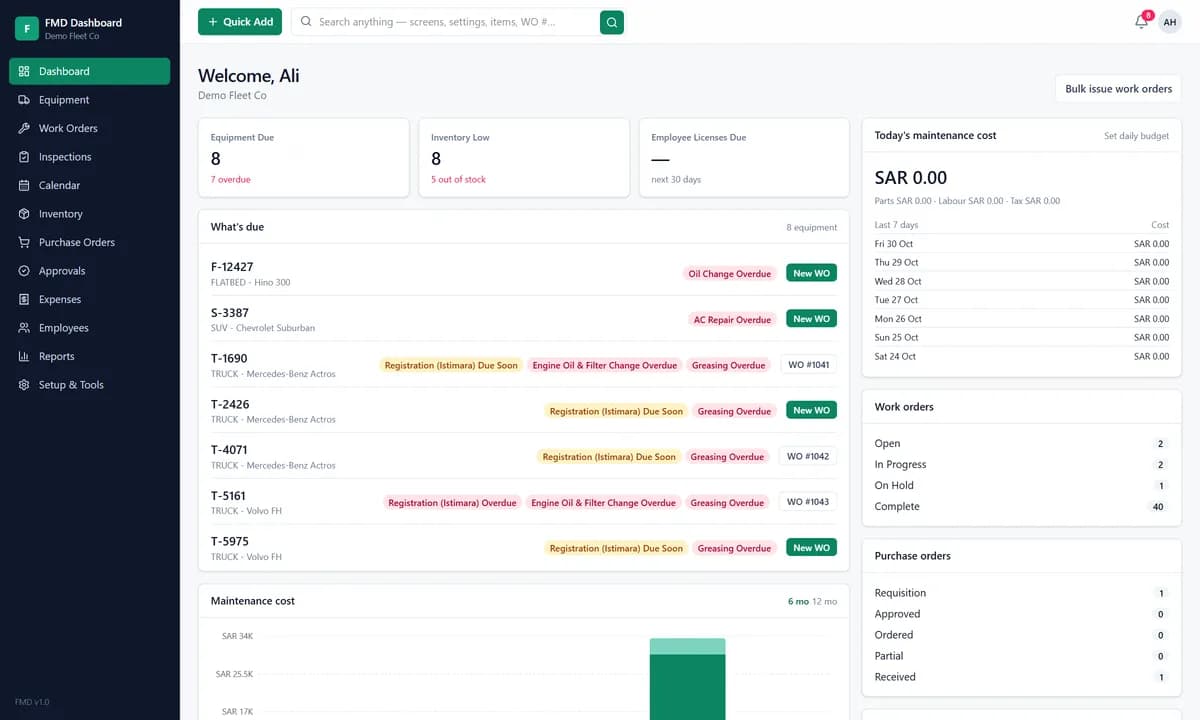
It is built around the six comparison points above:
- Deployment: our cloud, a hybrid setup, or in-house on your own servers.
- Pricing: a monthly subscription priced to your fleet and what you need, with support included and no one-time implementation fee on our cloud. We do not publish a per-user rate.
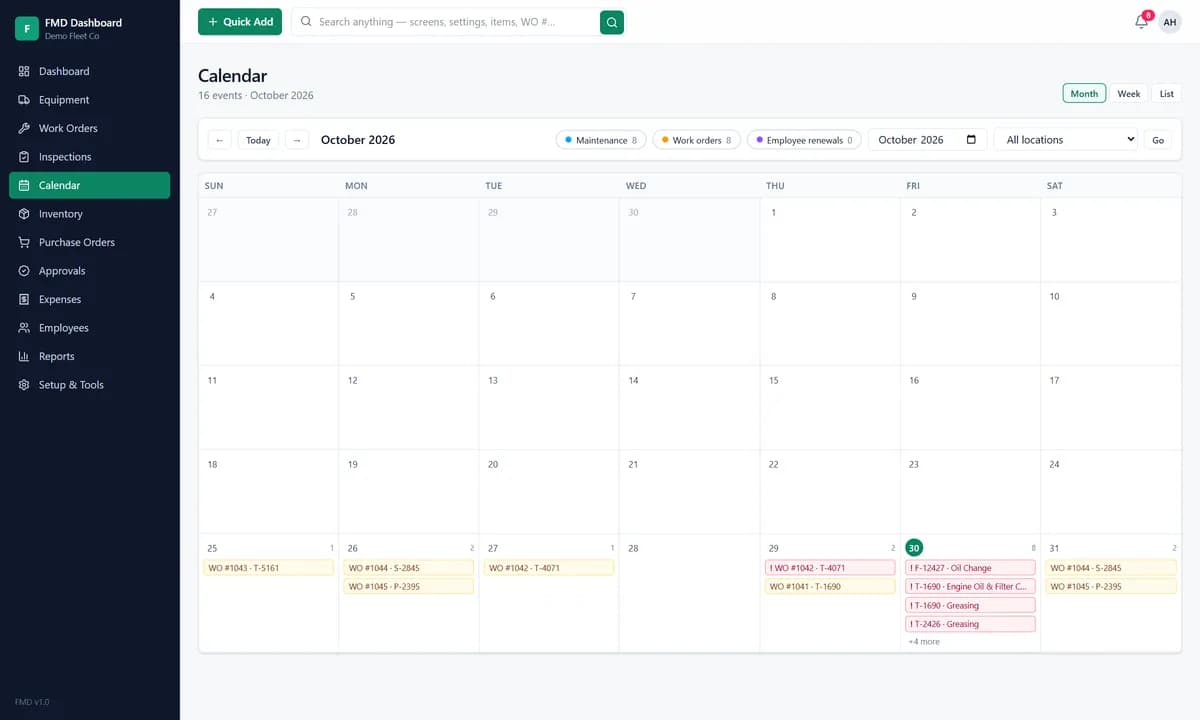
- Preventive maintenance: recurring tasks by kilometres, by dates or both, with advance notice and an overdue flag, plus registration and licence renewals as due dates.
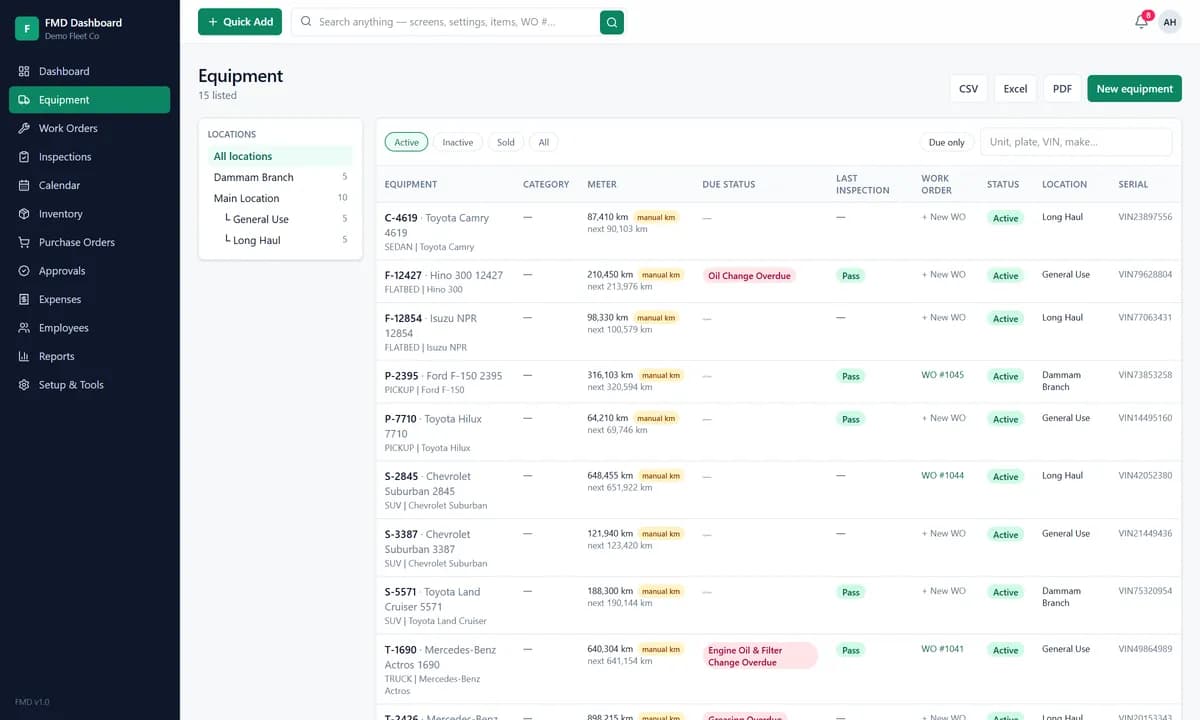
- Work orders: a fault becomes a job with an owner, a priority and a cost, and the parts, labour and downtime land on the right vehicle.
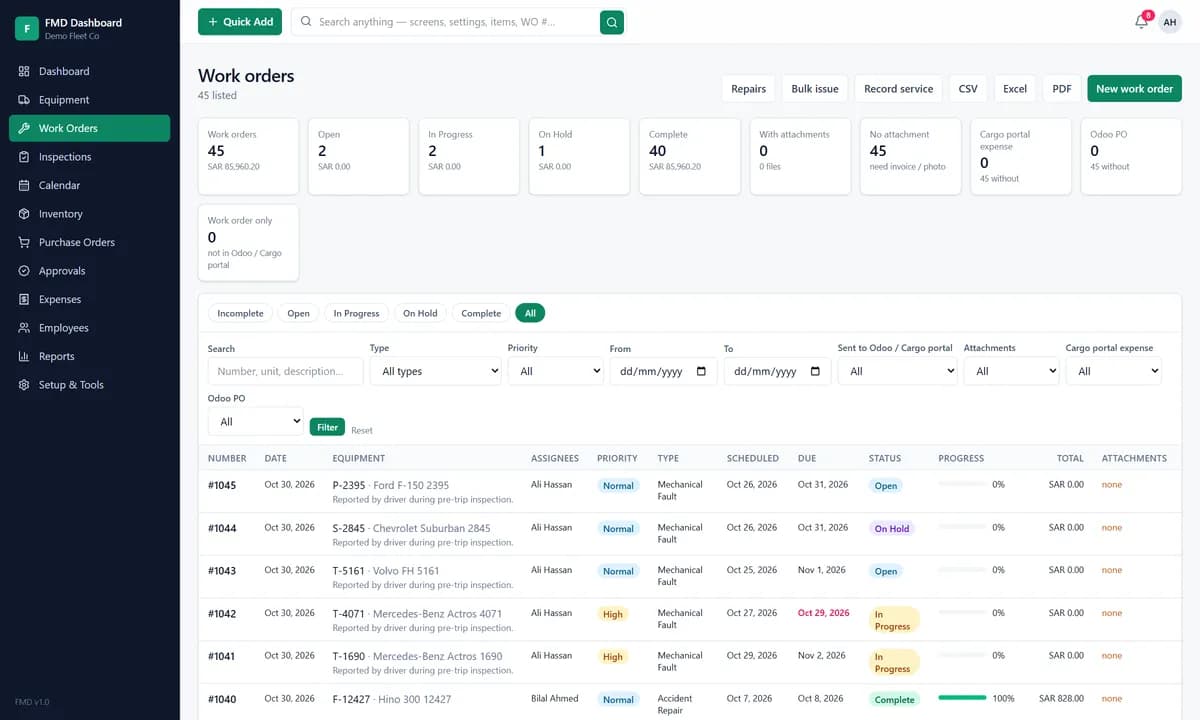
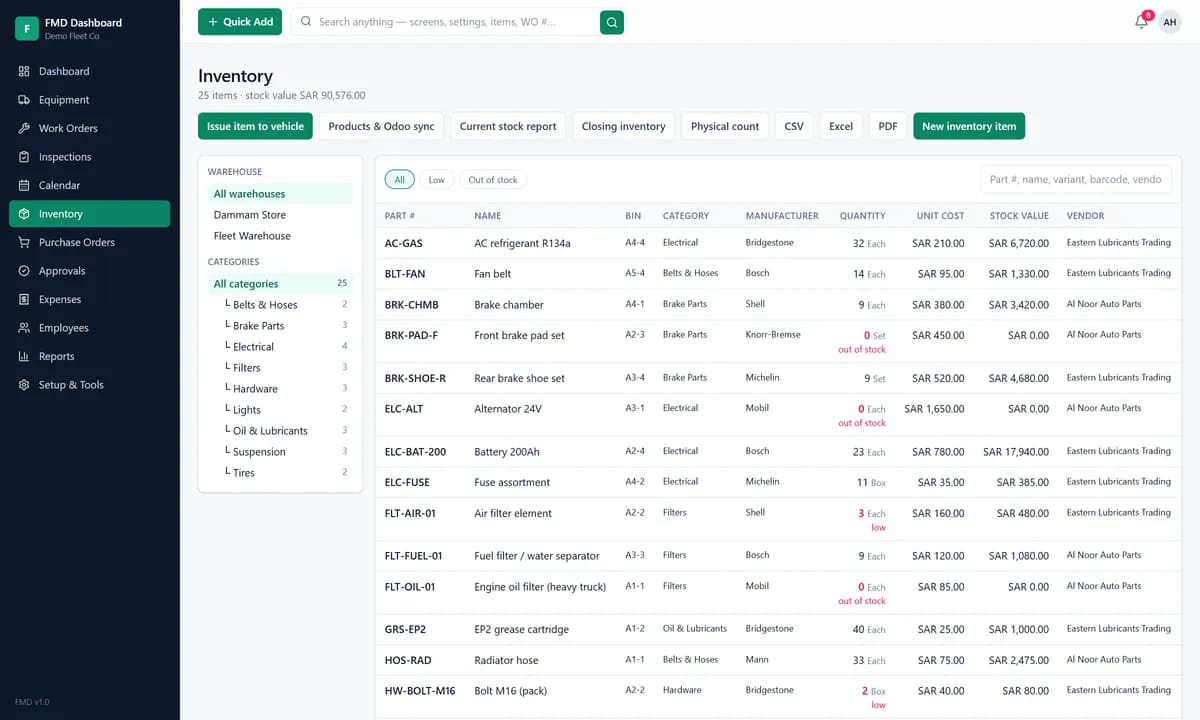
- Parts and inventory: parts with bin, category, quantity, unit cost and stock value across several warehouses, low-stock flags, and items issued to a vehicle so consumption is recorded against it, with physical counts and a closing inventory.
- Inspections and calendar: daily inspection checklists with pass and fail, and a calendar of every task and work order for the week ahead.
Support is available 24/7 and we commit to resolving issues within 24 hours. Basic customisation is included in the monthly plan; larger customisation is scoped and quoted. See the full Fleet Maintenance & Inventory Management System page.
How to choose
- 1Write down what it must do before you look at any tool: inspections and compliance, deep maintenance history, or maintenance plus tight parts control.
- 2Match the type to the job. Inspection-first (Whip Around), fleet-native CMMS (Fleetio), broad CMMS for mixed equipment (UpKeep), or a system shaped to your workflow with parts and consumption built in (ours).
- 3Check deployment and pricing model against your rules and your headcount, not just the monthly rate.
- 4Run a demo on your own vehicle list and a few real repairs. A tool that looks good on sample data can still miss your workflow.
If your fleet is more about tracking location and routes than repairs, our guides to vehicle tracking cost and fleet management software for small business are better starting points. For the repair-and-parts side, our fleet management software and vehicle tracking services, and inventory management, cover the pieces.
Want to see our system against your current one? Tell us your fleet and a few common repairs and we will show the schedule, the work order and the stock movement on one screen, and give the terms in writing so you can compare line by line.
Frequently asked questions
Fleet Maintenance Pro is fleet and equipment maintenance software from Innovative Maintenance Systems (mtcpro.com). It tracks service history, schedules preventive maintenance, and manages work orders, parts inventory and costs. It is offered as a Windows desktop product and as a cloud (web) version with a mobile app.
Software-aggregator listings in 2026 put the cloud version at roughly $35 per user per month (Basic) up to about $95 per user per month (Enterprise), and the desktop editions at a one-time ~$1,495–1,995. Prices differ between listing sites and change, so confirm the current figure and the exact edition with the vendor before you buy.
The usual reasons are: wanting to move off desktop-only software to something the whole team can reach from a browser or phone; per-user pricing that gets expensive as the team grows; and needing deeper parts and inventory control, or a system shaped to a specific repair workflow rather than a generic one.
Fleetio is the common fleet-native pick for maintenance depth and asset tracking; Whip Around is inspection and DVIR first; UpKeep is a broad CMMS that also covers non-vehicle equipment; Simply Fleet and Oxmaint are other options. Our own Fleet Maintenance & Inventory Management System is an alternative when you want parts and consumption tied to each vehicle and the system adapted to your workflow.
Decide what the software must do first: if it is driver inspections and compliance, an inspection-first tool fits; if it is deep maintenance history and asset lifecycle, a fleet-native CMMS fits; if you also maintain non-vehicle equipment, a broad CMMS fits. Then compare deployment, pricing model and parts control, and run a demo on your own vehicle list before committing.
Get new articles by email
How we build automation and software, with the lessons learned. One short email when a new article goes up. No spam.
- #Fleet Maintenance
- #Fleet Management
- #CMMS
- #Maintenance Software
- #Inventory
- #Software Comparison