
Key takeaways
- 1A bouquet is not a stock item. We modelled each arrangement as a recipe of stems and materials, so every sale moves stock stem by stem.
- 2Each stem has a minimum sell price. The bouquet’s floor is the sum of its stems, and both the till and the server refuse a price below it.
- 3Closing inventory records wastage per product, and the profit and loss values that wastage at the latest purchase cost, so dead flowers show up as money.
- 4Part payments become customer credit tied to a phone number, and the day close counts credit received alongside cash sales and the opening float.
- 5Pre-orders for weddings and occasions are grouped by delivery date, with the outstanding balance shown on every order.
Good flower shop POS software has to price a bouquet from the stems inside it, not as a fixed product, and it has to stop the cashier selling below what those stems are worth. That is the core of the system we built for a flower shop in Pakistan: every arrangement carries a recipe of stems and materials, each stem has a minimum sell price, and the till will not accept a bouquet price below the sum. Stock, wastage, credit and the day close all come out of the same records.
The problem
A bouquet is not a stock item. It is a dozen roses, some filler, wrapping and a ribbon, and the mix changes from order to order. Off-the-shelf POS software expects a barcode and a fixed price, so the shop could not price arrangements from their stems, could not see which flowers were actually used, and could not say what was thrown away at the end of the day.
The trade has other habits a generic till ignores. Customers book flowers days ahead for weddings and birthdays. Regular customers pay part now and the rest later. Deliveries go out with a rider and a delivery charge. And at the end of the day, the cash in the drawer has to match what the system says it should be.
How do you price a bouquet made of stems?
Products are stems, items are arrangements
We split the catalogue into two layers. Products are what the shop buys and counts: a rose, a lily, a filler, a roll of wrapping. Products can have sub-products, such as colour or stem length, and each one is marked purchase-only, sale-only or both, with a unit and a low-stock alert level.
Items are what the customer buys: a named arrangement with an optional photo and a recipe listing which products, which sub-products and how many of each. When the cashier picks an item, the recipe fills the line. The cashier can then add, remove or change stems before saving, because no two hand-tied bouquets are quite the same.
A minimum price the cashier cannot undercut
Every product has a minimum sell price per unit, set by the owner. A line’s floor is simple: for each stem on it, quantity times minimum price, all added together. The cashier types one sell price for the whole arrangement, and the screen shows the floor under the price box, turning red if the typed figure falls below it.
We did not trust the screen alone. When an order is saved, the server looks up each product’s minimum price again, recomputes the floor and refuses the order if any line is under it. It also refuses to sell anything marked purchase-only. A tired cashier, a stale browser tab or a quiet discount cannot slip a bouquet out below cost.
One price, split fairly across the stems
A single price per bouquet raises a reporting question: which stems earned the money? For the product sales report, we split each line’s price across its stems in proportion to their share of the line’s minimum value, falling back to an equal split if the minimum is zero. To make that stable, every saved line keeps a snapshot of each stem’s minimum price at the moment of sale. The report then shows, per product, the minimum value sold, the actual amount and the extra the shop earned above the floor.
How does the day close reconcile the drawer?
The day close works out what the drawer should hold: the opening float, plus cash sales actually paid, plus customer credit payments received that day, minus daily expenses paid in cash. Staff enter the counted cash, the system stores the expected figure, the count and the difference, along with notes and who closed the day. Voided orders are excluded from every total.
Voiding itself needs a reason, and a voided order stays in the records with that reason and a timestamp rather than disappearing. A day close can be saved again for the same date, and the latest figures replace the earlier ones.
Credit tied to a phone number
Customers are saved automatically by phone number as orders are taken. If the amount paid is less than the total, the remainder becomes credit, and the system insists on a phone number before it will record a part payment, because credit without a name to chase is just a loss. Each customer shows what they owe, what they have paid and every payment received. The dashboard shows total outstanding credit across the shop.
Pre-orders grouped by delivery date
Every order can carry a delivery date, an order type, a rider and delivery charges. The pre-orders screen lists everything not yet completed or voided from a chosen date onwards, grouped under each delivery date with a count, and shows the outstanding balance in amber on any order not fully paid. The dashboard counts deliveries due in the next three days. Customers can also store an occasion date, such as an anniversary, and a report lists those coming up.
What went wrong and how we fixed it
Our first version was a narrower tool. Items had no saved recipe, so every bouquet was built from scratch at the till. Orders could only be hard deleted, so a mistake left no trace. Every order was assumed to be paid in full, and there was no day close, no pre-order view and no held orders.
The second version added recipes, voiding with a reason, part payments, credit, the day close, staff PIN sign-in with roles, held orders and the pre-orders screen. The difficult part was the shop’s existing data. New columns were added to the existing tables in place, and each change is safe to run on a database that already has it. The trap was the paid amount: older orders had none, and a blank paid amount would have made every past sale look like money owed. We backfilled each older order as fully paid at sale time, which is what had actually happened, so the credit figures started from the truth.
Wastage needed a second look too. A closing count that silently absorbed dead flowers would make the shop look like it sold more than it did. The closing inventory screen now proposes a closing figure from opening stock, plus purchases, minus what the till sold, and staff record the real count, wastage and shop use separately. The consumption report then compares what the till says was used with what the stock count says was used, and shows the difference per product.
Lessons
- Model the trade, not the till. Once stems and arrangements were separate, pricing, stock and wastage all fell out of the same data.
- Enforce rules on the server. The red warning on screen helps the cashier; the server check is what protects the margin.
- Keep a snapshot of the price rules at sale time. Reports stay correct even after the owner changes a minimum price.
- Migrate with the facts. When a new field arrives, fill old rows with what really happened, not a blank.
- Make wastage visible. In the profit and loss it is valued at the latest purchase cost, so it reads as money rather than a count.
Checklist for businesses with the same problem
- Can your till price a product made of other products, and move stock for each part?
- Is there a minimum price, and is it checked on the server as well as on screen?
- Does every part payment get tied to a customer you can contact?
- Can you see upcoming orders grouped by the day they are due?
- Does your day close include the opening float, cash sales and credit received against a counted figure?
- Do you record wastage separately from sales at closing stock?
- Are voided sales kept with a reason, rather than deleted?
See the full project
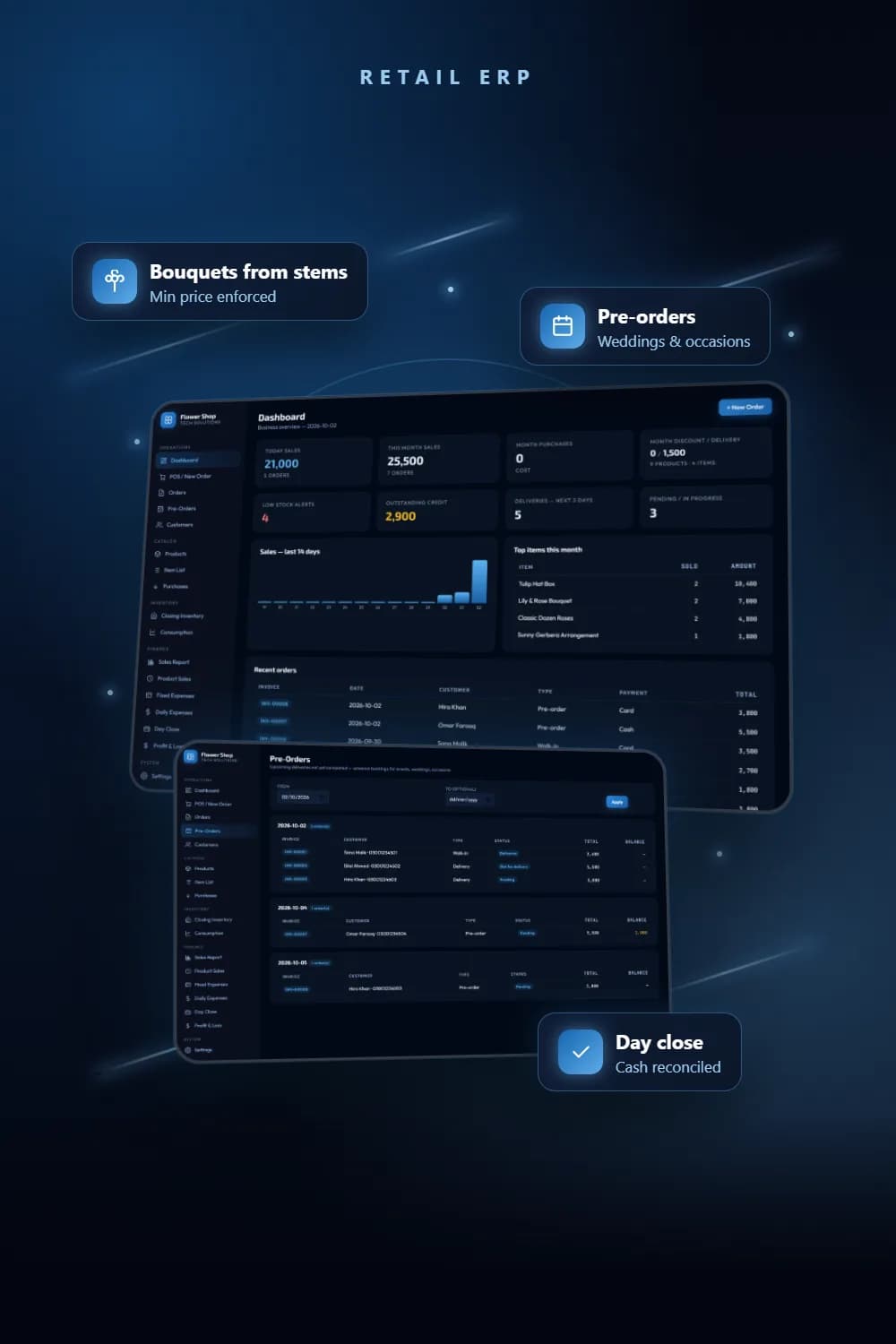
The full project shows the dashboard, the pre-orders screen, closing inventory with wastage and the profit and loss statement. We build POS systems, inventory management and custom software for retailers whose products do not fit a barcode. If your shop sells things made from other things, talk to us.
Frequently asked questions
It should sell arrangements built from stems. A bouquet needs a recipe of flowers, fillers and wrapping, so stock moves per stem, the price has a floor based on those stems, and wastage can be counted at the end of the day.
The owner sets a minimum sell price on each stem or material. The bouquet’s minimum is the quantity of each stem multiplied by its minimum price, added up. The cashier types one sell price, and any figure below that floor is rejected by the till and again by the server.
Yes. Picking an arrangement loads its saved recipe as a starting point, and the cashier can add, remove or change stems and quantities on that line. The minimum price recalculates as they edit.
At closing inventory. The screen proposes a closing count from opening stock plus purchases minus what the till sold, and staff enter the actual count, wastage and shop use per product. Wastage then appears in the profit and loss at the latest purchase cost.
No. It is a Node.js server with a SQLite database that runs on the shop PC and is used from a browser on that machine. It has no external package dependencies and starts from a single batch file.
See the full project
Services used in this project
Get new articles by email
How we build automation and software, with the lessons learned. One short email when a new article goes up. No spam.
- #POS systems
- #Retail software
- #Inventory management
- #Flower shop
- #Case study