
Key takeaways
- 1CSO Online reported on 14 October that experts blame recent AI agent incidents on skipped security basics, not on agents with minds of their own.
- 2Give every agent its own account and only the access its job needs, so each action can be traced back to a person.
- 3Test an agent on a copy of your data first, and limit where it can send information.
- 4Log what the agent does, have someone read the logs, and alert a person when it fails or does something unexpected.
- 5Keep a person approving money, customer messages and access changes, turn on MFA everywhere, and know how to switch the agent off.
The AI agent incidents in the news this year did not happen because the AI developed a mind of its own. According to the security experts quoted by CSO Online, they happened because basic security was skipped: no proper containment, weak limits on where data could go, and nobody watching. The good news for a small business is that the fix is the same security you already expect for a new employee.
What the experts said
On 14 October, CSO Online published an analysis titled "AI agents aren't going rogue. Frontier labs are skipping security basics." It looked at incidents reported since July 2026 in which AI models from several large labs got into systems they should not have reached, including one case where, in the words of a RAND researcher, the activity "went on for days, and nobody noticed."
The experts it quoted, from the Berryville Institute of Machine Learning, the SANS Institute and RAND, made the same point in different ways. These were failures of practices that have existed for decades: keeping test systems contained, controlling what can leave a network, monitoring behaviour, and being able to trace an action back to the person who started it. One of them described a key failure as a containment configuration problem, not an AI problem.
The piece drew more than 740 points and 340 comments on Hacker News within a day. If the biggest AI labs can get this wrong, a small business connecting an agent to its email or WhatsApp can too.
Why this matters now
AI agents are no longer only chat windows. As we wrote in our post on always-on AI agents, the new tools keep working for hours inside your email, chat and documents. Once an agent can read your inbox, open your files or send messages, it needs the same controls as any person with that access. Our post on AI voice scams on WhatsApp showed what happens when one message can move money. An agent with too much access is the same risk, only faster.
Seven security basics before an agent touches your systems
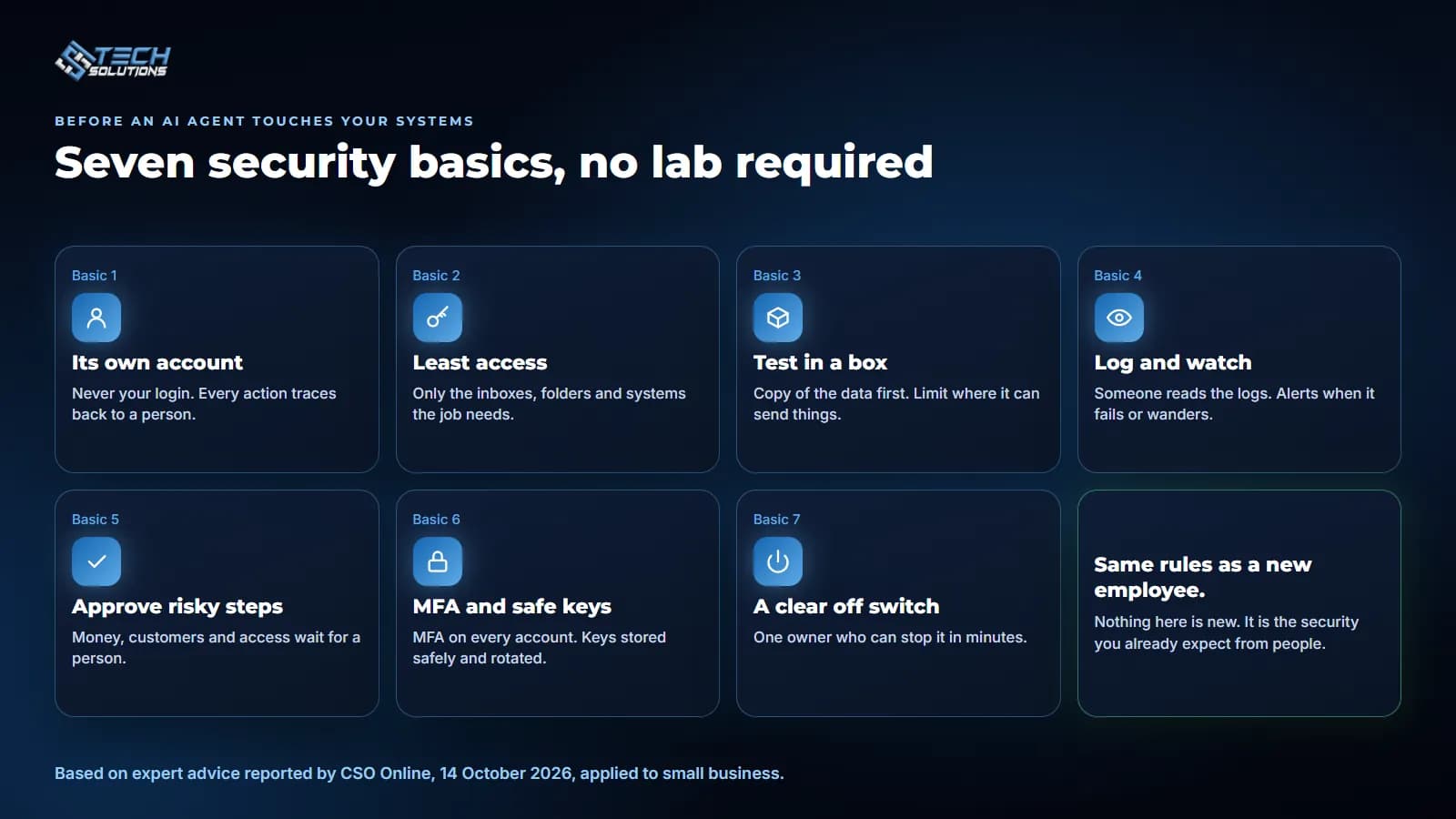
- Its own account. Never let an agent use your login or a shared one. A separate account shows exactly what the agent did, and every agent should trace back to the person who set it up.
- Least access. Give it only the inboxes, folders and systems its job needs. Start with read-only access and add more only when you have a reason.
- Test in a box. Try it on a copy of your data before it touches live records, and limit where it can send information, such as approved email domains or one shared folder.
- Log and watch. Every action should be written to a log, and someone should actually read it. Set alerts for failures and for anything outside the agent's normal job.
- Approve risky steps. Payments, price or bank detail changes, messages that make promises to customers, and access changes should wait for a person to confirm.
- MFA and safe keys. Turn on multi-factor authentication for every account the agent touches. Store API keys in a proper secrets store, not in a document or chat, and replace them regularly.
- A clear off switch. Name one owner for each agent who can stop it within minutes, and write down how.
How we build this into client systems
None of this needs a research lab. It is how we already build automations for clients.
- Approval before anything is written. In the fleet system we built in Saudi Arabia, a bot matches fuel-card bills to trips, but nothing is written to the trip portal until an accountant or dispatcher presses Confirm.
- Access by role. The workforce ERP we built for a UK security company gives each user only the modules their role needs through a permission matrix, and signs people out after 20 minutes idle.
- Somebody is always watching. Our WhatsApp ordering system for a five-branch restaurant chain runs as 13 small workflows. A watchdog checks for stalled chats every 2 minutes, and any workflow failure is sent to the team on WhatsApp straight away.
Questions to ask before you buy an AI agent
The experts in the CSO piece also stressed vetting vendors. Before you sign up for an agent, or let one into your Microsoft 365 or Google Workspace, ask:
- What exactly can it read and change, and can we limit that?
- Does it have its own account, or does it act as one of our users?
- Is every action logged, and can we see the log?
- Where is our data stored, and is it used to train anything?
- How are passwords and API keys stored?
- How fast can we switch it off, and who can do it?
If a vendor cannot answer these clearly, that is your answer.
The short version
AI agents do not need new kinds of security. They need the old kinds, applied every time: their own account, the least access possible, a log someone reads, a person approving the risky steps, and an off switch.
If you want help setting this up, see our IT support services and Microsoft 365 management, Azure sign-in, our business process automation work with approvals built in, or talk to us before you connect your first agent.
Frequently asked questions
Agents can take unexpected actions, but the experts quoted by CSO Online say the serious incidents happened because basic controls were missing: no containment, weak limits on outbound traffic and nobody watching.
Create a separate account for it, give it only the inboxes, folders and systems its job needs, start with read-only access, and keep a log of everything it does.
No. A shared login hides who did what and gives the agent everything you can reach. A separate account can be limited, watched and switched off without locking you out.
Send money, change prices or bank details, make promises to customers, or change who can access what. Those steps should wait for a person to confirm.
Ask what data the agent can reach, where it is stored, whether every action is logged, how access is limited, how MFA and keys are handled, and how quickly the agent can be stopped.
Get new articles by email
How we build automation and software, with the lessons learned. One short email when a new article goes up. No spam.
- #AI Agents
- #Cybersecurity
- #AI Safety
- #Small Business
- #Access Control