
Key takeaways
- 1OpenAI (29 September) and Google Cloud (8 October) announced AI agents that keep working across hours or days in email, chat and documents.
- 2Start each agent on a permission ladder: read, then draft, then act with approval, and act alone only on low-risk, reversible jobs.
- 3Good first jobs are narrow and repeated daily: order entry, matching bills to records, morning reports and flagging what got stuck.
- 4Keep a person approving anything that moves money, makes a promise to a customer or changes access.
- 5Give an agent only the access its job needs, a log of what it did, and an alert when it fails.
Always-on AI agents can now keep working on a task for hours or days, inside the email, chat and documents your team already uses. For a small business, the right first step is to give them narrow, repetitive jobs with clear inputs, and to keep a person approving anything that sends money, changes an order or speaks for the company. The technology changed in the last two weeks, but the rules for using it safely are the same as before.
At its DevDay event on 29 September, OpenAI introduced agents that stay on in the background and can be reached through ChatGPT and Slack, with Microsoft Teams access in early testing. On 8 October, Google Cloud announced a Gemini agent built for work that runs across hours or days, with reach into Google Workspace, Microsoft 365 and Slack. Who can use them, and at what price, still varies by plan and region, so check before you plan around either one.
The questions business owners are asking have not changed much. In r/AiAutomations this week, a thread asked whether AI automations are actually important or just another trend. In r/smallbusinessowner, another argued that most small businesses asking "where should we use AI?" are starting in the wrong place. Both are fair. Here is how we decide, based on the automations we run for clients.
What is different about an always-on agent?
A chatbot waits for you to ask something. An always-on agent keeps a task open, comes back to it, and can take actions in other apps while you are doing something else.
That is useful, and it changes the risk. A wrong answer in a chat window costs you a few seconds. A wrong action taken overnight, such as an email sent to a customer or a record changed in your accounts, can cost much more and is found later.
Use a permission ladder
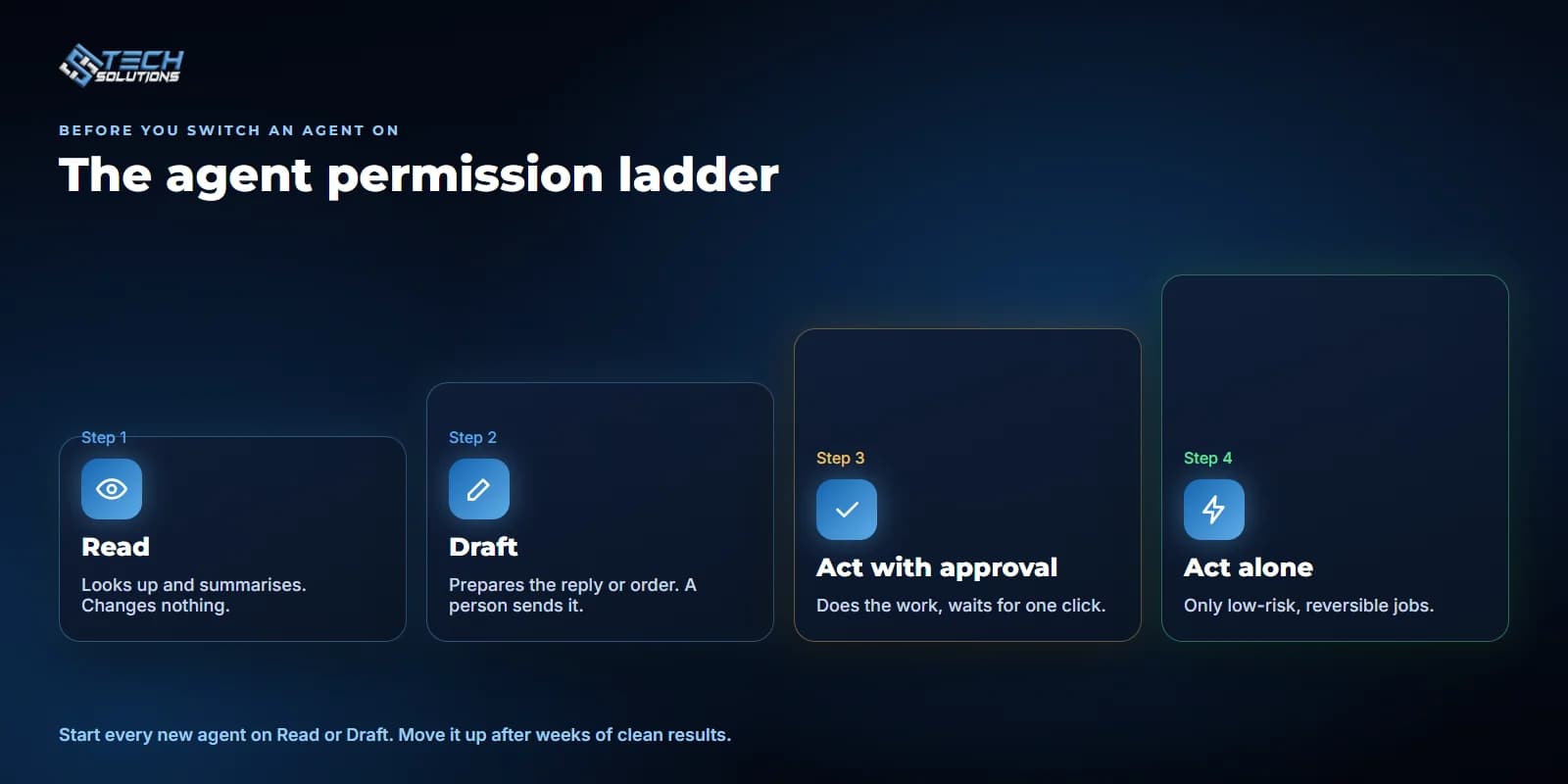
Before giving an agent a job, decide which rung it is allowed to reach:
- Read. The agent can look things up and summarise them, such as overnight messages, stock levels or a list of overdue invoices. It changes nothing.
- Draft. It prepares the reply, the order or the report, and a person sends it.
- Act with approval. It does the work and waits for one click from a person before anything is written or sent.
- Act alone. Only for low-risk, reversible jobs, such as tagging a message or filing a document.
Most businesses should start every new agent on the first two rungs and move it up only after a few weeks of clean results.
What to automate first
Good first jobs are narrow, repeated every day, and easy to check:
- Copying orders from WhatsApp or email into the system they belong in.
- Matching bills, fuel slips or bank lines to the records they belong to.
- Pulling numbers from two or three systems into one morning report.
- Flagging what got stuck: unanswered chats, unconfirmed orders, expiring licences.
These are the same jobs that pay off in the systems we build. Our WhatsApp ordering system for a five-branch restaurant chain runs as 13 small workflows, each with one job. A watchdog checks for stalled chats every 2 minutes, and any workflow failure is sent to WhatsApp so the team hears about it straight away.
What should still need a person
Keep a person in the loop for anything that is hard to undo:
- Money. Posting expenses, issuing refunds, changing prices. In the fleet system we built in Saudi Arabia, the fuel bot matches fuel-card rows to trips, but nothing is written to the trip portal until an accountant or dispatcher presses Confirm.
- Customers. Messages that make a promise or quote a price. Our ordering bot only quotes prices from the branch menu, a separate step checks every line in code, and staff can mute the bot on any chat and take over.
- Access and records. Who can see or change what. The workforce ERP we built for a UK security company uses a permission matrix per module and signs users out after 20 minutes idle. An agent should get the same treatment as a new employee: only the access its job needs.
Before you switch an agent on
- Can you describe its job in one sentence?
- Which rung of the ladder is it on, and who approves the next rung?
- What can it read, and what can it change?
- Where does it log what it did, so you can check it the next morning?
- Who gets alerted when it fails or gets stuck?
- How will you know, after a month, that it saved time?
Where this leaves a small business
The new agents make it easier to automate work that lives in email, chat and documents. They do not remove the need to decide what the agent is allowed to do. Start with one narrow job on the "read" or "draft" rung, check its work for a few weeks, and only then let it act.
If you want help picking that first job, see our business process automation and chat automation services, read why small, boring AI automations pay off first, or tell us what your team does every day.
Frequently asked questions
It is an AI assistant that keeps a task open in the background and can take actions in other apps, such as email, chat or documents, without waiting for someone to ask it each time.
Narrow jobs repeated every day that are easy to check, such as copying orders into the right system, matching bills to records, building a morning report or flagging stalled chats and orders.
Not at first. Let it read and draft, then act with a person's approval. Only low-risk, reversible jobs, like tagging or filing, should run without a click from a person.
Give it only the access its job needs, keep a log of what it did, alert someone when it fails, and require approval for anything involving money, customers or permissions.
No. Many useful automations run on tools like n8n with your existing systems. The newer agents help most with work that lives in email, chat and documents.
Get new articles by email
How we build automation and software, with the lessons learned. One short email when a new article goes up. No spam.
- #AI Agents
- #Business Automation
- #Small Business
- #AI Safety
- #n8n