
Work Pulse
Time tracking and team visibility for remote and in-office teams: worked hours, activity, attendance and optional screenshots, in one dashboard you control. A lighter, customisable alternative to tools like Time Doctor.
How much of the day actually turns into work?
When teams work from home, across sites or on hourly contracts, managers lose the simple signal of who is working on what.
Hours you cannot verify
Timesheets are filled in from memory at the end of the week. You pay for the hours on the sheet, not the hours worked, and nobody can tell the difference.
No view of a remote team
With people at home or across offices, a manager cannot see who has started, who is on a task and who is stuck, without a round of messages.
Big tools, big bills, little control
Off-the-shelf trackers charge per user per month, lock your data in their cloud, and rarely bend to how your team actually works.
What does the system cover?
Five groups of features, from the live team view to the reports you export for payroll.
Live team view
One screen shows who is working, on what, right now, so a manager stops chasing updates.
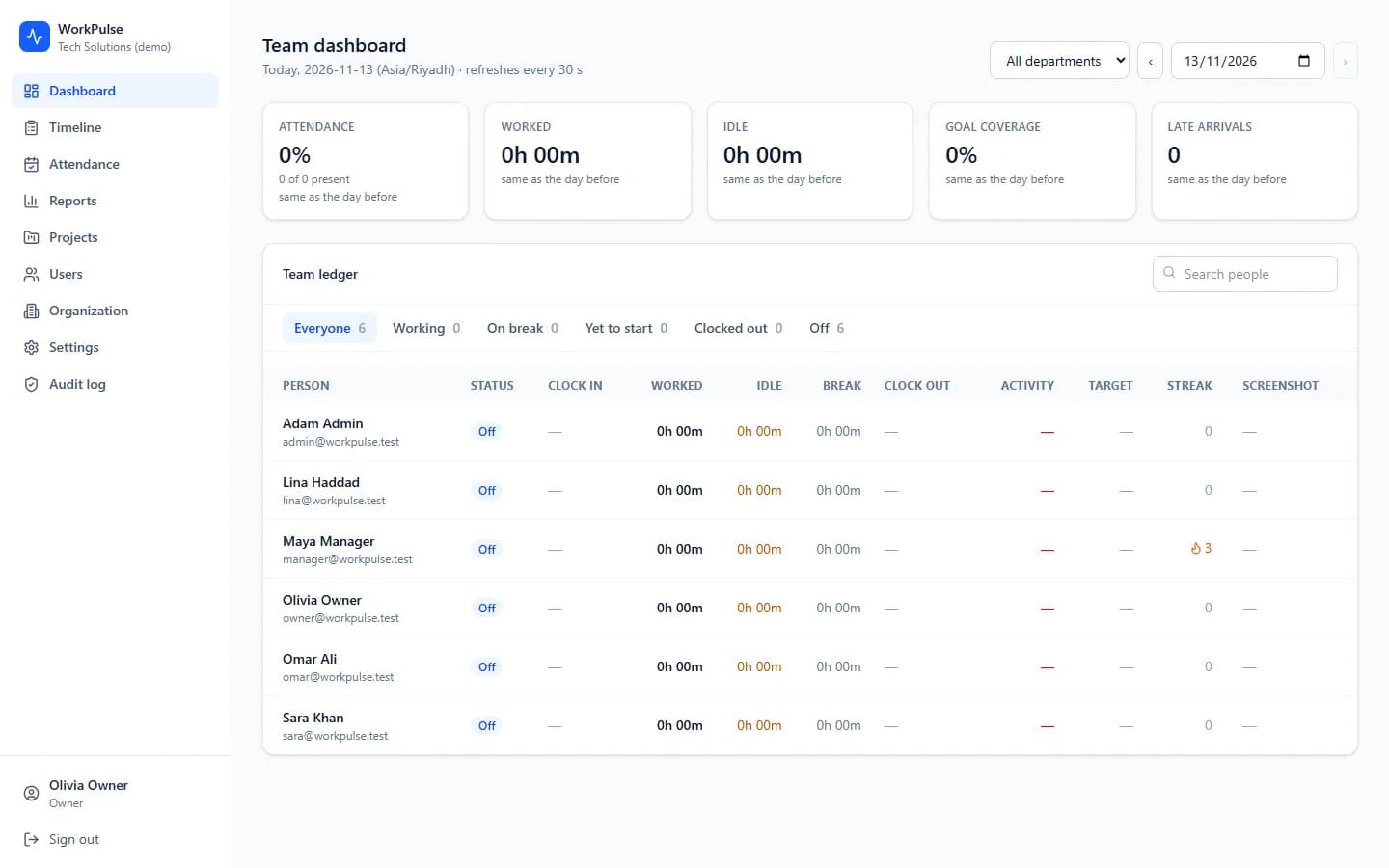
- Team dashboard: attendance, worked and idle time and goal coverage for the day
- A live ledger of every person: status, clock-in, worked, idle, activity and streak
- Filter by department and search for a person
- Refreshes on its own through the day
Timeline and activity
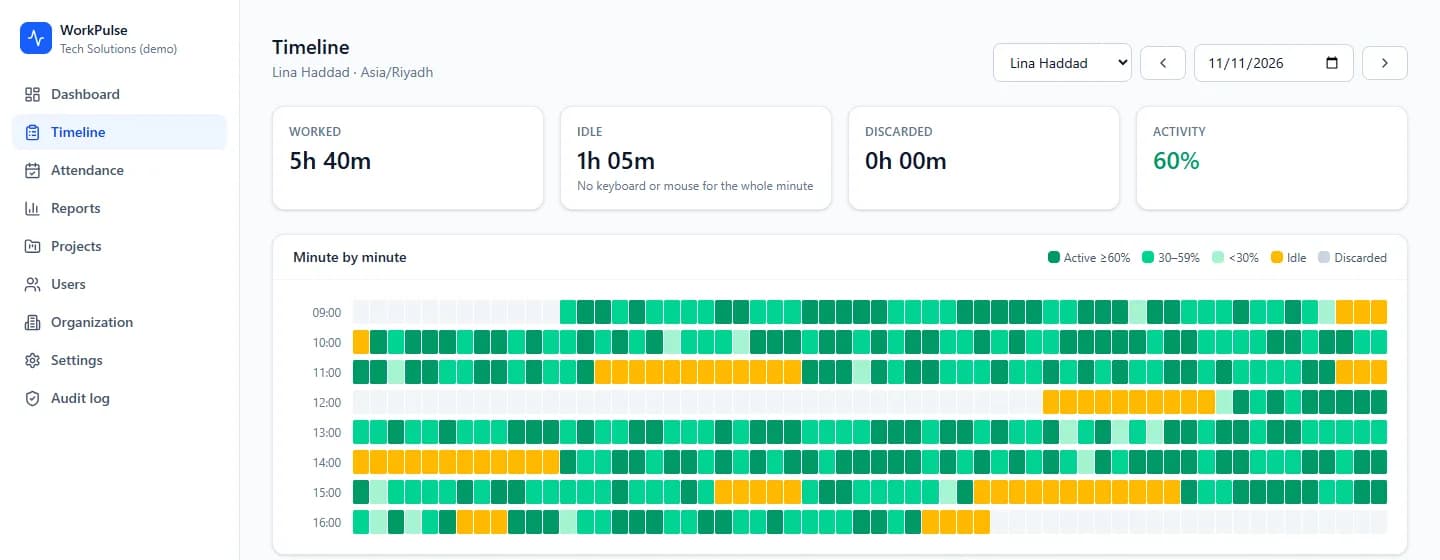
A fair, minute-by-minute picture of a day, with activity measured, not guessed.
- Minute-by-minute heatmap of active, low-activity, idle and discarded time
- Worked, idle, discarded and activity percentage per day
- Activity from keyboard and mouse counts only, never the keys pressed
- The app and window title worked in, when that setting is on
Attendance
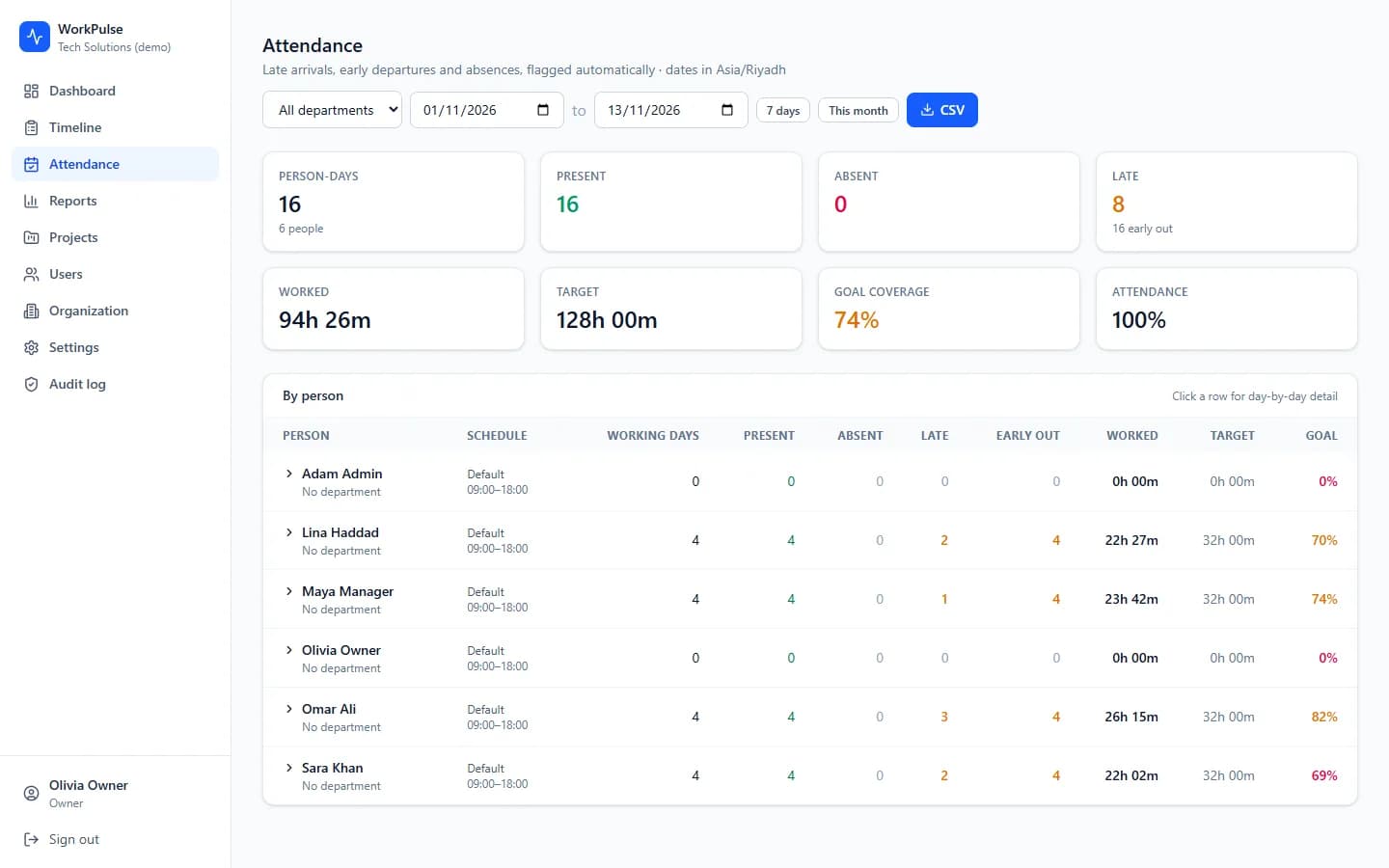
Late arrivals, early departures and absences are flagged against each person’s schedule, automatically.
- Present, absent, late and early-out counts across a date range
- Worked against target hours, with a goal-coverage percentage
- Per-person breakdown, with day-by-day detail on click
- Shifts and a default work schedule per person or department
Projects, tasks and reports
Time is tied to real work, and the numbers export cleanly for payroll and billing.
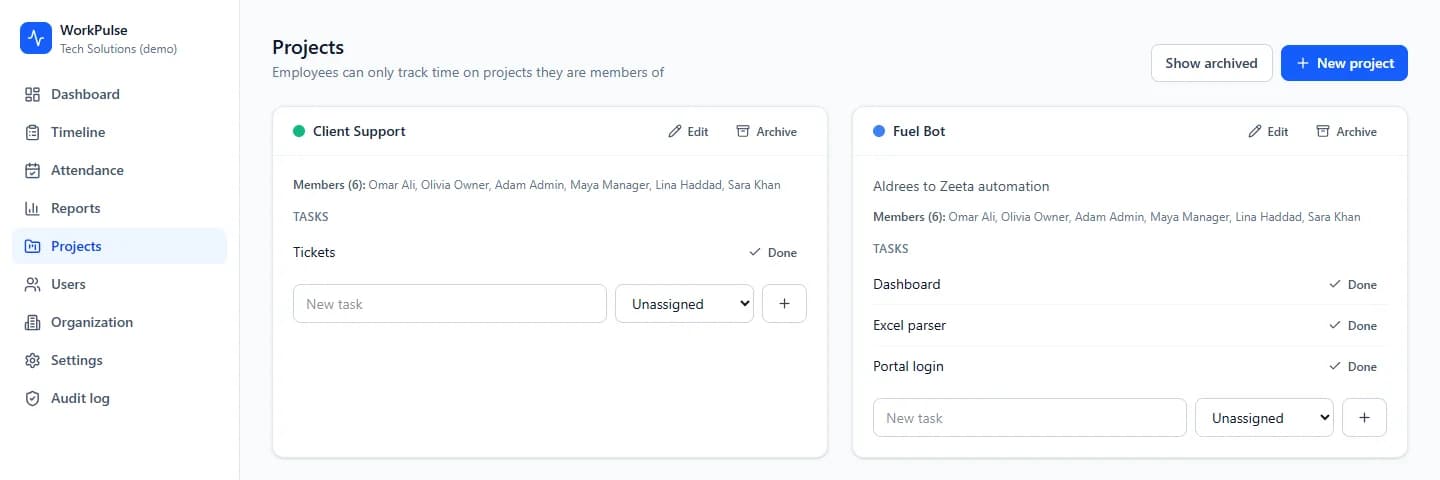
- Projects and tasks, with members who can track against them
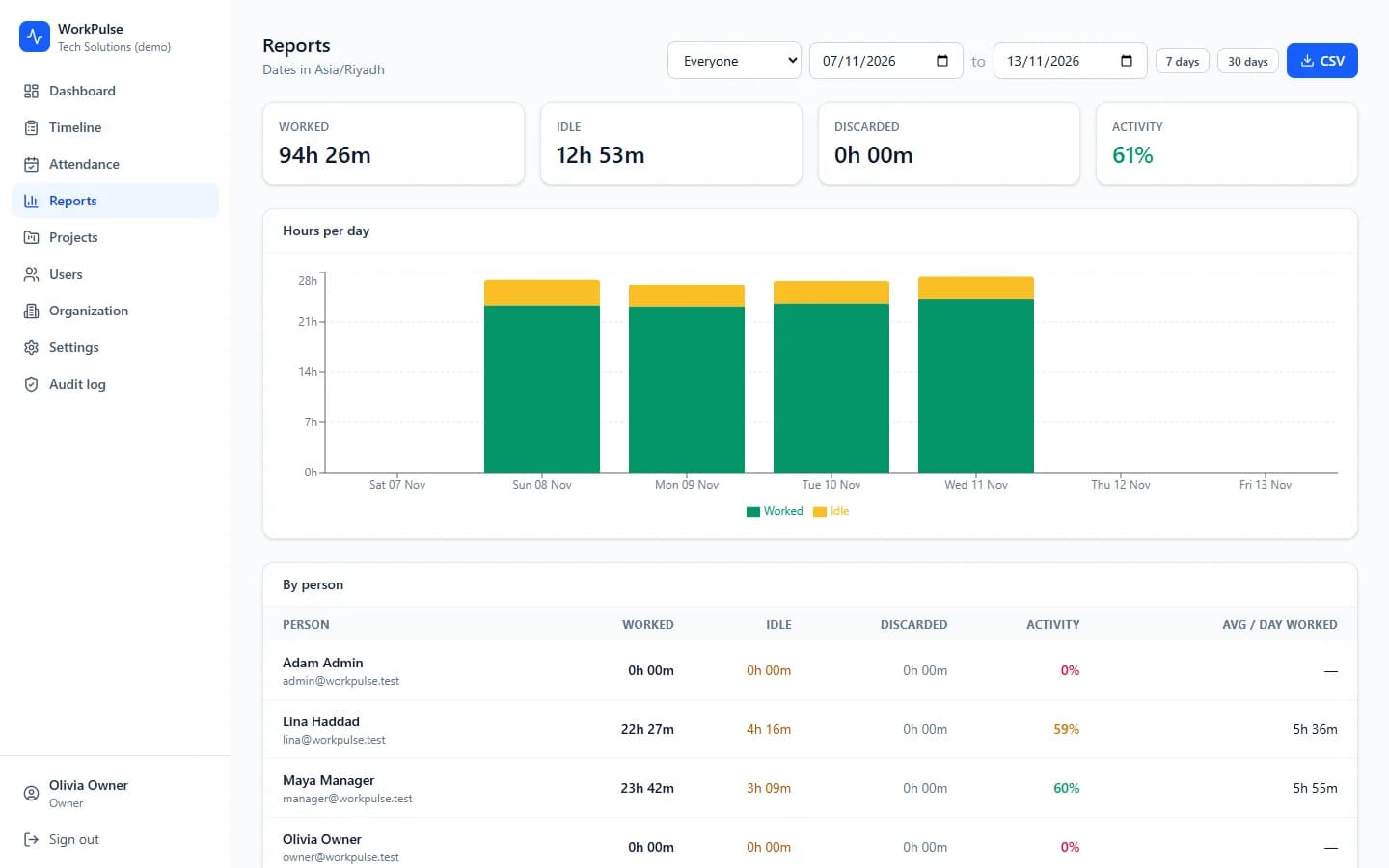
- Worked, idle and activity by person and by day
- Hours-per-day chart and an average day worked
- CSV export for payroll, client billing or your own analysis
Optional screenshots and admin
Proof when you need it, with roles and a log so the tool itself is accountable.
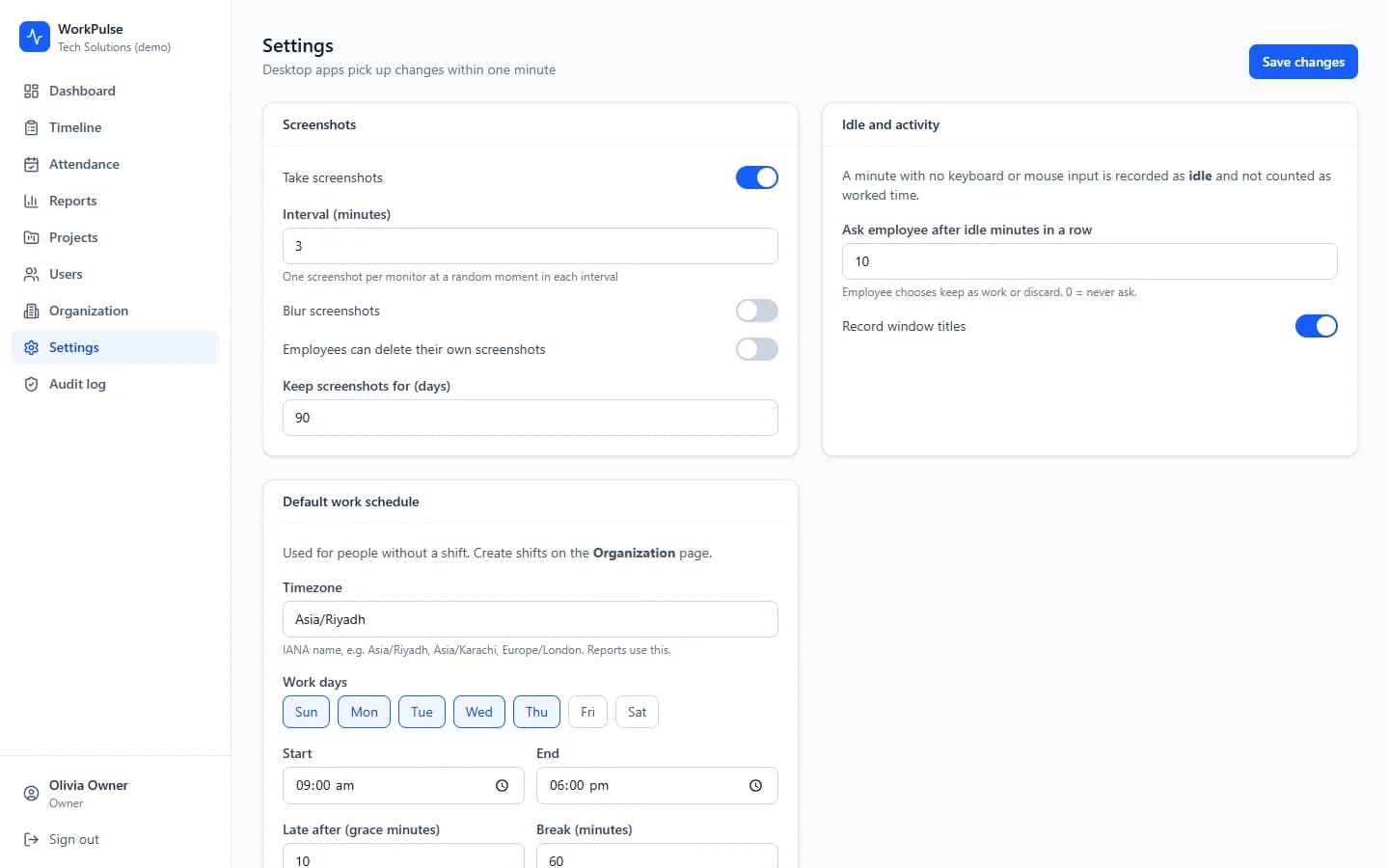
- Optional screenshots at an interval you set, with a blur option
- Roles for owner, admin, manager and user, each seeing only what they should
- A retention setting that deletes old screenshots automatically
- An audit log of sensitive actions, such as viewing or deleting a screenshot
What do the screens look like?
Real screens from Work Pulse, captured with demonstration data. The demo organisation and its people are fictional.
Monitoring staff is sensitive. We build it to be fair
Employee tracking has to respect the people being tracked, and the law where you operate. Work Pulse is built with that in mind, and you stay in control of what is collected.
Counts, never keystrokes
Activity is measured from how often the keyboard and mouse are used, as counts. The actual keys pressed are never recorded. It is a measure of activity, not surveillance of content.
Screenshots are optional
Screenshots can be turned off entirely. When on, you set the interval, can blur them, and set how many days they are kept before they delete automatically.
Idle time is honest
A minute with no input is recorded as idle, not as work. When someone returns, the app can ask whether idle time was work (for example a phone call) so the record is fair.
Roles limit who sees what
A manager sees their own team, not the whole company. Every view of a full-size screenshot and every deletion is written to an audit log, so the tool is accountable too.
Be open with your team
Monitoring works best when staff know it is there and why. We help you set it up so it is transparent, and so it meets the consent and privacy rules in your country before you roll it out.
Your data, your servers
Run it in our cloud, or keep every screenshot and record on your own servers with an in-house install. Your employees’ data does not have to live with a third party.
Cloud, hybrid or in-house your choice
The same product, run the way your business needs it.
Cloud
We host and run it. You pay a monthly plan that includes support, with no one-time implementation fee.
Hybrid
Part of the system on your servers and part in the cloud, for example data on site and reports online. Terms depend on the solution and the contract.
In-house
Installed on your own servers and run by your team, with our support. Terms depend on the solution and the contract.
SaaS first, your rules on top
It is a ready product, so you start fast. We also change it to fit how you work, and you keep control of what is customised.
Basic changes are included
Basic customisation is part of the monthly support plan. Larger customisation is scoped and quoted against your requirement.
Support all day, every day
Support is available 24/7, and we commit to resolving issues within 24 hours.
Priced to your needs
Plans vary by team size, sites and what you need. We quote in writing after seeing how you work.
Questions buyers ask before they commit
Short answer first, detail underneath.
Time-tracking and team-visibility software for remote and in-office teams. A desktop app records worked time, activity and optional screenshots, and a web dashboard shows a live team view, timelines, attendance and reports you can export. It is a lighter, customisable alternative to tools like Time Doctor.
No. Activity is measured from keyboard and mouse counts only, never the keys pressed. It tells you how active a minute was, not what was written. Screenshots are a separate, optional feature you control.
No. Screenshots can be turned off completely. When you use them, you set the interval, can blur them, and set a retention period after which they delete automatically. Viewing and deleting a screenshot is recorded in the audit log.
It is a monthly plan priced to your team size and what you need, with support included. On our cloud there is no one-time implementation fee. For hybrid or in-house installs the terms depend on the solution and the contract. We quote in writing after a demo.
Yes. Work Pulse runs in our cloud, in a hybrid setup, or fully in-house on your own servers, so your employees’ data can stay with you. We help you choose based on your privacy rules and your IT setup.
Rules differ by country, and often require that staff are informed and that monitoring is proportionate. We are not lawyers, so check your local law, but we help you configure Work Pulse to be transparent and to collect only what you need, which makes compliance easier.
Yes. It is a ready product, and we adapt it to your process. Basic customisation is included in the monthly support plan, and larger customisation is scoped and quoted against your requirement.